Published
January 18, 2025
A phased implementation plan for a company adopting LeapOCR for ESG, focusing on quick wins and scaling.
Your company needs automated ESG data collection. The deadline is 90 days out. You have thousands of documents to process, and you need to meet CSRD requirements while preparing for external assurance and investor reviews.
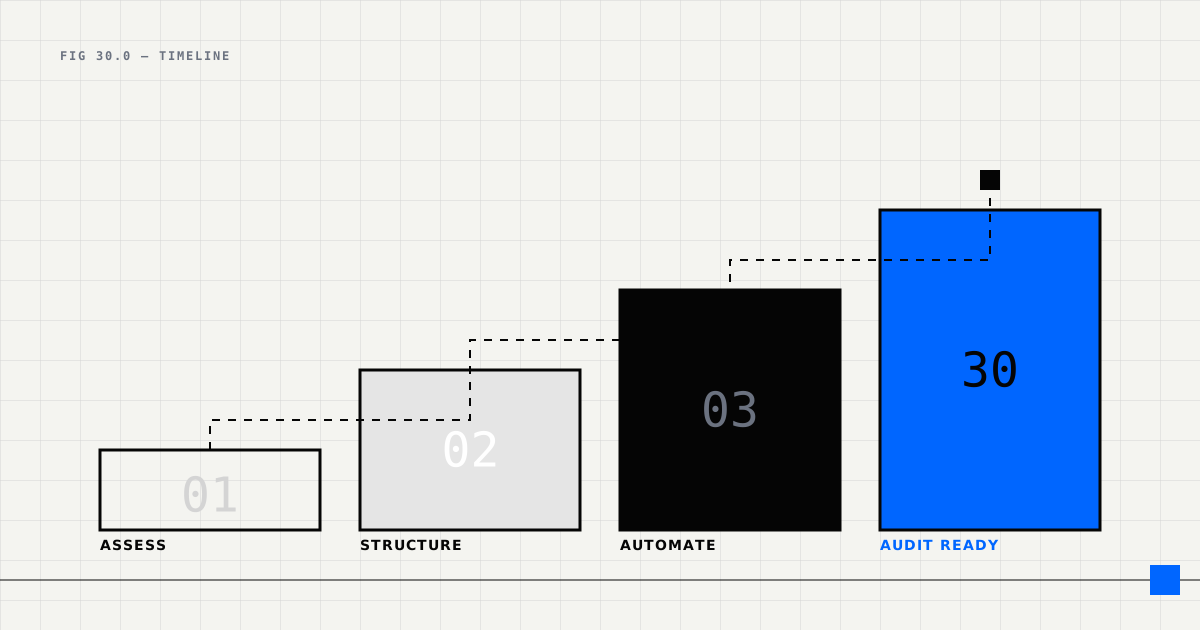
Starting from scratch can feel overwhelming. This 30-day plan breaks down the implementation into manageable phases. You’ll build a working system that starts with quick wins, then scales based on what actually works for your organization.
The numbers behind this approach are compelling. Forrester reports that AI can reduce ESG compliance costs by 86% (from €447K to €82K annually), delivering 101% ROI over three years. Carbon accounting software studies show even stronger results: 4,690% ROI with 0.3-month payback periods and 90% time savings.
Before diving into implementation, make sure you have these foundations in place.
The first week focuses on getting the technical infrastructure in place and selecting the right pilot documents.
Set up your technical infrastructure.
Tasks:
# 1. Install SDK
npm install leapocr  # or
pip install leapocr

# 2. Configure environment
# .env
LEAPOCR_API_KEY=your_api_key
DATABASE_URL=postgresql://user:pass@localhost/esg_db
DOCUMENT_STORAGE=s3://your-bucket/esg-docs

# 3. Initialize database
createdb esg_db
psql esg_db < schema.sql
Deliverable: Working development environment.
Choose documents that will demonstrate impact without being too complex. Start with documents that:
Recommended pilot documents:
Deliverable: 50-100 sample documents for testing.
Objective: Build your first ESG extraction template.
Template: Electricity Utility Bill
utility_bill_schema = {
  "type": "object",
  "properties": {
    "document_type": {"enum": ["electricity_bill"]},
    "facility_id": {"type": "string"},
    "supplier": {"type": "string"},
    "billing_period": {
      "type": "object",
      "properties": {
        "start_date": {"type": "string", "format": "date"},
        "end_date": {"type": "string", "format": "date"}
      }
    },
    "energy_consumption_kwh": {"type": "number", "minimum": 0},
    "renewable_percentage": {"type": "number", "minimum": 0, "maximum": 100}
  },
  "required": ["facility_id", "billing_period", "energy_consumption_kwh"]
}

template = {
  "name": "esg-electricity-bill-v1",
  "schema": utility_bill_schema,
  "instructions": """
  Extract electricity utility bill data:
  - Facility ID (if present)
  - Billing period (start and end dates in ISO 8601 format)
  - Total energy consumption in kWh
  - Renewable energy percentage (if specified)

  Look for key terms: "consumption," "usage," "kWh," "total."
  """,
  "model": "standard-v1"
}

# Create template
client.templates.create(template)
Deliverable: Working template for pilot documents.
Week 1 Success Criteria:
This week you’ll process your pilot documents at scale and validate the extraction quality.
Process your pilot documents at scale.
def batch_process_pilot(document_paths: list[str]):
  """Process pilot documents in batches."""
  results = []

  for doc_path in document_paths:
    try:
      job = client.ocr.process_file(
        file_path=doc_path,
        format="structured",
        template_slug="esg-electricity-bill-v1"
      )

      result = client.ocr.wait_until_done(job["job_id"])

      if result["status"] == "completed":
        data = result["pages"][0]["result"]
        confidence = result["pages"][0"].get("confidence_score", 0)

        # Save to database
        save_extraction(data, confidence, doc_path)
        results.append({"status": "success", "confidence": confidence})
      else:
        results.append({"status": "failed", "error": result.get("error")})

    except Exception as e:
      results.append({"status": "error", "error": str(e)})

  return results

# Process pilot documents
pilot_results = batch_process_pilot(pilot_documents)

# Analyze results
success_rate = sum(1 for r in pilot_results if r["status"] == "success") / len(pilot_results)
avg_confidence = np.mean([r["confidence"] for r in pilot_results if r["status"] == "success"])

print(f"Success rate: {success_rate:.2%}")
print(f"Average confidence: {avg_confidence:.2%}")
Deliverable: 50-100 processed documents with accuracy metrics.
Validate extraction quality and refine your template.
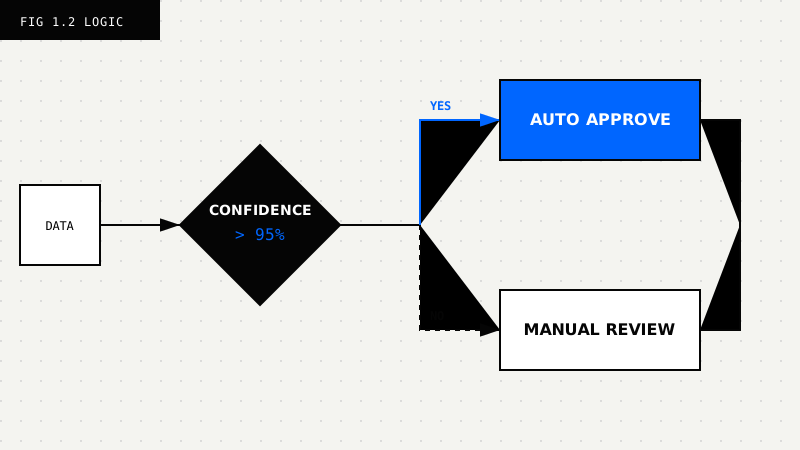
Validation process:
Validation script:
def validate_extraction(extracted_data: dict, actual_data: dict) -> dict:
  """Validate extraction against actual data."""
  errors = []

  # Check required fields
  for field in ["facility_id", "energy_consumption_kwh"]:
    if field not in extracted_data:
      errors.append({"field": field, "error": "missing"})

  # Check accuracy
  if extracted_data.get("energy_consumption_kwh") != actual_data.get("energy_consumption_kwh"):
    errors.append({
      "field": "energy_consumption_kwh",
      "error": "wrong_value",
      "extracted": extracted_data.get("energy_consumption_kwh"),
      "actual": actual_data.get("energy_consumption_kwh")
    })

  return {
    "valid": len(errors) == 0,
    "errors": errors,
    "accuracy": 1 - (len(errors) / len(actual_data))
  }
Deliverable: Validation report with accuracy metrics and template improvements.
Add 2-3 more document types to your system.
Priority document types:
Template: Energy Certificate
certificate_schema = {
  "type": "object",
  "properties": {
    "certificate_id": {"type": "string"},
    "certificate_type": {"enum": ["I-REC", "REC", "GO"]},
    "energy_source": {"enum": ["Solar", "Wind", "Hydro", "Biomass"]},
    "energy_mwh": {"type": "number", "minimum": 0},
    "issue_date": {"type": "string", "format": "date"},
    "expiry_date": {"type": "string", "format": "date"}
  },
  "required": ["certificate_id", "certificate_type", "energy_mwh"]
}
Deliverable: 3-4 working templates for different document types.
Week 2 Success Criteria:
Week 3 is about building the production pipeline: database integration, webhooks for async processing, and monitoring dashboards.
Build the data pipeline that takes extracted data and stores it in your database.
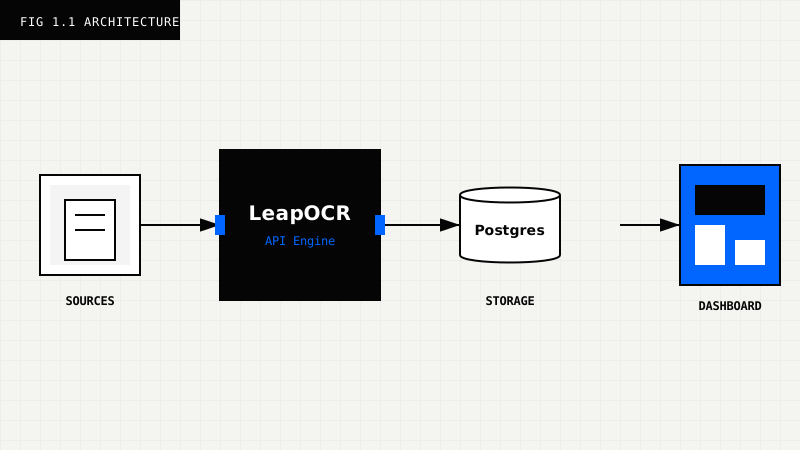
Database schema:
CREATE TABLE esg_data_points (
  id SERIAL PRIMARY KEY,
  document_type VARCHAR(50) NOT NULL,
  facility_id VARCHAR(50) NOT NULL,
  reporting_period_start DATE NOT NULL,
  reporting_period_end DATE NOT NULL,
  data JSONB NOT NULL,
  metadata JSONB NOT NULL,
  confidence_score NUMERIC(3, 2),
  validated BOOLEAN DEFAULT FALSE,
  created_at TIMESTAMP DEFAULT NOW(),
  UNIQUE(document_type, facility_id, reporting_period_start, reporting_period_end)
);

CREATE INDEX idx_esg_facility ON esg_data_points(facility_id);
CREATE INDEX idx_esg_period ON esg_data_points(reporting_period_start, reporting_period_end);
CREATE INDEX idx_esg_confidence ON esg_data_points(confidence_score);
Pipeline integration:
def save_extraction(data: dict, confidence: float, doc_path: str):
  """Save extracted data to database."""
  cursor.execute("""
    INSERT INTO esg_data_points (
      document_type, facility_id, reporting_period_start, reporting_period_end,
      data, metadata, confidence_score, validated
    ) VALUES (%s, %s, %s, %s, %s, %s, %s, %s)
    ON CONFLICT (document_type, facility_id, reporting_period_start, reporting_period_end)
    DO UPDATE SET
      data = EXCLUDED.data,
      confidence_score = EXCLUDED.confidence_score,
      validated = EXCLUDED.validated
  """, (
    data.get("document_type"),
    data.get("facility_id"),
    data["billing_period"]["start_date"],
    data["billing_period"]["end_date"],
    json.dumps(data),
    json.dumps({"source_document": doc_path, "extracted_at": datetime.now()}),
    confidence,
    confidence >= 0.95  # Auto-validate if confidence >= 95%
  ))

  conn.commit()
Deliverable: End-to-end pipeline from document to database.
Set up asynchronous processing with webhooks so you don’t have to poll for results.
Webhook handler:
from fastapi import FastAPI, Request

app = FastAPI()

@app.post("/webhooks/leapocr")
async def leapocr_webhook(request: Request):
  """Handle LeapOCR completion webhook."""
  payload = await request.json()

  job_id = payload["job_id"]
  status = payload["status"]

  if status == "completed":
    # Fetch full results
    result = client.ocr.get_results(job_id)
    data = result["pages"][0]["result"]
    confidence = result["pages"][0].get("confidence_score", 0)

    # Save to database
    save_extraction(data, confidence, result.get("source_document"))

    # Send notification
    if confidence >= 0.95:
      await notify_success(f"Auto-approved: {data.get('facility_id')}")
    else:
      await notify_review(f"Review needed: {data.get('facility_id')} (confidence: {confidence:.2%})")

  elif status == "failed":
    await notify_error(f"Extraction failed: {job_id}")

  return {"status": "received"}
Deliverable: Async processing pipeline with webhooks.
Build a monitoring dashboard for your ESG pipeline so you can track performance in real time.
Metrics to track:
def get_pipeline_metrics():
  """Get ESG pipeline performance metrics."""

  cursor.execute("""
    SELECT
      document_type,
      COUNT(*) as total_processed,
      AVG(confidence_score) as avg_confidence,
      SUM(CASE WHEN validated THEN 1 ELSE 0 END) as auto_approved,
      SUM(CASE WHEN NOT validated THEN 1 ELSE 0 END) as manual_review
    FROM esg_data_points
    WHERE created_at >= NOW() - INTERVAL '7 days'
    GROUP BY document_type
  """)

  return cursor.fetchall()

# API endpoint for dashboard
@app.get("/api/metrics")
def metrics():
  return get_pipeline_metrics()
Deliverable: Real-time dashboard with key metrics.
Week 3 Success Criteria:
The final week covers team training, production deployment, audit preparation, and planning the next phase.
Train your team on the new system.
Training materials:
Training sessions:
Deliverable: Trained team and documentation.
Launch your production system.
Production checklist:
Deployment script:
# 1. Update configuration
cp .env.production .env

# 2. Run migrations
psql esg_db_prod < migrations/*.sql

# 3. Deploy application
docker-compose up -d

# 4. Verify deployment
curl https://esg-api.yourcompany.com/health

# 5. Run smoke test
python smoke_test.py
Deliverable: Production system live.
Get your system ready for external assurance.
Audit readiness checklist:
Generate audit report:
def generate_audit_report():
  """Generate audit readiness report."""

  cursor.execute("""
    SELECT
      COUNT(*) as total_data_points,
      SUM(CASE WHEN validated THEN 1 ELSE 0 END) as auto_approved,
      AVG(confidence_score) as avg_confidence,
      COUNT(DISTINCT facility_id) as facilities_covered,
      COUNT(DISTINCT document_type) as document_types
    FROM esg_data_points
    WHERE created_at >= NOW() - INTERVAL '90 days'
  """)

  metrics = cursor.fetchone()

  return {
    "reporting_period": "Last 90 days",
    "total_data_points": metrics[0],
    "auto_approved_rate": metrics[1] / metrics[0] if metrics[0] > 0 else 0,
    "average_confidence": metrics[2],
    "facilities_covered": metrics[3],
    "document_types": metrics[4],
    "audit_ready": metrics[2] >= 0.95  # Ready if avg confidence >= 95%
  }
The system is audit-ready when average confidence reaches 95% or higher.
Deliverable: Audit readiness package.
Review your 30-day progress and plan the next phase.
Review metrics:
Stakeholder presentation:
Prepare slides that show:
Phase 2 planning:
Deliverable: Phase 2 roadmap approved.
Week 4 Success Criteria:
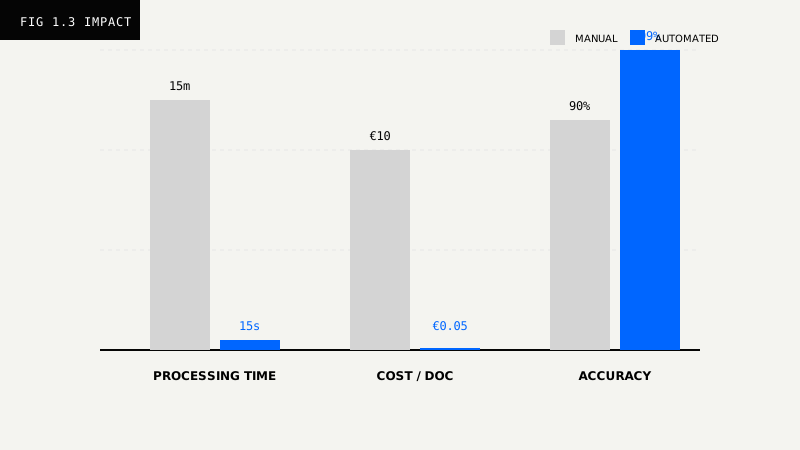
| Metric | Day 1 | Day 30 | Change |
|---|---|---|---|
| Documents processed | 0 | 500+ | — |
| Average confidence | N/A | >95% | — |
| Auto-approval rate | 0% | >90% | +90% |
| Processing time | N/A | <15 sec | — |
| Manual effort | 100% | <10% | -90% |
| Cost per document | €5-15 | €0.05 | -99% |
| Error rate | 8-12% | <3% | -75% |
Before (Manual):
After (Automated):
Savings: €4,827/month (97% cost reduction)
Avoid beginning with handwritten notes, poor scans, or multi-page contracts. Instead, start with clean, standardized documents like utility bills and certificates.
Don’t wait for 100% accuracy before launching. Launch with 95% accuracy and improve based on real-world feedback.
Rolling out without training your team leads to resistance. Train stakeholders, gather their feedback, and iterate accordingly.
Waiting until audit season to prepare documentation creates unnecessary stress. Build an audit trail from day one.
Building complex systems before proving value wastes time. Start simple, prove it works, then scale.
After your 30-day pilot, you’ll have a working system that proves the value. Here’s how to scale it.
During this phase, expand coverage across your organization:
Once the foundation is solid, explore advanced capabilities:
You can reach audit-ready ESG automation in 30 days. The approach outlined here focuses on starting with manageable wins, learning from feedback, and building architecture that scales.
Most organizations implementing this plan see:
The key is beginning with a focused pilot, proving the value, then scaling systematically. You don’t need to boil the ocean—start with electricity bills, prove the approach works, and expand from there.
Your audit-ready ESG system is 30 days away.
Next Steps:
Try LeapOCR on your own documents
Eligible paid plans include a 3-day trial with 100 credits after you add a credit card, so you can test actual PDFs, scans, and forms before committing to a rollout.
Keep reading
More implementation guides, benchmarks, and workflow notes for teams building document pipelines.

Robotic Process Automation (RPA) was a bridge technology. Learn why flexible Vision Language Models (VLM) are replacing brittle scripts in modern supply chains.
The warehouse receipt is the moment of truth for inventory. Learn how converting these documents into real-time structured data feeds eliminates shortage claims and speeds up order fulfillment.
Detention and demurrage fees are the silent killers of logistics margins. See how automated document processing stops the clock and saves $100+ per container daily.