Published
January 18, 2025
Explanation of Scope 3 emissions. The challenge of collecting data from third-party documents. How AI can automate this collection.
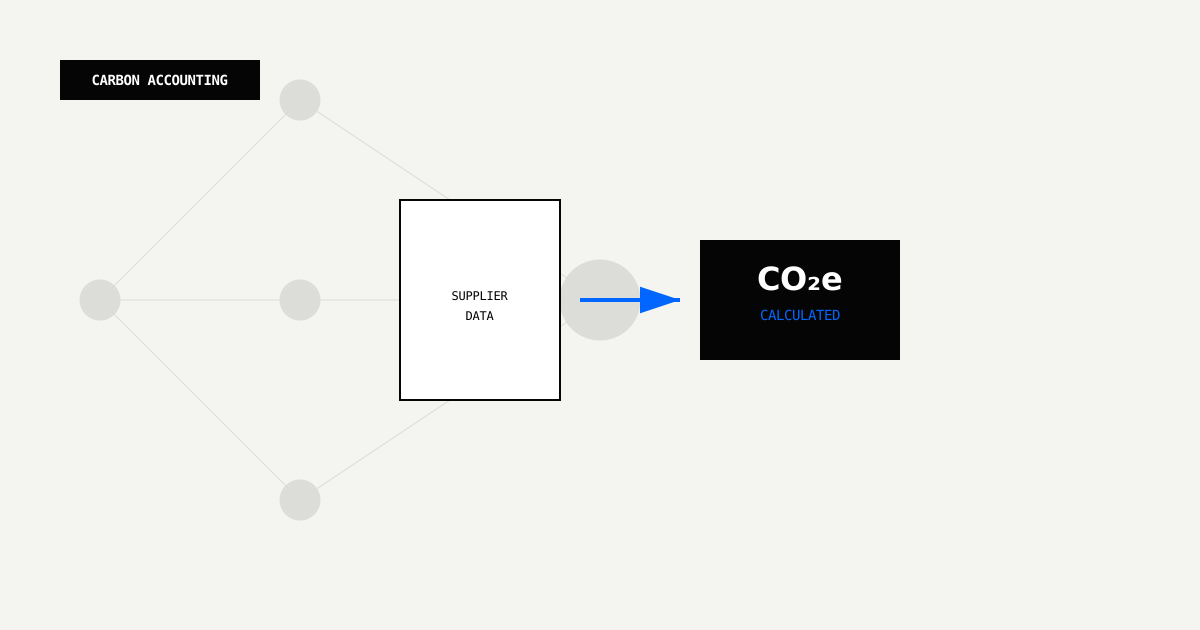
Scope 3 emissions represent the biggest challenge in corporate carbon accounting. For most companies, they also make up the majority of their carbon footprint—often 70-95% of total emissions. Yet fewer than 30% of companies actually measure these emissions comprehensively, according to GHG Protocol data.
The reason lies in the data collection challenge. Scope 3 requires gathering emissions information from hundreds of external parties: suppliers, logistics providers, business travel platforms, waste management companies, and others. Each organization sends data in their own format, through their preferred channels, on their own timeline.
This guide shows how Document AI automates Scope 3 data collection, turning fragmented supplier documents into structured, validated emissions data.
The GHG Protocol Corporate Value Chain (Scope 3) Standard defines 15 categories of indirect emissions across a company’s entire value chain. These include both upstream activities (suppliers, logistics) and downstream activities (product use, disposal):
| Category | Description | Data Sources |
|---|---|---|
| 1. Purchased Goods & Services | Emissions from producing purchased goods | Supplier questionnaires, product carbon footprints |
| 2. Capital Goods | Emissions from producing fixed assets | Equipment specifications, supplier data |
| 3. Fuel & Energy Related | Emissions from fuel production | Utility bills, fuel purchase records |
| 4. Upstream Transportation | Emissions from transporting purchased goods | Freight invoices, carrier reports |
| 5. Waste Generated | Emissions from waste disposal | Waste management invoices, landfill reports |
| 6. Business Travel | Emissions from employee travel | Travel booking platforms, expense reports |
| 7. Employee Commuting | Emissions from employee commutes | Surveys, transit passes, parking data |
| 8. Upstream Leased Assets | Emissions from leased assets | Lease agreements, utility bills |
| 9. Downstream Transportation | Emissions from product delivery | Logistics invoices, carrier reports |
| 10. Processing of Sold Products | Emissions from processing sold products | Customer data, processing facility reports |
| 11. Use of Sold Products | Emissions from product use | Product usage data, customer surveys |
| 12. End-of-Life Treatment | Emissions from product disposal | Recycling reports, waste management data |
| 13. Downstream Leased Assets | Emissions from leased assets | Lease agreements, utility bills |
| 14. Franchises | Emissions from franchise operations | Franchise sustainability reports |
| 15. Investments | Emissions from investments | Portfolio company ESG reports |
Why Scope 3 is Difficult to Measure:
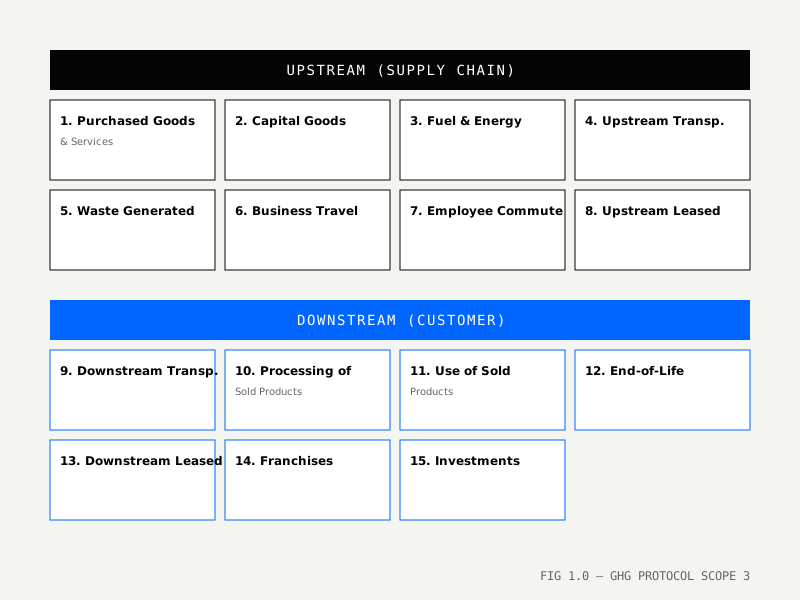 FIG 1.0 — GHG Protocol’s 15 Scope 3 categories spanning the entire corporate value chain
Consider Category 1 (Purchased Goods & Services) for a typical manufacturing company. The scope of data collection quickly becomes overwhelming:
With manual collection, the timeline typically stretches to seven months:
Many companies abandon primary data collection entirely and use industry averages instead, accepting significant trade-offs in accuracy and granularity.
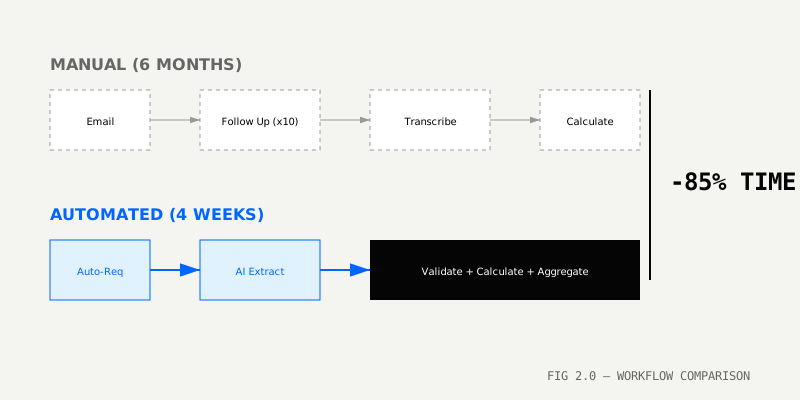
Traditional Scope 3 data collection follows a familiar pattern:
1. Design Excel questionnaire → Email to 200 suppliers
2. Wait 3-6 weeks for responses (40% response rate)
3. Manually transcribe data from PDF questionnaires into spreadsheets
4. Convert units (kg CO2e vs. tonnes, different emission factors)
5. Validate completeness and reasonableness
6. Calculate emissions using spend-based or average-data methods
7. Identify gaps and follow up with suppliers
Time: 6-8 months | Accuracy: ±30% | Response Rate: 40%
With Document AI, the workflow changes fundamentally:
1. Define JSON schema for supplier emissions data
2. Send automated email with upload link (or integrate supplier portals)
3. AI extracts data from uploaded documents (PDFs, Excel, Word)
4. Validates against schema (required fields, data types, ranges)
5. Normalizes units and applies emission factors automatically
6. Flags low-confidence extractions for human review
7. Pushes validated data to Scope 3 database
Time: 4-6 weeks | Accuracy: ±5% | Response Rate: 65%+
{
  "$schema": "http://json-schema.org/draft-07/schema#",
  "type": "object",
  "properties": {
    "supplier_id": { "type": "string" },
    "supplier_name": { "type": "string" },
    "reporting_year": { "type": "integer", "minimum": 2020 },
    "reporting_period": {
      "type": "object",
      "properties": {
        "start_date": { "type": "string", "format": "date" },
        "end_date": { "type": "string", "format": "date" }
      }
    },
    "emissions": {
      "type": "object",
      "properties": {
        "scope1_tco2e": { "type": "number", "minimum": 0 },
        "scope2_tco2e": { "type": "number", "minimum": 0 },
        "scope3_tco2e": { "type": "number", "minimum": 0 },
        "total_tco2e": { "type": "number", "minimum": 0 }
      }
    },
    "methodology": {
      "type": "string",
      "enum": ["GHG Protocol", "ISO 14064", "Custom", "Spend-based", "Average-data"]
    },
    "verification": {
      "type": "object",
      "properties": {
        "status": {
          "type": "string",
          "enum": ["Third-party verified", "Self-assessed", "Not verified"]
        },
        "verifier": { "type": "string" },
        "verification_date": { "type": "string", "format": "date" }
      }
    },
    "data_coverage": {
      "type": "object",
      "properties": {
        "percentage": { "type": "number", "minimum": 0, "maximum": 100 },
        "exclusions": { "type": "array", "items": { "type": "string" } }
      }
    },
    "breakdown_by_category": {
      "type": "array",
      "items": {
        "type": "object",
        "properties": {
          "category": { "type": "string" },
          "emissions_tco2e": { "type": "number" },
          "activity_data": { "type": "string" }
        }
      }
    }
  },
  "required": ["supplier_id", "reporting_year", "emissions"]
}
[TODO: Add schema visualization showing field hierarchy and validation rules]
The template defines how the AI should interpret and extract data from supplier documents:
supplier_emissions_template = {
  "name": "scope3-supplier-emissions",
  "description": "Extract emissions data from supplier questionnaires and carbon footprint reports",
  "schema": supplier_emissions_schema,
  "instructions": """
  Extract supplier emissions data for Scope 3 Category 1 (Purchased Goods & Services).

  Key fields to extract:
  - Supplier ID and name
  - Reporting year and period
  - Scope 1, 2, and 3 emissions in metric tons CO2e (normalize from kg if needed)
  - Methodology (GHG Protocol, ISO 14064, spend-based, etc.)
  - Verification status and verifier (if third-party verified)
  - Data coverage percentage and any exclusions

  Handle various document formats:
  - Supplier questionnaires (often in Excel with multiple tabs)
  - Carbon footprint reports (PDF with tables and charts)
  - Sustainability reports (longer PDFs with emissions in appendices)
  - Product carbon footprints (per-unit emissions that need aggregation)

  Look for emissions data in:
  - Executive summary tables
  - GHG inventory breakdowns
  - Emissions by Scope (Scope 1, 2, 3)
  - Carbon accounting methodology sections

  If data is incomplete:
  - Note what's provided (e.g., "Only Scope 1+2 reported")
  - Extract whatever is available
  - Flag missing Scope 3 or partial data

  Normalize units:
  - Convert kg CO2e to tonnes (divide by 1000)
  - Recognize "tCO2e", "MTCO2e", "tonnes CO2 equivalent"
  - Handle regional variations (e.g., German "t CO2-Äq")

  Multilingual support:
  - Handle documents in English, German, French, Italian, Spanish
  - Recognize "Scope 1" equivalents: "Bereich 1" (DE), "Périmètre 1" (FR)
  """,
  "model": "pro-v1",
  "tags": ["scope3", "supplier", "category-1"]
}from leapocr import LeapOCR
import smtplib
from email.mime.text import MIMEText
import psycopg2
client = LeapOCR(api_key=os.getenv("LEAPOCR_API_KEY"))
conn = psycopg2.connect(os.getenv("DATABASE_URL"))
def send_supplier_request(supplier_email: str, supplier_id: str, upload_link: str):
"""Send automated email requesting emissions data."""
msg = MIMEText(f"""
Dear Supplier,
As part of our carbon footprint accounting under the GHG Protocol,
we're collecting Scope 3 emissions data from our supply chain.
Please upload your emissions data here:
{upload_link}
Accepted formats:
- Supplier questionnaires (Excel, PDF)
- Carbon footprint reports (PDF)
- Sustainability reports (PDF)
- Product carbon footprints (Excel, PDF)
Deadline: {deadline}
If you need a template or have questions, please contact us.
Best regards,
Sustainability Team
""")
msg['Subject'] = "Request for Emissions Data - Scope 3 Category 1"
msg['From'] = "sustainability@yourcompany.com"
msg['To'] = supplier_email
# Send email
smtp = smtplib.SMTP('smtp.yourcompany.com')
smtp.send_message(msg)
smtp.quit()
def process_supplier_document(file_path: str, supplier_id: str):
"""Process uploaded supplier document."""
job = client.ocr.process_file(
file_path=file_path,
format="structured",
template_slug="scope3-supplier-emissions",
metadata={"supplier_id": supplier_id}
)
result = client.ocr.wait_until_done(job["job_id"])
if result["status"] == "completed":
data = result["pages"][0]["result"]
confidence = result["pages"][0].get("confidence_score", 0)
# Save to database
save_supplier_emissions(data, supplier_id, confidence)
# Send confirmation email
send_confirmation_email(supplier_id, confidence)
return data
else:
# Handle failure
send_error_notification(supplier_id, result.get("error"))
return None
def save_supplier_emissions(data: dict, supplier_id: str, confidence: float):
"""Save extracted emissions data to database."""
cursor = conn.cursor()
cursor.execute("""
INSERT INTO supplier_emissions (
supplier_id, supplier_name, reporting_year,
scope1_tco2e, scope2_tco2e, scope3_tco2e, total_tco2e,
methodology, verification_status, data_coverage_percentage,
extracted_at, confidence_score, review_status
) VALUES (%s, %s, %s, %s, %s, %s, %s, %s, %s, %s, %s, %s, %s)
ON CONFLICT (supplier_id, reporting_year)
DO UPDATE SET
scope1_tco2e = EXCLUDED.scope1_tco2e,
scope2_tco2e = EXCLUDED.scope2_tco2e,
scope3_tco2e = EXCLUDED.scope3_tco2e,
extracted_at = EXCLUDED.extracted_at
""", (
data["supplier_id"],
data["supplier_name"],
data["reporting_year"],
data["emissions"]["scope1_tco2e"],
data["emissions"]["scope2_tco2e"],
data["emissions"]["scope3_tco2e"],
data["emissions"]["total_tco2e"],
data["methodology"],
data.get("verification", {}).get("status"),
data.get("data_coverage", {}).get("percentage"),
result["extracted_at"],
confidence,
"flagged_for_review" if confidence < 0.95 else "auto_approved"
))
conn.commit()Suppliers often return data in Excel files with multiple worksheets. The AI can navigate these structures:
# Instructions for multi-tab documents
multi_tab_instructions = """
This is a multi-tab supplier questionnaire. Extract data from all relevant tabs:

Tab 1 - General Information:
- Supplier ID, name, contact
- Reporting year and period

Tab 2 - Emissions Data:
- Scope 1, 2, 3 emissions (look for summary table)
- Breakdown by emission source if available

Tab 3 - Methodology:
- Calculation methodology
- Emission factors used
- Data sources

Tab 4 - Verification:
- Verification status (if applicable)
- Verifier name and date

Extract comprehensive data across all tabs, merging into single JSON structure.
"""

# Process with multi-tab awareness
job = client.ocr.process_file(
  file_path="supplier_questionnaire.xlsx",
  instructions=multi_tab_instructions,
  format="structured",
  schema=supplier_emissions_schema
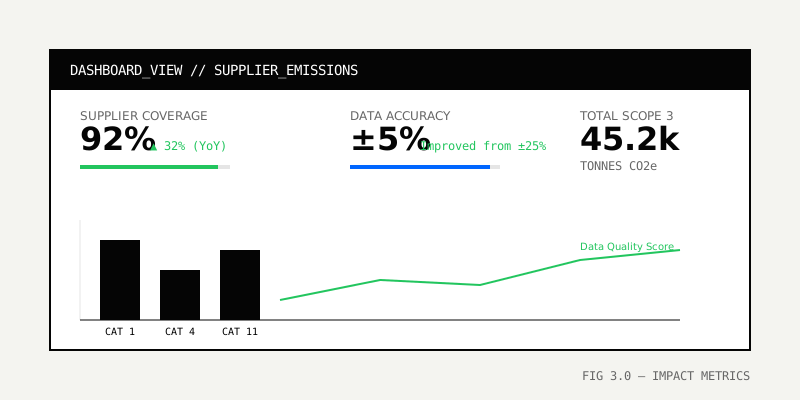
)Company: Global logistics firm Challenge: Collect emissions data from 50+ freight carriers (DHL, UPS, FedEx, Maersk, etc.)
The company’s sustainability team spent 40 hours per month managing this process manually:
Result: Only 60% of carriers provided usable data. The remaining 40% required estimation.
With Document AI, the process became largely automatic:
Results:
Suppliers frequently provide partial data (for example, reporting only Scope 1 and 2, but not Scope 3). The extraction template can handle this gracefully:
# Template instructions for partial data
partial_data_instructions = """
Extract whatever emissions data is provided. If Scope 3 is missing:
- Note "Scope 3: Not reported"
- Extract Scope 1+2 if available
- Flag for follow-up: "Request full Scope 3 data from supplier"

Data quality flags:
- If only spend-based data provided (not activity data): flag "low_confidence"
- If no methodology specified: flag "methodology_missing"
- If pre-2020 data (outdated): flag "data_stale"
"""Some suppliers provide per-product carbon footprints rather than aggregate totals. The system can calculate totals automatically:
# Extract product-level footprints and aggregate
product_footprint_schema = {
  "products": {
    "type": "array",
    "items": {
      "product_id": "string",
      "product_name": "string",
      "emissions_per_unit_kgco2e": "number",
      "units_purchased": "number",
      "total_emissions_tco2e": "number"
    }
  }
}

# Post-aggregation in pipeline
def aggregate_product_footprints(extracted_data: dict) -> dict:
  """Aggregate product-level footprints to supplier-level total."""
  total_emissions = sum(
    p["total_emissions_tco2e"]
    for p in extracted_data["products"]
  )

  return {
    "supplier_id": extracted_data["supplier_id"],
    "total_scope3_tco2e": total_emissions,
    "product_count": len(extracted_data["products"]),
    "breakdown": extracted_data["products"]
}Business travel emissions come from booking platforms and expense management systems. You can extract this data automatically:
travel_emissions_schema = {
  "trips": {
    "type": "array",
    "items": {
      "employee_id": "string",
      "departure_date": "date",
      "origin": "string",
      "destination": "string",
      "transport_mode": {"enum": ["flight", "train", "car", "bus"]},
      "distance_km": "number",
      "emissions_kgco2e": "number"
    }
  }
}

# Extract from travel booking confirmations (email PDFs)
travel_template = {
  "name": "scope3-business-travel",
  "schema": travel_emissions_schema,
  "instructions": """
  Extract trip details from booking confirmations:
  - Employee name/ID
  - Travel dates
  - Origin and destination (airports, stations)
  - Transport mode (flight, train, etc.)
  - Distance (if provided, or calculate from route)
  - Emissions (if provided by carrier, or calculate using DEFRA factors)

  Handle:
  - Multiple-leg journeys (extract each leg)
  - Different booking platforms (Concur, Egencia, etc.)
  - Multilingual confirmations (Air France, Lufthansa, etc.)
  """
}Every extraction should pass through validation checks before entering your database:
def validate_supplier_emissions(data: dict) -> list[str]:
  """Validate extracted emissions data."""
  errors = []

  # Check completeness
  if data.get("scope3_tco2e") is None:
    errors.append("Scope 3 emissions missing")

  # Check reasonableness
  if data.get("total_tco2e", 0) < 0:
    errors.append("Negative emissions value")

  # Check year
  if data.get("reporting_year", 0) < 2020:
    errors.append("Reporting year outdated (pre-2020)")

  # Check methodology
  if data.get("methodology") not in ["GHG Protocol", "ISO 14064", "Spend-based"]:
    errors.append(f"Unrecognized methodology: {data.get('methodology')}")

  # Check data coverage
  coverage = data.get("data_coverage", {}).get("percentage", 0)
  if coverage < 50:
    errors.append(f"Low data coverage: {coverage}%")

return errorsWhen suppliers provide activity data but not pre-calculated emissions, you can apply standard emission factors automatically:
# Apply standardized emission factors
def calculate_emissions(activity_data: dict) -> dict:
  """Calculate emissions using DEFRA/IEA factors."""
  emissions = {}

  # Road freight (DEFRA 2024)
  if activity_data["mode"] == "road":
    emissions["co2e_tonnes"] = (
      activity_data["tonne_km"] * 0.062  # gCO2e/tonne-km
    )

  # Air freight (DEFRA 2024)
  if activity_data["mode"] == "air":
    emissions["co2e_tonnes"] = (
      activity_data["tonne_km"] * 0.602  # gCO2e/tonne-km
    )

  # Sea freight (DEFRA 2024)
  if activity_data["mode"] == "sea":
    emissions["co2e_tonnes"] = (
      activity_data["tonne_km"] * 0.010  # gCO2e/tonne-km
    )

return emissionsManual Collection:
AI-Powered Collection:
ROI: 2.3x in Year 1, 2.5x ongoing
Beyond direct cost savings, automation delivers several advantages:
Scope 3 emissions don’t need to remain opaque or unmeasured. By automating supplier data collection with Document AI, companies can:
Companies that move to automated Scope 3 collection now will have more accurate carbon footprints, faster decarbonization insights, and stronger ESG ratings.
Try it on your documents
Start automating Scope 3 collection.
Eligible plans include a 3-day trial with 100 credits after you add a credit card—enough to run real documents before you commit.
Your supply chain’s emissions are real. Your data should be too.
Next Steps:
Try LeapOCR on your own documents
Eligible paid plans include a 3-day trial with 100 credits after you add a credit card, so you can test actual PDFs, scans, and forms before committing to a rollout.
Keep reading
More implementation guides, benchmarks, and workflow notes for teams building document pipelines.
Detention and demurrage fees are the silent killers of logistics margins. See how automated document processing stops the clock and saves $100+ per container daily.

CSRD isn't just about compliance; it's a data engineering problem. Here is how to build an automated pipeline that turns scattered PDFs into audit-ready JSON.

We calculated the real cost of manual ESG data collection. It’s not just the labor—it’s the missed opportunities, the audit risks, and the team burnout.