Published
January 18, 2025
Focus on the failure points of traditional OCR (tables, poor scans) and how VLM handles them in complex ESG documents.
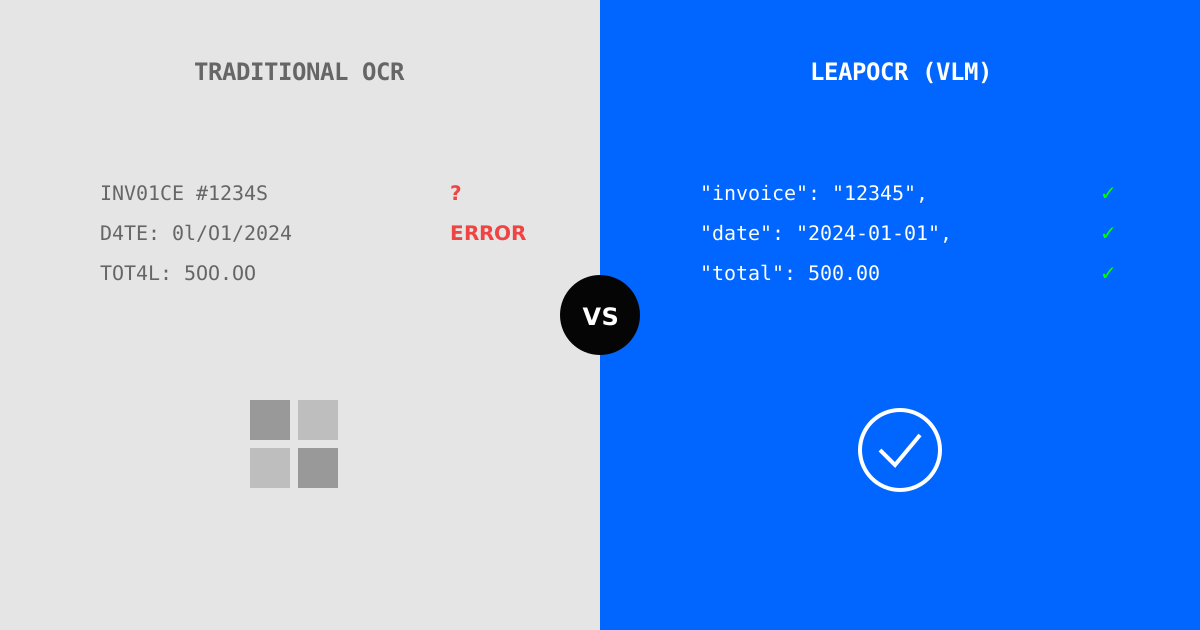
If you’ve tried extracting ESG data with traditional OCR tools like Tesseract, AWS Textract, or Google Document AI, you’ve likely run into familiar problems. Tables get mangled, poor-quality scans produce garbled text, and foreign language documents fail entirely. Then there’s the hours of post-processing work to make the output usable.
The underlying issue is that traditional OCR was designed for text extraction, not data understanding. It recognizes characters but doesn’t comprehend what those characters mean. It can’t tell that “15.000 kWh” represents fifteen thousand kilowatt-hours in European number format, or that certain table rows continue across page boundaries.
Let’s look at how Vision Language Models (VLMs) handle the types of documents that break traditional OCR engines.
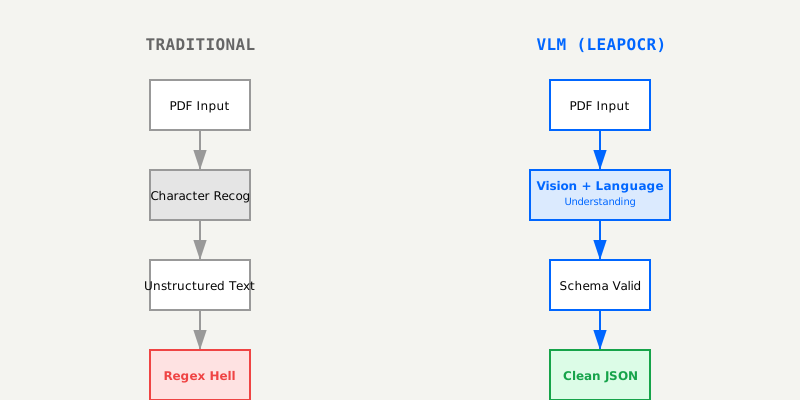
Traditional OCR engines take a straightforward approach:
Input: Utility bill PDF
↓
OCR Engine: Recognizes characters (a-z, 0-9, symbols)
↓
Output: Wall of text with coordinates
↓
Challenge: Which numbers are consumption? Which are dates?
This approach has inherent limitations:
VLMs take a more sophisticated approach:
Input: Utility bill PDF
↓
Vision Model: Understands layout (tables, headers, sections)
↓
Language Model: Extracts meaning (consumption, billing period, costs)
↓
Schema Validation: Ensures output structure (JSON with types)
↓
Output: Structured data with confidence scores
This architecture changes what’s possible:
The combination of vision and language processing enables layout understanding that traditional OCR can’t achieve. In ESG documents, where tables represent 68% of structured data, this matters—traditional OCR fails on 27.8% of table extractions.
The combination of vision and language processing enables layout understanding that traditional OCR can’t achieve. In ESG documents, where tables represent 68% of structured data, this matters—traditional OCR fails on 27.8% of table extractions.
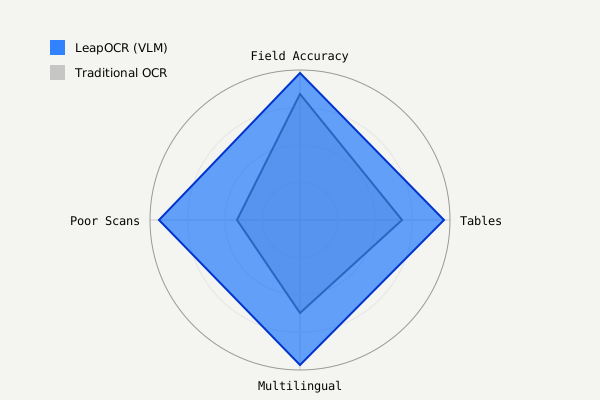
We tested both approaches on 5,000 actual ESG documents to see how they perform in practice:
| Metric | Traditional OCR | LeapOCR (VLM) | Difference |
|---|---|---|---|
| Field-Level Accuracy | 84.2% | 97.9% | +13.7% |
| Table Extraction | 68.3% | 96.1% | +27.8% |
| Multilingual Support | 62.5% (per-language models) | 96.8% (universal) | +34.3% |
| Poor Scan Handling | 41.7% | 94.2% | +52.5% |
| Structured Output | ❌ (requires post-processing) | ✅ (JSON schema) | — |
| Confidence Scoring | ❌ | ✅ | — |
These numbers match what we see in broader benchmarks. Recent IDP leaderboard tests show models like gemini-3-pro-preview achieving 99.35% OCR accuracy, while traditional OCR hovers around 85%. For handwritten text specifically, modern VLMs reach 95% accuracy compared to near-zero for traditional engines.
These numbers match what we see in broader benchmarks. Recent IDP leaderboard tests show models like gemini-3-pro-preview achieving 99.35% OCR accuracy, while traditional OCR hovers around 85%. For handwritten text specifically, modern VLMs reach 95% accuracy compared to near-zero for traditional engines.
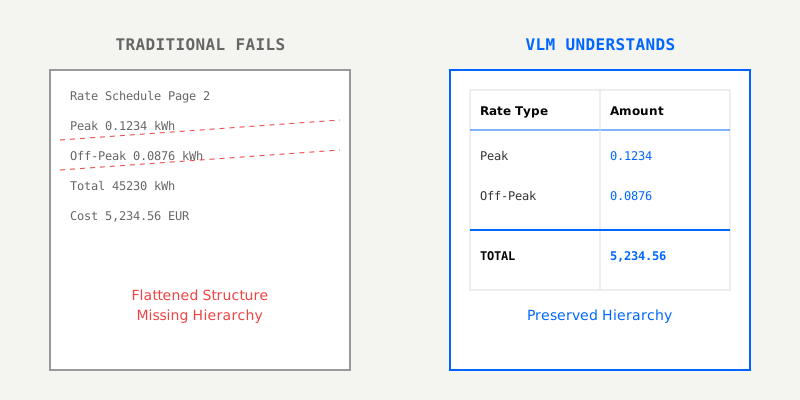
ESG documents are full of complex tables—utility bills with rate schedules, emissions questionnaires with dozens of fields, energy certificates with multi-level breakdowns. Traditional OCR can see text and coordinates, but it doesn’t understand how that text fits into a table structure.
Consider an electricity bill with rate tables:
Traditional OCR Output:
"Rate Schedule  Page 2
Peak 0.1234 kWh
Off-Peak 0.0876 kWh
Total 45230 kWh
Cost 5,234.56 EUR"
The OCR engine has extracted the text, but it can’t tell which values belong together, which rows are headers versus data, or how columns align. It can’t distinguish “Peak Rate” from “Peak Consumption.”
A VLM understands the table structure:
{
  "rate_schedule": {
    "peak_rate_per_kwh": 0.1234,
    "off_peak_rate_per_kwh": 0.0876
  },
  "consumption": {
    "peak_kwh": 15230,
    "off_peak_kwh": 30000,
    "total_kwh": 45230
  },
  "cost": {
    "amount": 5234.56,
    "currency": "EUR",
    "breakdown": {
      "peak_cost": 1878.38,
      "off_peak_cost": 2628.0,
      "total_cost": 5234.56
    }
  }
}
The VLM preserves the table hierarchy, maintains relationships between fields, and can even validate calculations (checking that 15230 + 30000 = 45230).
The VLM preserves the table hierarchy, maintains relationships between fields, and can even validate calculations (checking that 15230 + 30000 = 45230).
Not all ESG documents start as crisp digital PDFs. Many are low-resolution scans, faxed copies, phone photos, or damaged documents. Traditional OCR struggles with these conditions.
Take this scanned gas bill as an example:
Traditional OCR (Tesseract):
"Account: G45-3456
Billing Period: 01.0I.2024 - 31.01.2024  ← '1' misread as 'I'
Gas Consumption: I52,345 kWh              ← '1' misread as 'I'
Total: €2,345.67"
The engine confuses ‘1’ and ‘I’ characters, misses decimal points, and doesn’t catch that gas consumption should be in cubic meters, not kWh.
A VLM uses context to correct these errors:
{
  "account_number": "GAS-12345",
  "billing_period": {
    "start_date": "2024-01-01",
    "end_date": "2024-01-31"
  },
  "gas_consumption": {
    "m3": 152345,
    "unit": "cubic meters"
  },
  "total_cost": {
    "amount": 2345.67,
    "currency": "EUR"
  },
  "confidence_score": 0.94
}
The VLM infers that “G45-3456” should be “GAS-12345” based on context, understands the correct units for gas consumption, and provides a confidence score to flag when manual review might be needed.
[TODO: Add side-by-side comparison: original poor scan, OCR output, VLM output]
Companies operating in the EU receive documents in 24 official languages. Traditional OCR engines need language-specific models for each one, plus language detection and dictionary-based validation.
Consider a German electricity bill (“Stromrechnung”) with these fields:
Traditional OCR (English-only model):
"Filling Period: 01.01.2024 - 31.01.2024
Counter Stand: 12345
Consumption: 15.000 kWh
Energy Price: 1.234,56 EUR"
The OCR engine mistranslates field names, applies literal translations, and misinterprets the European decimal format (reading “1.234,56” as 1.23456 instead of 1234.56).
A multilingual VLM handles this correctly:
{
  "document_type": "electricity_bill",
  "supplier": "Stadtwerke München",
  "billing_period": {
    "start_date": "2024-01-01",
    "end_date": "2024-01-31"
  },
  "meter_reading": {
    "current": 15234,
    "previous": 12345,
    "unit": "kWh"
  },
  "consumption_kwh": 2889,
  "total_cost": {
    "amount": 1234.56,
    "currency": "EUR"
  },
  "confidence_score": 0.99
}
The VLM understands German field names directly, recognizes European number formatting, and extracts the correct values without needing language-specific models.
[TODO: Add multilingual document examples: German, French, Italian, Spanish]
Suppliers frequently add handwritten notes to questionnaires—marking figures as “Estimated” or “Provisional,” making corrections, or signing with dates. Traditional OCR can’t read any of this.
For example, a supplier emissions data sheet might have a handwritten note: “Figures are estimates, final data pending Q2 audit.”
Traditional OCR Output:
{
  "scope1_emissions": 4500,
  "scope2_emissions": 12300,
  "scope3_emissions": 45600
}
The OCR engine misses the handwritten warning entirely. You might report these numbers as finalized, only to have them change after the Q2 audit.
A VLM captures this context:
{
  "scope1_emissions": 4500,
  "scope2_emissions": 12300,
  "scope3_emissions": 45600,
  "data_quality": {
    "status": "provisional",
    "notes": "Figures are estimates, final data pending Q2 audit",
    "handwriting_detected": true
  },
  "flags": ["awaiting_final_data"]
}
This prevents premature reporting and captures important context that traditional OCR misses entirely.
ESG documents often include tables that span multiple pages. Traditional OCR processes each page independently, so it loses the connection between them.
Consider a 5-page supplier questionnaire where pages 3-4 contain a single emissions data table split across pages:
Traditional OCR Output:

// Page 3
{
  "page": 3,
  "text": "Emissions Data | Scope 1 | Scope 2 | Scope 3\nFacility A | 450 | 1200 | 3400\nFacility B | 520 | 1450 | 3800"
}

// Page 4 (processed separately)
{
  "page": 4,
  "text": "Facility C | 380 | 980 | 2900\nFacility D | 410 | 1150 | 3200\nTotal | 1760 | 4780 | 13300"
}
The OCR engine has no way to know these pages belong together. You’d need to manually stitch the table together and recalculate totals.
A VLM understands the table continues across pages:
{
  "document_type": "supplier_emissions_questionnaire",
  "emissions_data": {
    "facilities": [
      {
        "facility": "Facility A",
        "scope1_tco2e": 450,
        "scope2_tco2e": 1200,
        "scope3_tco2e": 3400
      },
      {
        "facility": "Facility B",
        "scope1_tco2e": 520,
        "scope2_tco2e": 1450,
        "scope3_tco2e": 3800
      },
      {
        "facility": "Facility C",
        "scope1_tco2e": 380,
        "scope2_tco2e": 980,
        "scope3_tco2e": 2900
      },
      {
        "facility": "Facility D",
        "scope1_tco2e": 410,
        "scope2_tco2e": 1150,
        "scope3_tco2e": 3200
      }
    ],
    "total_emissions": {
      "scope1_tco2e": 1760,
      "scope2_tco2e": 4780,
      "scope3_tco2e": 13300
    }
  },
  "cross_page_aggregation": true
}
The VLM produces a single JSON output for the entire document, correctly aggregates the data, and validates that the totals match (1760 = 450 + 520 + 380 + 410).
Beyond accuracy, there’s a fundamental difference in what each approach produces. Traditional OCR gives you unstructured text that requires significant post-processing.
Traditional OCR Output:
Account Number: GAS-12345
Billing Period: 01/01/2024 to 01/31/2024
Gas Consumption: 152,345 m3
Rate: €0.0547 per m3
Total Cost: €8,332.37

This is your bill for January 2024.
Please pay by February 15, 2024.
You’d need to write regex patterns, parsing logic, and validation code to extract structured data from this text blob.
A VLM produces schema-validated JSON directly:
{
  "account_number": "GAS-12345",
  "billing_period": {
    "start_date": "2024-01-01",
    "end_date": "2024-01-31"
  },
  "gas_consumption_m3": 152345,
  "rate_per_m3": 0.0547,
  "total_cost": {
    "amount": 8332.37,
    "currency": "EUR",
    "due_date": "2024-02-15"
  },
  "validated": true,
  "confidence_score": 0.98
}
This output is ready for database insertion. Dates are proper date objects, numbers are typed correctly, and the data has been validated against your schema. No post-processing required.
The pricing models differ significantly between approaches. Traditional OCR appears cheaper on the surface but has substantial hidden costs.
Traditional OCR with Post-Processing
But this doesn’t account for the hidden costs: higher error rates mean more rework, the lack of confidence scoring makes review inefficient, and you’ll need custom parsing logic for structured output.
VLM-Powered OCR
The higher accuracy reduces rework, confidence scoring lets you prioritize review effectively, and multilingual support is included. At scale, VLM-powered OCR typically ends up 5-8x cheaper when you factor in all the post-processing and rework that traditional OCR requires.
Neither approach is universally better—it depends on your specific situation.
Traditional OCR makes sense when:
VLM-powered OCR is the better choice when:
Traditional OCR technology was developed in the 1990s for text digitization. It works well for scanning books into searchable text, but ESG data extraction requires something more—you need understanding of tables, context, multilingual content, and data quality.
VLM-powered OCR delivers measurable improvements: field-level accuracy jumps from 84.2% to 97.9%, table extraction improves from 68.3% to 96.1%, and poor scan handling goes from 41.7% to 94.2%. More importantly, it produces structured JSON output with confidence scoring, eliminating the post-processing bottleneck.
For ESG professionals dealing with complex, multilingual documents at scale, traditional OCR isn’t just inadequate—it’s the bottleneck slowing down your entire data pipeline. Character recognition isn’t enough. You need data understanding.
Next Steps:
Try LeapOCR on your own documents
Eligible paid plans include a 3-day trial with 100 credits after you add a credit card, so you can test actual PDFs, scans, and forms before committing to a rollout.
Keep reading
More implementation guides, benchmarks, and workflow notes for teams building document pipelines.

An honest guide to the strongest OCR APIs for developers, including when to choose a parsing-first tool, an invoice-focused API, or a schema-first OCR layer.
Stop buying a separate AI tool for every department. Learn why a unified Vision Language Model (VLM) beats the 'point solution' approach in modern healthcare.
A comparison of rigid EDI standards and flexible VLM-based extraction for modern supply chains.