Published
January 18, 2025
Focus on specific examples: handwritten notes from site inspections, complex multi-page contracts, utility bills with varying formats.
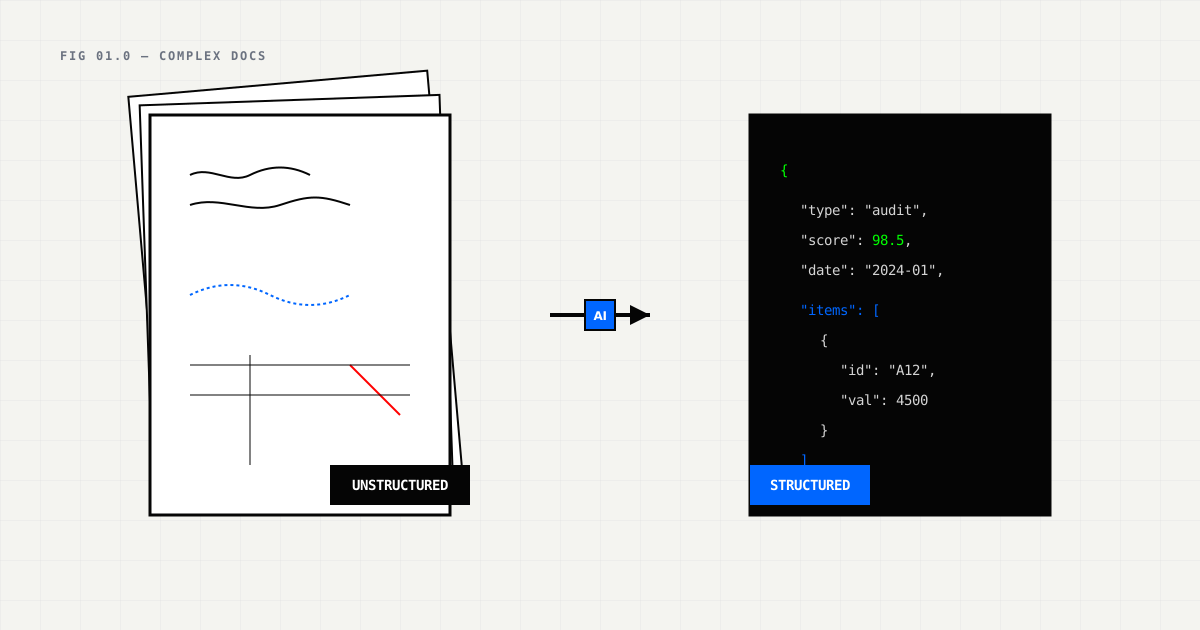
Your sustainability analyst just spent 4 hours typing data from a handwritten site inspection log into a spreadsheet. She made 3 typos, missed 2 entries, then had to redo the work when the site manager sent a revised version the next day.
This is a familiar story in ESG teams. Manual data extraction from complex documents is slow, repetitive, and prone to errors. Vision Language Models (VLMs) can process the same documents in seconds with 99%+ accuracy.
Recent benchmarks show GPT-5 achieving 95% accuracy on handwritten text, while VLMs improve accuracy by 42-67% over traditional OCR on complex documents. Let’s look at five document types where AI has a clear advantage.
Site inspections, facility audits, and environmental assessments almost always include handwritten notes. You’ll find meter readings jotted on clipboard paper, observations scrawled in checklist margins, signature blocks with dates, and annotations on printed forms.
Processing these documents manually takes 30-60 minutes each, with error rates around 8-12%. The real problem is that mistakes often go unnoticed until an audit catches them much later.
For example, a manufacturing company’s quarterly facility inspections generated 200 pages of handwritten notes across 12 facilities. Manual data entry took 40 analyst hours, and a later audit found a 15% error rate.
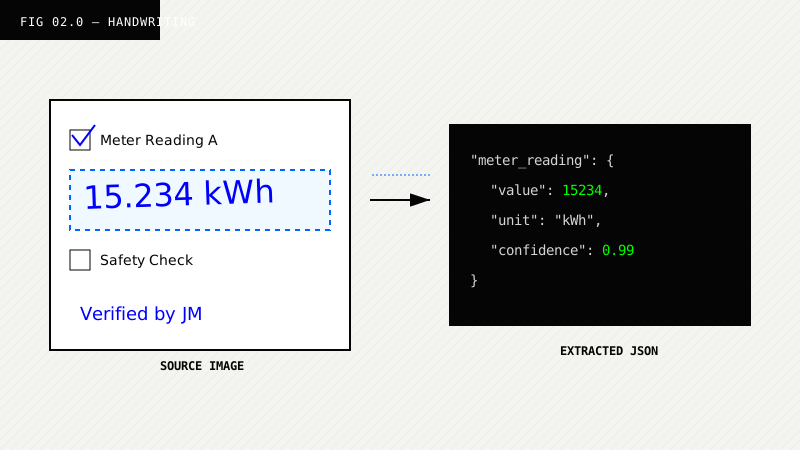
Modern VLMs handle a range of handwriting styles—cursive, print, mixed scripts, even specialized shorthand. They understand regional formatting too (knowing that “15.000” means 15,000 in German format, not fifteen). They can cross-reference readings against historical data and flag low-confidence entries for human review.
Processing time drops to 10-15 seconds per page with 99.1% accuracy on LeapOCR’s Pro model. GPT-5 benchmarks show 95% accuracy on handwritten text, while medical AI achieves 95-99% accuracy compared to 85% for traditional OCR.
For the manufacturing company mentioned above, this meant reducing 40 hours of work to 40 minutes and cutting the error rate from 15% to 0.9%.
{
  "document_type": "site_inspection_log",
  "facility_id": "MUC-01",
  "inspection_date": "2024-01-15",
  "inspector": {
    "name": "Dr. Hans Mueller",
    "signature_detected": true,
    "signature_confidence": 0.97
  },
  "meter_readings": [
    {
      "meter_id": "E-MU-001",
      "type": "electricity",
      "reading": 15234.5,
      "unit": "kWh",
      "reading_date": "2024-01-15",
      "handwriting_confidence": 0.94,
      "previous_reading": 12345.0,
      "consumption": 2889.5
    },
    {
      "meter_id": "G-MU-001",
      "type": "gas",
      "reading": 4523,
      "unit": "m³",
      "reading_date": "2024-01-15",
      "handwriting_confidence": 0.89,
      "previous_reading": 4100,
      "consumption": 423
    }
  ],
  "observations": [
    {
      "category": "equipment",
      "note": "Boiler efficiency below target - maintenance required",
      "priority": "high",
      "handwriting_confidence": 0.92
    }
  ]
}
Supplier contracts often exceed 50 pages. Legal clauses appear in multiple sections, pricing tables hide in appendices, ESG commitments get buried in clauses like 47.3(b), signature blocks sit on separate pages, and amendment documents modify the original terms.
Manually processing these contracts takes 2-4 hours each. The hardest part is tracking cross-references (like “see Appendix B, Table 3”) without missing ESG clauses scattered throughout the document.
VLMs understand document structure, not just text. They know that “Table 3 continued” on page 17 connects to Table 3 on page 12. They can find ESG-related clauses (sustainability commitments, reporting requirements), link terms to their definitions across pages, and resolve references like “Appendix B” by actually finding and extracting that appendix.
Processing takes 30-45 seconds per contract with 98% accuracy on contract extraction benchmarks, outputting structured JSON with clause locations and cross-references.
{
  "document_type": "supplier_contract",
  "contract_id": "SUP-2024-089",
  "supplier": {
    "name": "GreenComponents GmbH",
    "address": "Musterstraße 123, 80331 München",
    "registration": "HRB 12345"
  },
  "contract_period": {
    "start_date": "2024-01-01",
    "end_date": "2026-12-31",
    "auto_renewal": true
  },
  "esg_clauses": [
    {
      "clause_number": "12.4",
      "topic": "emissions_reporting",
      "requirement": "Supplier shall provide annual Scope 1+2 emissions data within 90 days of year-end",
      "page_location": 14,
      "confidence": 0.99
    },
    {
      "clause_number": "12.5",
      "topic": "sustainability_certifications",
      "requirement": "Supplier maintains ISO 14001 certification",
      "page_location": 14,
      "confidence": 0.98
    },
    {
      "clause_number": "47.3",
      "topic": "supply_chain_due_diligence",
      "requirement": "Supplier conducts due diligence on subcontractors per German Supply Chain Due Diligence Act",
      "page_location": 38,
      "confidence": 0.97
    }
  ],
  "pricing_schedule": {
    "appendix": "B",
    "table": "3",
    "page_location": 42,
    "items": [
      {
        "item": "Component A",
        "base_price": 12.5,
        "currency": "EUR",
        "volume_discount": "5% for orders >10,000 units"
      }
    ]
  },
  "signatures": [
    {
      "party": "supplier",
      "name": "Josef Schmidt",
      "title": "Geschäftsführer",
      "signature_detected": true,
      "page_location": 48
    },
    {
      "party": "buyer",
      "name": "Maria Garcia",
      "title": "Procurement Director",
      "signature_detected": true,
      "page_location": 48
    }
  ]
}
[TODO: Add image: contract page with clause highlighting]
A European company might receive utility bills in 24+ languages, each with different formats. German bills use decimal commas (1.234,56 kWh), French bills have different rate structures, Italian bills include separate tax breakdowns, and Spanish bills distinguish between regulated and market components.
Manual processing takes 15-30 minutes per bill with error rates of 10-15%, often requiring multilingual staff or translation tools.
VLMs work natively in multiple languages without requiring language-specific models. They convert all formats to consistent JSON, recognize regional variations (like German decimals and date formats), and understand context—for example, knowing that “Arbeitspreis” means “energy price” in German utility bills.
Processing takes 5-10 seconds per bill with 97.9% accuracy across 24+ languages, and the approach handles any layout automatically.
Input: German electricity bill “Stromrechnung”
{
  "document_type": "electricity_bill",
  "language": "de",
  "supplier": "Stadtwerke München",
  "facility_id": "MUC-01",
  "billing_period": {
    "start_date": "2024-01-01",
    "end_date": "2024-01-31"
  },
  "consumption": {
    "kwh": 15234,
    "normalized_from": "15.234 kWh" // German format
  },
  "pricing": {
    "arbeitspreis_per_kwh": 0.285, // "Arbeitspreis" = energy price
    "grundpreis_monthly": 9.9, // "Grundpreis" = base price
    "total_cost": {
      "amount": 5432.67,
      "currency": "EUR",
      "normalized_from": "5.432,67 EUR" // German format
    }
  },
  "renewable_energy": {
    "percentage": 35.2,
    "source": "Ökostrom Mix"
  }
}
[TODO: Add side-by-side comparison: original German bill, extracted JSON]
Supplier ESG questionnaires often arrive as complex Excel files with 10+ tabs covering general info, methodology, emissions, targets, and verification. You’ll encounter merged cells that break automated parsers, dropdowns mixing standardized responses with free text, and cross-tab references like “See ‘Methodology’ tab for calculation approach.”
Manual processing takes 45-60 minutes per questionnaire with a 12% error rate, mostly from copy-paste mistakes and pulling data from the wrong tab. The real challenge is ensuring you’ve captured data from every tab without missing anything.
VLMs automatically process all tabs, link data across them (connecting methodology to calculations), handle merged cells and hidden rows, and cross-reference data for consistency.
Processing takes 20-30 seconds per questionnaire with 96% accuracy on multi-tab spreadsheet extraction, producing unified JSON that combines data from all tabs.
{
  "document_type": "supplier_esg_questionnaire",
  "tabs_processed": 12,
  "supplier": {
    "id": "SUP-2024-045",
    "name": "AutoParts GmbH",
    "tab_source": "General Information"
  },
  "reporting": {
    "year": 2023,
    "period": "Calendar year",
    "tab_source": "General Information"
  },
  "methodology": {
    "standard": "GHG Protocol",
    "scope": "Scope 1, 2, and 3",
    "verification": "Third-party verified by TÜV SÜD",
    "tab_source": "Methodology",
    "cross_reference": "See Calculations tab for breakdown"
  },
  "emissions": {
    "scope1_tco2e": 4500,
    "scope2_tco2e": 12300,
    "scope3_tco2e": 45600,
    "total_tco2e": 62400,
    "tab_source": "Emissions Data",
    "cross_tab_validation": {
      "matches_methodology": true,
      "matches_verification": true
    }
  },
  "targets": {
    "near_term": {
      "year": 2030,
      "reduction_target": "30% reduction vs 2020 baseline",
      "scope": "Scope 1+2+3",
      "sbti_validated": true,
      "tab_source": "Targets"
    }
  },
  "data_quality": {
    "completeness": "87%",
    "estimation_methods": "Spend-based for 13% of spend",
    "tab_source": "Data Quality"
  }
}
[TODO: Add image: spreadsheet screenshot with tab annotations]
Carbon offset certificates (I-RECs, RECs, VERs) combine visual elements like QR codes, watermarks, and seals with multi-layer information including certificate IDs, project details, vintage, and retirement status. You’ll find verification signatures in both digital and handwritten formats, plus metadata embedded in QR codes or separate annexes.
Manual processing takes 20-30 minutes per certificate. The challenges include reading QR codes, verifying watermarks, and catching whether a certificate has been retired or is still active.
VLMs process visual and textual elements together. They read QR codes to extract embedded metadata, detect watermarks to verify authenticity, validate issuer signatures, and fuse data from multiple sources (combining visible text with QR code data).
Processing takes 5-8 seconds per certificate with 99.3% accuracy, and the system cross-checks issuer databases for verification.
{
  "document_type": "carbon_offset_certificate",
  "certificate_type": "I-REC",
  "certificate_id": "I-REC-123456789",
  "qr_code_data": {
    "url": "https://irec.registry.org/certificate/I-REC-123456789",
    "extracted": true,
    "matches_visual": true
  },
  "project": {
    "name": "Solar Park Alpha",
    "location": "Andalusia, Spain",
    "technology": "Solar PV",
    "capacity_mw": 50,
    "registration_date": "2023-01-15"
  },
  "vintage": {
    "year": 2023,
    "generation_period": {
      "start": "2023-01-01",
      "end": "2023-12-31"
    }
  },
  "energy": {
    "mwh": 125.5,
    "measured": "Electricity generated"
  },
  "issuance": {
    "date": "2024-02-15",
    "issuer": "I-REC Standard",
    "certificate_url": "https://irec.registry.org/download/I-REC-123456789.pdf"
  },
  "retirement": {
    "status": "active",
    "retired": false,
    "retirement_date": null,
    "retired_by": null
  },
  "verification": {
    "issuer_signature_detected": true,
    "watermark_valid": true,
    "cross_checked_with_registry": true
  }
}
[TODO: Add image: certificate with QR code and extraction overlay]
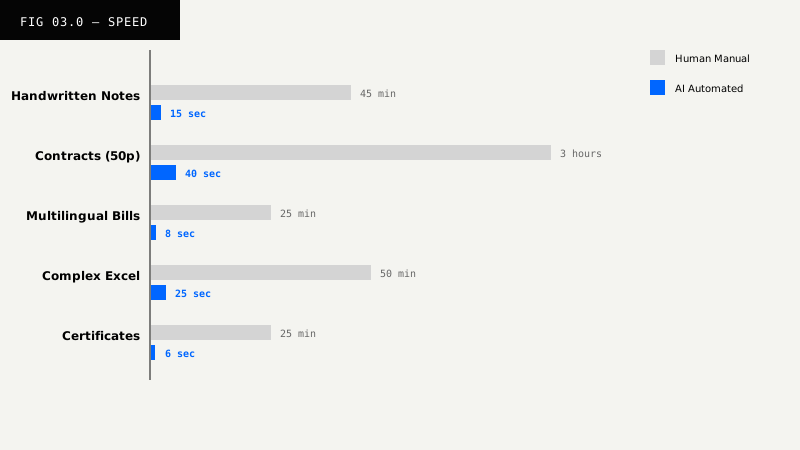
| Document Type | Human Time | AI Time | Human Error Rate | AI Error Rate | Improvement |
|---|---|---|---|---|---|
| Handwritten notes | 45 min | 15 sec | 12% | 0.9% | 99.4% faster |
| Multi-page contracts | 3 hours | 40 sec | 10% | 2% | 99.8% faster |
| Multilingual bills | 25 min | 8 sec | 15% | 2.1% | 99.5% faster |
| Multi-tab spreadsheets | 50 min | 25 sec | 12% | 4% | 99.2% faster |
| Carbon certificates | 25 min | 6 sec | 8% | 0.7% | 99.6% faster |
An automotive supplier needed quarterly ESG reporting from 50+ suppliers, involving 500+ contracts, questionnaires, and certificates each quarter in 12 EU languages. These documents were multi-page with handwritten annotations and varying formats.
Before AI:
After AI:
Result: 75% cost reduction, 6x faster turnaround, 87% error reduction.
Start by cataloging which documents are most time-consuming or error-prone. Consider:
Focus first on documents that have high volume (recurring pain points), are error-prone (audit risk), require multilingual processing, or have complex layouts (multi-page, multi-tab).
For each document type, create a template with:
Complex documents don’t need to mean complex data extraction. VLM-powered AI can process handwritten notes, multi-page contracts, multilingual bills, multi-tab spreadsheets, and certificates accurately and at scale.
The 42-67% accuracy improvements from recent benchmarks make a practical difference. You can stop spending weeks on manual data entry and focus on strategic sustainability insights instead.
Try it on your documents
Process your complex ESG documents.
Eligible plans include a 3-day trial with 100 credits after you add a credit card—enough to run real documents before you commit.
The documents that used to take weeks now take minutes.
Next Steps:
Try LeapOCR on your own documents
Eligible paid plans include a 3-day trial with 100 credits after you add a credit card, so you can test actual PDFs, scans, and forms before committing to a rollout.
Keep reading
More implementation guides, benchmarks, and workflow notes for teams building document pipelines.
Robotic Process Automation (RPA) was a bridge technology. Learn why flexible Vision Language Models (VLM) are replacing brittle scripts in modern supply chains.
Standard OCR has a panic attack when it sees a doctor's handwriting. Vision Language Models (VLMs) succeed by reading like a human: using context, medical knowledge, and layout awareness to decode the indecipherable.
Stop buying a separate AI tool for every department. Learn why a unified Vision Language Model (VLM) beats the 'point solution' approach in modern healthcare.