Published
January 26, 2026
Stop buying a separate AI tool for every department. Learn why a unified Vision Language Model (VLM) beats the 'point solution' approach in modern healthcare.
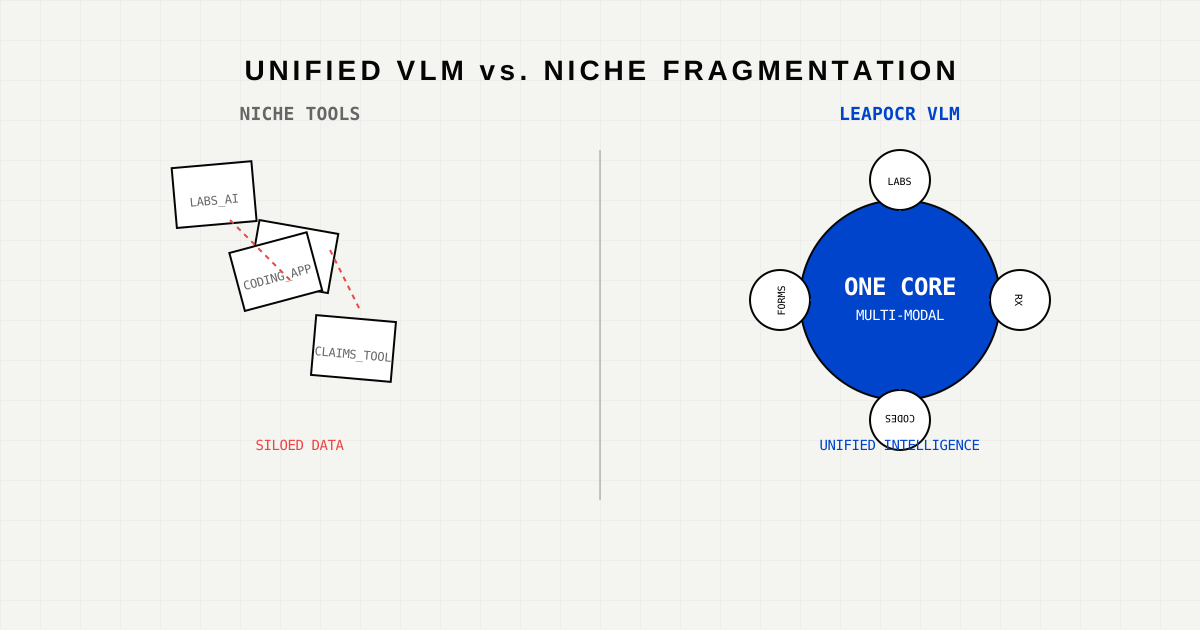
Healthcare CIOs and CTOs face a recurring dilemma: “Do we buy the ‘Best-in-Class’ tool for every specific problem, or do we opt for a unified platform?”
Ten years ago, the answer was “Best-in-Class.” You bought one OCR tool for the Radiologists, another for the Billing Department, and a third for the Pharmacy.
Today, that strategy is failing. It has created a fragmented landscape of brittle (“niche”) tools that don’t talk to each other, require separate maintenance contracts, and—worst of all—break whenever a document template changes.
LeapOCR represents the new paradigm: The Unified Vision Language Model (VLM).
Niche tools are built on a philosophy of rules and templates.
Hemoglobin and Platelets.Member ID in the top right corner.This works fine… until the world changes. The moment a new layout is introduced, the rigid rules break.
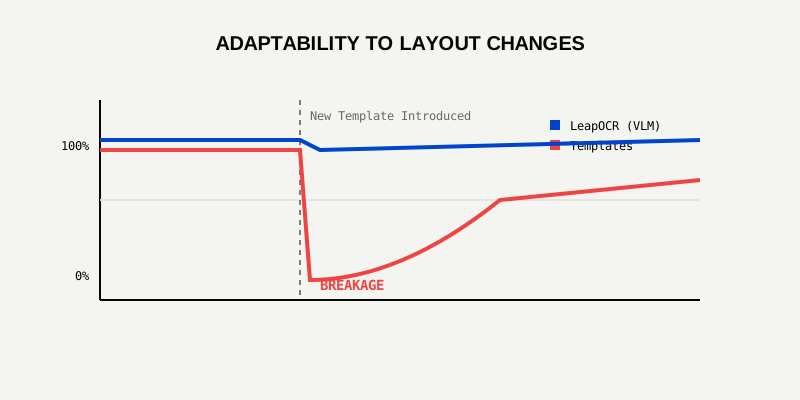
As shown above, niche tools experience a “crash” in accuracy every time a vendor updates their form layout. LeapOCR’s VLM doesn’t utilize templates; it uses semantic understanding. It reads Member ID regardless of whether it’s in the top right, bottom left, or handwritten in the margin.
Buying five different tools means building five different integrations into your EHR (Electronic Health Record).
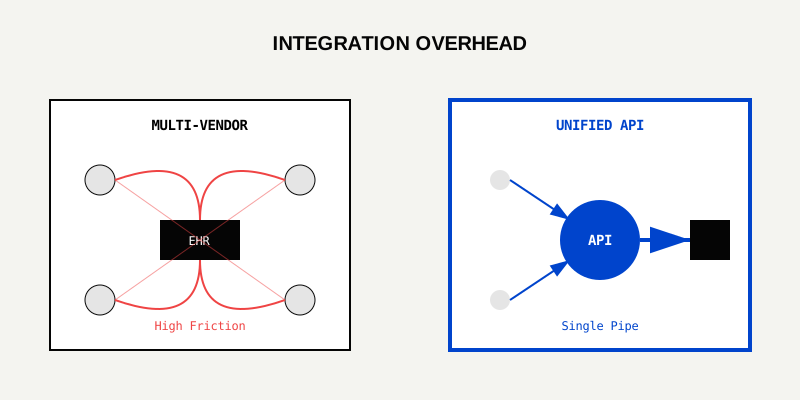
This “Spaghetti Architecture” is expensive to build and impossible to maintain. If Vendor A changes their API schema, your entire billing workflow might halt.
LeapOCR offers a Single Unified API. You integrate it once. Whether you are processing a handwritten doctor’s note, a PDF lab report, or an insurance card image, the endpoint is the same. The data structure is consistent.
The sticker price of a niche tool might seem low. “$500/month for Lab Extraction? Great!”
But when you multiply that by 10 different departments, and add the hidden costs of maintenance, server monitoring, and vendor management, the math changes.
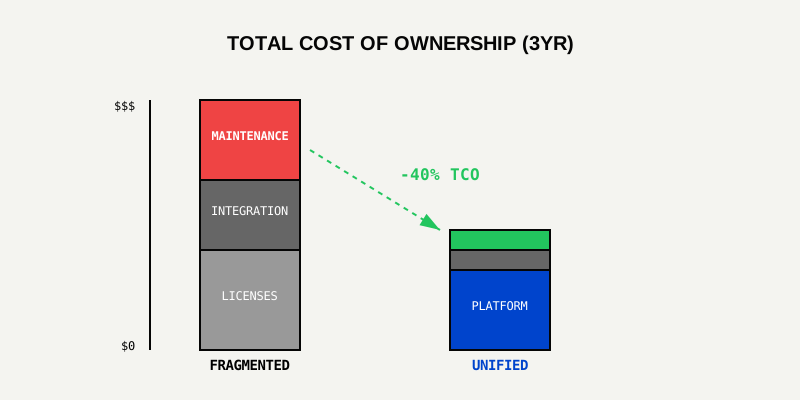
With a unified VLM platform, you gain economies of scale. You aren’t paying for 10 separate sales teams and 10 separate CEO salaries. You are paying for one robust compute engine.
We are honest engineering partners. There are edge cases where a niche tool is still necessary:
But for Administrative Data Extraction—which accounts for 80% of healthcare paperwork—the flexible VLM is undisputed.
The era of the “One-Trick Pony” software is ending. Healthcare systems are too complex and move too fast for brittle, template-based tools.
A flexible VLM like LeapOCR gives you an “Artificial Intelligence Intern” that can roam from department to department, handling Intake forms today and Claims denials tomorrow, without needing a software update.
Consolidate your stack. View the VLM Capabilities Matrix or Schedule a Consolidation Audit.
Try LeapOCR on your own documents
Eligible paid plans include a 3-day trial with 100 credits after you add a credit card, so you can test actual PDFs, scans, and forms before committing to a rollout.
Keep reading
More implementation guides, benchmarks, and workflow notes for teams building document pipelines.

How AI compares clinical documentation to billed codes to capture missed revenue without increasing audit risk.
A technical playbook for pushing medical coding accuracy to the edge with VLMs, schema validation, and human-in-the-loop review.
How confidence thresholds turn AI extraction into a safe, reviewable workflow for medical coding and billing.