Published
December 8, 2025
Stop feeding raw text to your LLM. Learn why preserving document structure is key to reducing hallucinations in RAG apps.
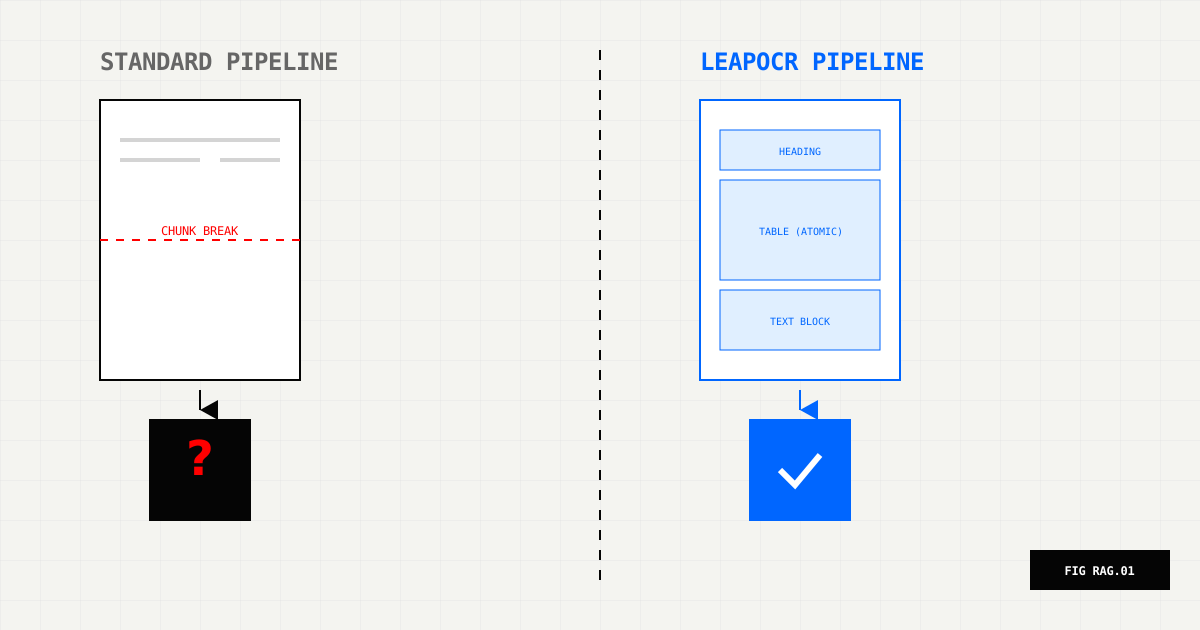
RAG applications often work well in demos but struggle with real-world documents. When you feed them PDFs containing tables, multi-column layouts, or sidebars, the quality drops noticeably. The problem usually starts much earlier than the retrieval step—it begins with how the document gets converted to text.
The standard approach flattens everything into plain text, chunks by token count, and embeds. This process destroys the document’s structure, leaving the LLM without the spatial context it needs to understand relationships between content. When tables get split across chunks or columns read out of order, hallucinations follow.
The fix lies in upstream processing: using layout-aware OCR combined with smarter chunking strategies. Let’s walk through what goes wrong and how to address it.
Most RAG implementations follow this pattern:
This approach has specific failure modes:
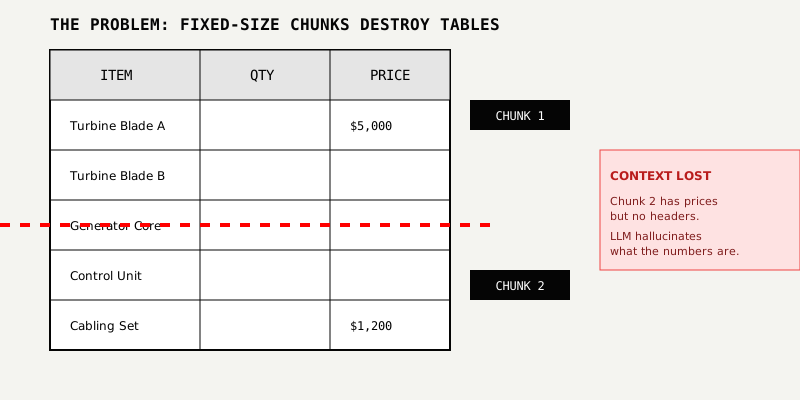
Tables fragment across chunks. A table row might start in one chunk and end in another, separating quantities from their descriptions or prices from line items. The LLM receives partial context and fills in gaps with incorrect information.
Multi-column layouts interleave. Documents with two or three columns get read top-to-bottom, left-to-right. This mixes content from different sections together, creating incoherent chunks that embed poorly.
Headers and footers pollute every chunk. Page numbers, copyright notices, and section titles that appear on every page add noise to embeddings, making semantic retrieval less accurate.
Document hierarchy disappears. Headings, bullet points, and nested lists all flatten to plain text. The structural cues that help humans scan documents vanish, making it harder to chunk intelligently.
Consider the sample documents in your project:
/assets/blog/pdf-images/sample-tables-01.png and sample-tables-02.png/assets/blog/pdf-images/sample-contract-shuttle-01.png and -02.pngWhen these go through a standard OCR pipeline, the spatial relationships between elements disappear. A pricing table becomes a list of disconnected numbers. A sidebar blends into the main body text. By the time retrieval happens, the context is already corrupted.
A layout-aware OCR engine preserves structural information:
LeapOCR supports this through two output formats: Markdown (which preserves headings, tables, and lists using standard syntax) or structured JSON (which uses schemas to capture field relationships). You get the shape of the document, not just the words.
Once you have layout-aware output, adjust your chunking strategy to take advantage of it:
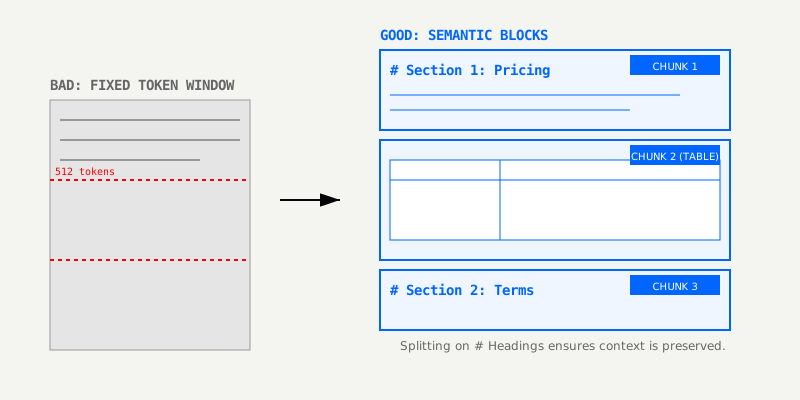
1. Use Markdown output. Setting format: "markdown" keeps tables and headings in the text, giving you clear boundaries for splitting.
2. Chunk by structure, not fixed size.
3. Store rich metadata with embeddings. Include section titles, page numbers, flags for tables/lists, and document type alongside your vectors.
4. Filter at retrieval time. When a query asks about pricing, prefer chunks tagged with section: pricing rather than relying on semantic similarity alone.
Here’s how this looks in practice using LeapOCR with Markdown output:
import { LeapOCR } from "leapocr";

const client = new LeapOCR({ apiKey: process.env.LEAPOCR_API_KEY });

const job = await client.ocr.processURL("https://your-bucket.example.com/sample-contract.pdf", {
  format: "markdown", // preserves headings, lists, tables
  model: "pro-v1",
});

await client.ocr.waitUntilDone(job.jobId);
const { output } = await client.ocr.getJobResult(job.jobId);
await client.ocr.deleteJob(job.jobId);

// Split markdown by headings, keep tables intact
function chunkMarkdown(md: string) {
  const sections = md.split(/\n(?=##?\s)/);
  return sections.map((section, idx) => ({
    id: `sec-${idx}`,
    text: section.trim(),
    metadata: {
      section: section.split("\n")[0].replace(/^#+\s*/, ""),
      hasTable: /\|.*\|/.test(section),
    },
  }));
}

const chunks = chunkMarkdown(output.markdown);
// Embed chunks with your vector DB, preserving metadata
For structured documents like invoices or bills of lading, you can skip chunking entirely. Use format: "structured" with a JSON schema and store the parsed fields directly in your database.
The best way to validate this approach is a simple A/B test:
Most teams see noticeable improvement on all three metrics when they preserve document structure. Tables that were previously fragmented stay coherent, and section-aware retrieval brings back the right context more often.
If you’re dealing with RAG failures today, start small:
The sample assets in /assets/blog/pdf-images/ are good candidates for this experiment. Once you see the impact on a few pages, scaling to your full document pipeline is straightforward.
Try LeapOCR on your own documents
Eligible paid plans include a 3-day trial with 100 credits after you add a credit card, so you can test actual PDFs, scans, and forms before committing to a rollout.
Keep reading
More implementation guides, benchmarks, and workflow notes for teams building document pipelines.

Why classic OCR struggles on real-world documents and how AI-native, layout-aware extraction turns PDFs and scans into reliable, structured data your systems can trust.
A production-focused guide to turning PDFs and scans into schema-fit JSON without building a brittle cleanup layer after OCR.

A practical, low-lift way to turn invoices, receipts, onboarding packs, and contracts into structured data—without burning precious engineering cycles.