Published
December 5, 2025
Why classic OCR struggles on real-world documents and how AI-native, layout-aware extraction turns PDFs and scans into reliable, structured data your systems can trust.
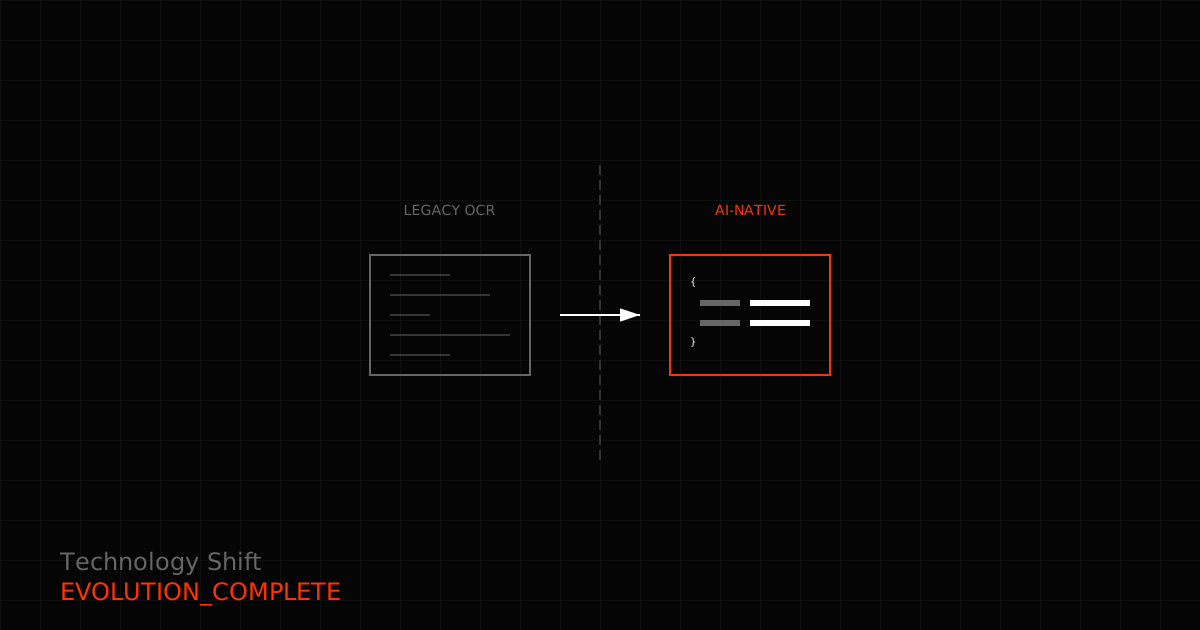
Classic OCR was built to spot characters. AI-native OCR is built to understand documents. That distinction matters when you’re working with real-world documents rather than pristine scans.
This guide explains the difference and shows you how to use AI-native OCR in production.
Who this is for: Product, ops, and engineering teams evaluating OCR options who want structured JSON with minimal manual cleanup.
The fundamental difference comes down to what each system tries to do:
Legacy OCR treats documents as images of characters. It finds text, but it doesn’t understand what that text represents. You get back a wall of text that your team needs to parse, clean, and structure.
AI-native OCR treats documents as structured information. It understands layouts, identifies fields, and returns data in the shape you actually need.
This isn’t just an academic difference. Legacy OCR typically requires manual QA, custom parsing scripts, and repeated attempts to extract what you need. AI-native OCR integrates directly into your workflows through async jobs, schema-defined outputs, and predictable data shapes.
Legacy OCR works well enough on clean, single-column documents. But real-world documents aren’t usually that simple.
Layout confusion breaks everything: When legacy OCR encounters multi-column layouts, nested tables, or sidebars, it typically flattens them into a single stream. Reading order gets scrambled, and information that should stay together ends up scattered.
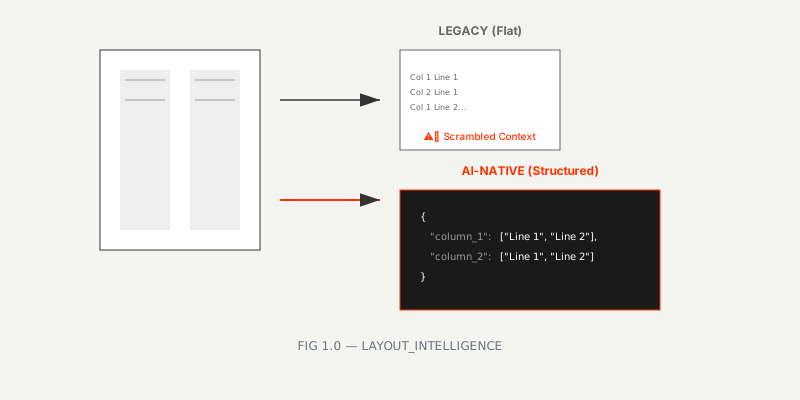 FIG 1.0 — How different systems handle multi-column layouts
Real-world quality varies: Phone photos in low light, skewed scans, watermarks, and mixed languages all cause accuracy to drop. Legacy systems don’t handle these edge cases gracefully.
No semantic understanding: Legacy OCR can read “INV-2045” but has no idea whether it’s looking at an invoice number, purchase order, or line item reference. Every string looks the same to the system.
One model for everything: Receipts, contracts, handwritten notes, and printed forms all get processed the same way. The result is none of them work particularly well.
AI-native OCR addresses these problems through several capabilities:
Layout awareness: The system understands document structure. Table rows stay intact, reading order respects columns, and labels remain paired with their values. You don’t have to reconstruct relationships after the fact.
Field extraction: Instead of returning undifferentiated text, AI-native OCR identifies specific data types. It knows that dates, totals, names, and IDs are different things that need different handling.
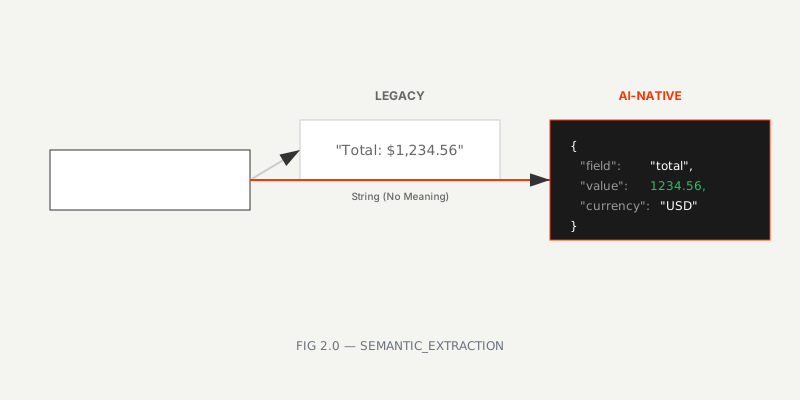 FIG 2.0 — From raw strings to semantic entities
Schema and template support: You define the output structure using JSON Schema or template slugs. The system returns data in the exact shape your application expects, with optional processing instructions to fine-tune the results.
Model selection: Different documents need different approaches. You can choose standard-v1 for high-volume processing, english-pro-v1 for English-language precision, or pro-v1 for complex layouts, handwriting, or multilingual content.
Flexible output formats: Return structured JSON for complete data or markdown when you only need searchable text.
Job lifecycle control: Process documents asynchronously, poll for status updates, fetch results when ready, and delete data immediately after use. You stay in control of the entire pipeline.
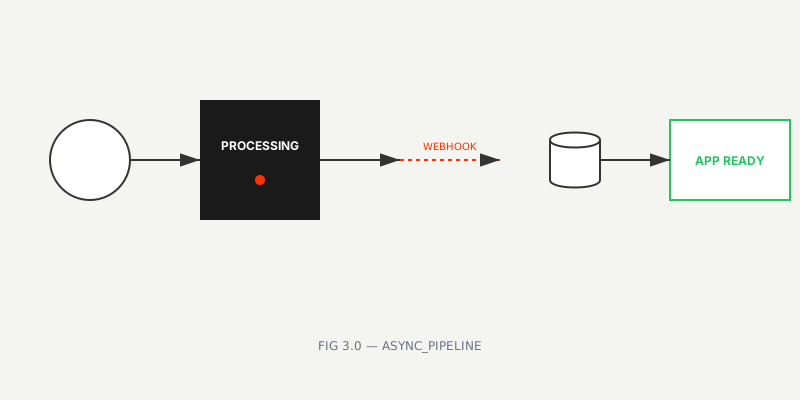 FIG 3.0 — Modern async integration pattern
The difference in output becomes clear when you see it side-by-side.
Legacy OCR gives you raw text. Your team then writes parsing scripts, maps fields manually, and fixes ordering issues. The OCR step is only the beginning.
AI-native OCR (using structured format) returns complete, validated JSON. Fields are identified, typed correctly, and ready to persist directly to your database or send to downstream APIs.
{
  "invoice_number": "INV-2024-001",
  "invoice_date": "2024-01-15",
  "due_date": "2024-02-15",
  "vendor": { "name": "ACME Corp" },
  "line_items": [
    { "description": "Service Fee", "total": 1000.0 },
    { "description": "Tax", "total": 234.56 }
  ],
  "total": 1234.56
}Let’s walk through how to implement this in a real system.
Your choice of format depends on what you’re trying to do:
structured: Returns a JSON object for the document. Use this when you need complete data that you can persist directly—invoices, contracts, receipts.markdown: Returns clean text when you only need searchable content for archives or review.If you need both searchable text and structured fields, run two jobs or store both the structured output and a markdown pass.
Different documents require different models:
standard-v1: The economical default. Works well for clean, printed documents at high volume.english-pro-v1: Higher accuracy for English-language content.pro-v1: Handles complex layouts, handwriting, and multilingual documents.Start with standard-v1 and upgrade only when you encounter persistent issues like handwriting, dense tables, or noisy scans.
Use JSON Schema when you need exact control over output structure, or templates for centrally managed configurations.
Keep your initial schemas focused on essential fields: invoice number, dates, totals, vendor, and line items. You can expand from there. For contracts and IDs, start with 6-8 core fields (names, dates, IDs, amounts) before adding secondary details.
import { LeapOCR } from "leapocr";

const client = new LeapOCR({ apiKey: process.env.LEAPOCR_API_KEY });

// Submit a PDF by URL with structured output (schema + instruction together is allowed)
const job = await client.ocr.processURL("https://example.com/invoice.pdf", {
  format: "structured",
  model: "pro-v1",
  schema: {
    invoice_number: "string",
    invoice_date: "string",
    due_date: "string",
    vendor: { name: "string" },
    line_items: [{ description: "string", total: "number" }],
    total: "number",
  },
  instructions: "Return currency values as numbers and dates as YYYY-MM-DD.",
});

// Wait for completion
await client.ocr.waitUntilDone(job.jobId);

// Fetch results
const result = await client.ocr.getJobResult(job.jobId);

// Clean up immediately after use
await client.ocr.deleteJob(job.jobId);Even with AI-native OCR, you should validate results before trusting them in production:
Running OCR in production requires thinking about operations, not just accuracy.
Cost structure: Structured extraction adds one credit per page. For cost-sensitive processing, standard-v1 handles most use cases well. Upgrade to pro-v1 or english-pro-v1 only when accuracy issues justify the additional cost.
Async processing: Use waitUntilDone for simple synchronous flows. For UI progress tracking or long-running jobs, implement polling against /ocr/status/{job_id}.
Data management: Delete jobs immediately after persisting the data you need. The system provides a 7-day auto-deletion safety net, but you shouldn’t rely on it for routine operations.
Batch processing: Group similar documents together to stabilize output and reduce unexpected results.
Observability: Track processed pages, failure rates, and latency. Log job_id and source document so you can trace issues when they occur.
The fastest way to understand the difference is to test it yourself:
pro-v1, when to add schemas or templates, and when markdown output suffices.LeapOCR implements this AI-native approach across several dimensions:
structured and markdown for different downstream needsstandard-v1, english-pro-v1, and pro-v1 based on your speed vs accuracy requirementsCommon integration patterns include webhooks to your queue with results pushed into ERP/CRM/DB systems, or direct API returns for smaller jobs.
Documentation is available at /docs/concepts/formats, /docs/concepts/models, /docs/concepts/schemas, and /docs/api.
The best way to understand AI-native OCR is to try it on your own documents.
Start with a small, representative sample set—not the cleanest documents in your archive, but the ones that usually cause problems. Pick an appropriate model, choose structured output, and define a minimal schema covering the fields you actually need.
If the JSON drops cleanly into your database or API payloads without manual fixes, you’ve moved beyond legacy OCR.
From there, run a 10-20 document pilot, implement validation logic and deletion workflows, and set up monitoring with /ocr/status/{job_id}. You’ll quickly see whether the AI-native approach fits your production needs.
Try LeapOCR on your own documents
Eligible paid plans include a 3-day trial with 100 credits after you add a credit card, so you can test actual PDFs, scans, and forms before committing to a rollout.
Keep reading
More implementation guides, benchmarks, and workflow notes for teams building document pipelines.
A production-focused guide to turning PDFs and scans into schema-fit JSON without building a brittle cleanup layer after OCR.

An honest guide to the strongest OCR APIs for developers, including when to choose a parsing-first tool, an invoice-focused API, or a schema-first OCR layer.
A practical, low-lift way to turn invoices, receipts, onboarding packs, and contracts into structured data—without burning precious engineering cycles.