Published
December 5, 2025
A practical, low-lift way to turn invoices, receipts, onboarding packs, and contracts into structured data—without burning precious engineering cycles.
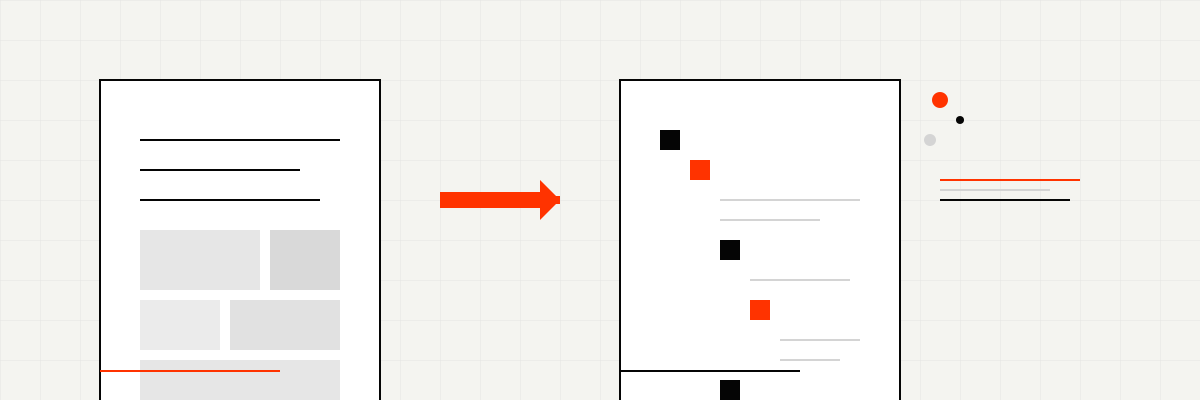
If someone on your team is still manually copying invoice totals, receipt amounts, or onboarding details into spreadsheets or forms, you’re losing time twice. First on the data entry itself, then again when that work pulls engineers away from building product or ops folks from higher-leverage tasks.
LeapOCR gives you a straightforward way to turn PDFs and scans into structured JSON with minimal setup. This post walks through how to actually use it, specifically for the document workflows that trip up early-stage companies.
Target audience: Founders, operations leads, and engineering teams at startups who need to process documents but don’t want to build and maintain an in-house OCR pipeline.
The issues compound quickly:
You don’t need to accept this as overhead. Automation here is straightforward once you know the options.
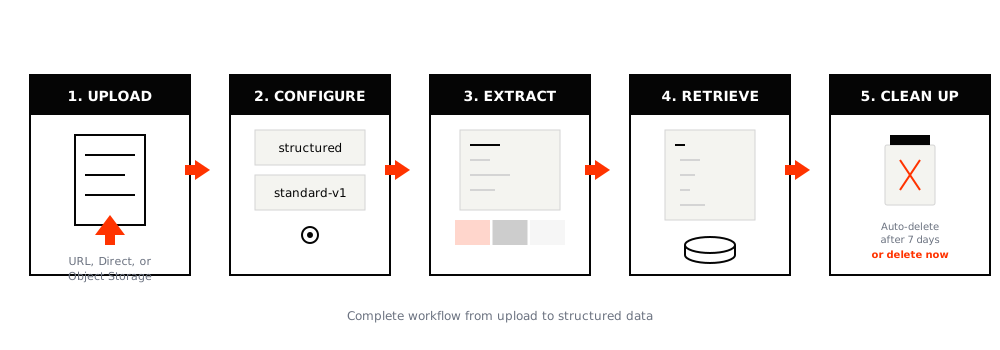
The pipeline follows five steps:
Upload - Send files via direct upload, URL, or object storage (/ocr/uploads/url or /ocr/uploads/direct)
Configure - Pick your format and model:
structured (JSON output) or markdown (plain text)standard-v1 (covers most cases), english-pro-v1 (optimized for English), or pro-v1 (handles handwriting, multilingual content, and difficult layouts)Extract - Define what you want using a schema, a template slug, or natural language instructions
Retrieve - Fetch results from /ocr/result/{job_id} and route them to your database, CRM, accounting system, or webhook handler
Clean up - Delete completed jobs with /ocr/delete/{job_id} (they auto-delete after 7 days regardless)
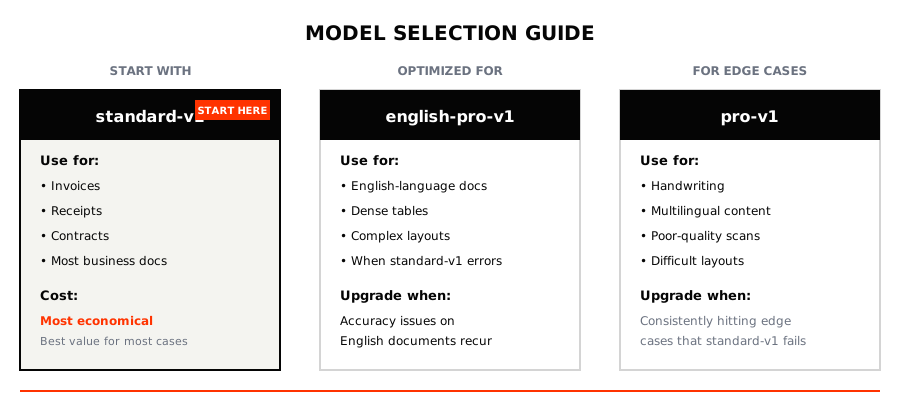
Start with standard-v1. It handles invoices, receipts, contracts, and most business documents well. Only switch to pro-v1 or english-pro-v1 if you’re consistently running into edge cases like handwriting, dense tables, multilingual content, or poor-quality scans.
For formats, match the output to your use case:
structured for invoices, receipts, and contracts where you want a JSON object per documentmarkdown when you need searchable text for archives or reviews but don’t need structured field extractionCost consideration: standard-v1 is the most economical. Reserve the pro models for specific document sources that actually need them.
You have three ways to specify what data to extract:
Schema + Instructions - Define the exact JSON structure you want, version-controlled in your codebase. This works well for engineering-owned pipelines where the output shape needs to be predictable.
Template Slug - Reference a pre-configured template stored in LeapOCR. The advantage here is that non-engineers can adjust the extraction rules without a deployment. This fits situations where multiple teams or services process the same document type.
Either approach works - you can use templateSlug alone, pass in a schema, provide instructions, or combine schema with instructions. Choose based on who needs to be able to modify the extraction rules and how tightly coupled they are to your application code.
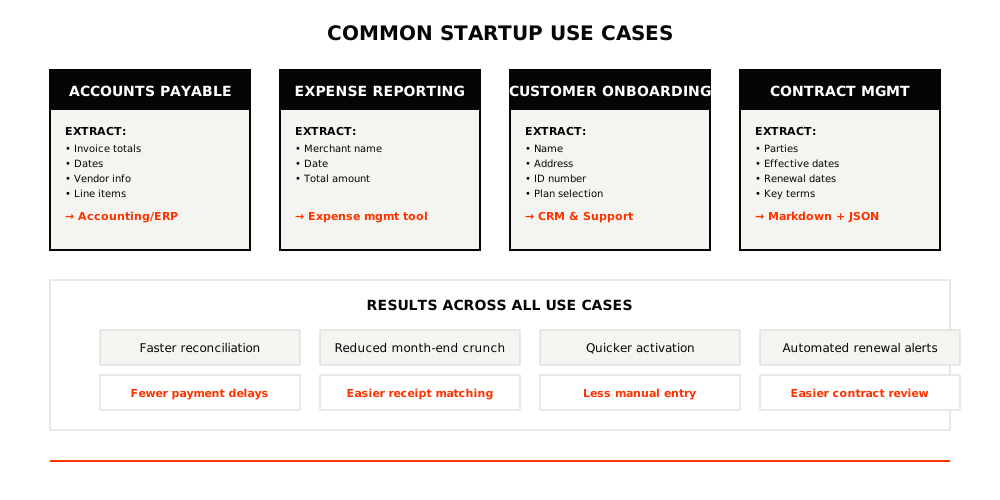
Here’s what automation looks like in practice:
Accounts Payable/Receivable
Expense Reporting
Customer Onboarding
Contract Management
A few practical habits help avoid bill surprises:
standard-v1 by default; upgrade only when accuracy issues recur/ocr/status/{job_id} for long-running jobs or when you need UI progress updates; use waitUntilDone() for simpler flowsHere’s a complete example using the schema approach:
import { LeapOCR } from "leapocr";

const client = new LeapOCR({ apiKey: process.env.LEAPOCR_API_KEY });

// Schema + instructions path (most flexible in-app)
const job = await client.ocr.processURL("https://example.com/invoice.pdf", {
  format: "structured",
  model: "standard-v1", // start here; upgrade to pro only if needed
  schema: {
    invoice_number: "string",
    invoice_date: "string",
    due_date: "string",
    vendor: { name: "string" },
    line_items: [{ description: "string", total: "number" }],
    total: "number",
  },
  instructions: "Return currency as numbers and dates as YYYY-MM-DD.",
});

await client.ocr.waitUntilDone(job.jobId);
const result = await client.ocr.getJobResult(job.jobId);

// Minimal validation
const page = result.pages[0].result as any;
const summed = (page.line_items || []).reduce(
  (sum: number, item: any) => sum + (item.total || 0),
  0,
);
if (Math.abs(summed - page.total) > 1) {
  // Route to review or flag in your system
}

await client.ocr.deleteJob(job.jobId);

// Template path (no schema/instructions)
// const job = await client.ocr.processURL("https://example.com/invoice.pdf", {
//   templateSlug: "invoice-extraction",
// });
// await client.ocr.waitUntilDone(job.jobId);
// const result = await client.ocr.getJobResult(job.jobId);
// await client.ocr.deleteJob(job.jobId);Track these metrics before and after implementation:
Run a small pilot first:
standard-v1 with structured output and a minimal schemaOnce the pilot works, expand to other document types and integrate /ocr/status/{job_id} polling for long-running jobs or user-facing progress indicators.
Documentation worth reading next: /docs/concepts/formats, /docs/concepts/models, /docs/concepts/schemas, /docs/api.
Try LeapOCR on your own documents
Eligible paid plans include a 3-day trial with 100 credits after you add a credit card, so you can test actual PDFs, scans, and forms before committing to a rollout.
Keep reading
More implementation guides, benchmarks, and workflow notes for teams building document pipelines.
Why classic OCR struggles on real-world documents and how AI-native, layout-aware extraction turns PDFs and scans into reliable, structured data your systems can trust.
A production-focused guide to turning PDFs and scans into schema-fit JSON without building a brittle cleanup layer after OCR.
How combining OCR with modern AI turns static PDFs and document photos into clean, structured data that your tools and teams can actually use.