Published
January 26, 2026
Stop wrestling with brittle PDFs. Learn how to build a scalable, schema-first medical extraction pipeline using the LeapOCR Python SDK and AsyncIO.
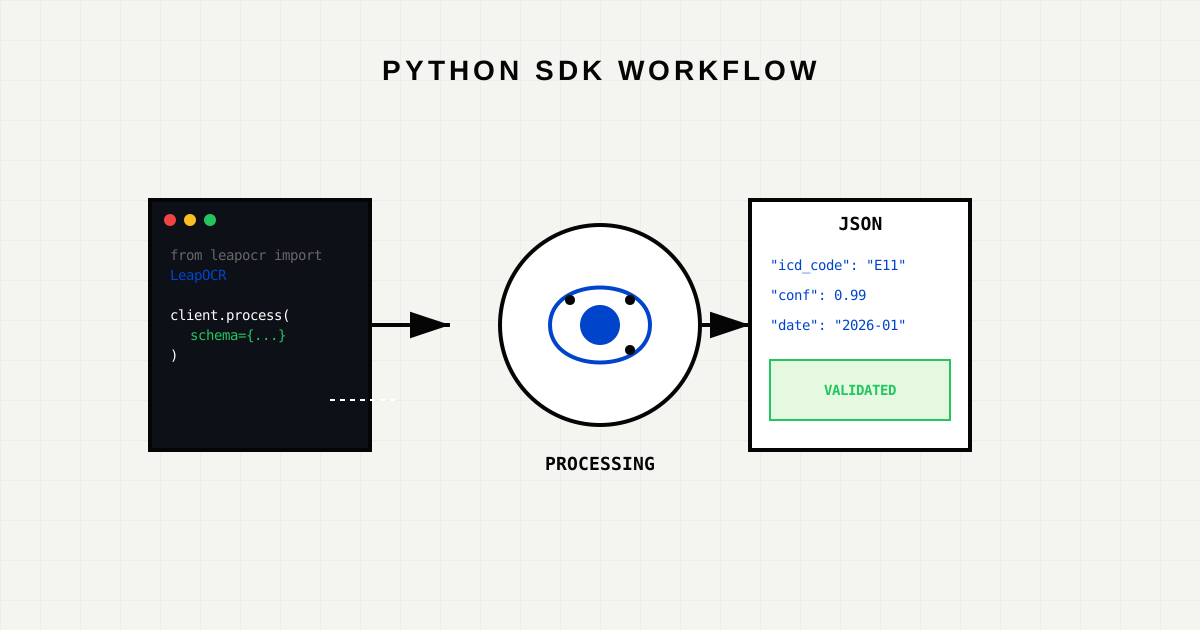
Medical datastreams are messy. You deal with faxed referrals, scanned insurance cards, and sprawling PDF medical records. Traditional OCR gives you “text soup”—a raw string of characters that is useless for downstream automation.
As a developer, you don’t want text; you want Data.
In this guide, we will build a production-grade extraction pipeline using the LeapOCR Python SDK. We will process a batch of patient records, enforce a strict JSON schema, and handle the asynchronous nature of long-running OCR jobs.
We are building a service that takes a URL (e.g., a PDF stored in S3) and returns a structured JSON object containing:
First, install the SDK.
pip install leapocrLeapOCR uses API keys for authentication. In a production environment, never hardcode these. Use environment variables.
import os
from leapocr import LeapOCR

# Initialize with Type-Safety
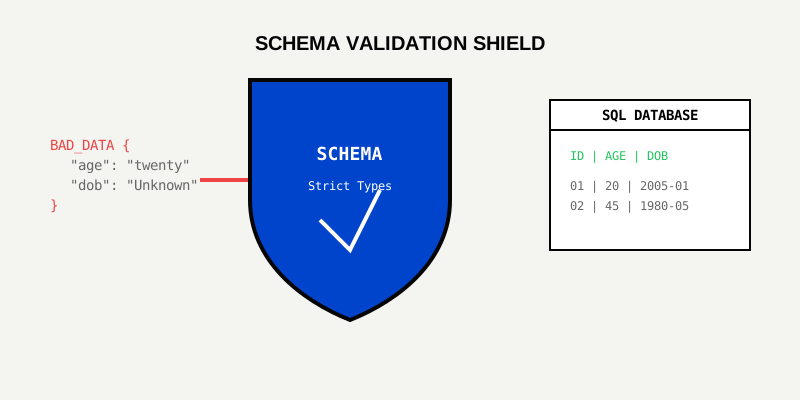
client = LeapOCR(api_key=os.environ["LEAPOCR_API_KEY"])This is the most critical step. Unlike generic OCR, LeapOCR allows you to define the shape of the data you expect. This acts as a contract between your input documents and your database.
# Define the structure we want to extract
medical_record_schema = {
    "patient": {
        "name": "string",
        "dob": "date (YYYY-MM-DD)",
        "mrn": "string"
    },
    "encounter": {
        "date": "date (YYYY-MM-DD)",
        "provider": "string",
        "facility": "string"
    },
    "clinical_data": {
        "chief_complaint": "string",
        "diagnoses": [
            {
                "condition": "string",
                "icd_10_code": "string (optional)",
                "status": "string (active|resolved)"
            }
        ]
    }
}Medical records can be hundreds of pages long. Processing them synchronously (blocking the thread) is a bad pattern. Instead, we use Python’s asyncio to submit jobs and poll for results concurrently.
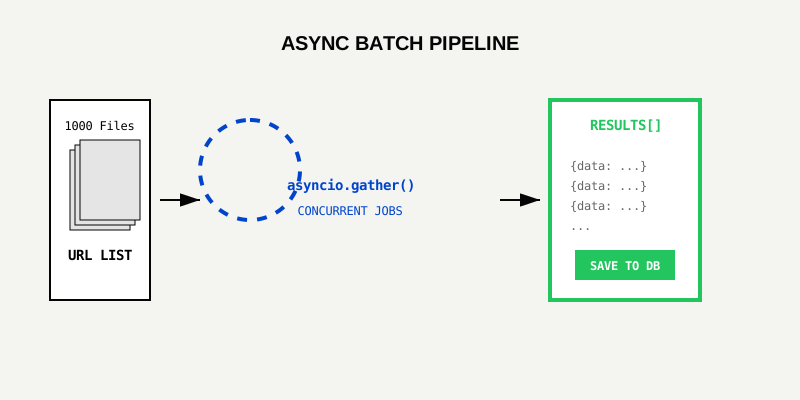
Here is a robust implementation using asyncio.gather:
import asyncio
from leapocr.types import JobStatus

async def process_document(url: str):
    print(f"Submitting: {url}")

    # 1. Submit the Job (Non-blocking)
    job = client.ocr.process_url(
        url,
        format="structured",
        model="pro-v1",  # Optimized for handwriting/medical
        schema=medical_record_schema
    )

    # 2. Polling / Webhook Alternative
    # For scripts, we can use the helper `.wait_until_done()`
    print(f"Processing job {job.job_id}...")
    result = client.ocr.wait_until_done(job.job_id)

    if result.status == JobStatus.FAILED:
        print(f"Job {job.job_id} failed: {result.error}")
        return None

    return result.data

async def batch_process(urls: list[str]):
    # Create tasks for all URLs
    tasks = [process_document(url) for url in urls]

    # Run them concurrently
    results = await asyncio.gather(*tasks)
    return results

# Run the pipeline
if __name__ == "__main__":
    urls = [
        "https://s3.bucket/patient_A.pdf",
        "https://s3.bucket/patient_B.pdf",
        # ... 1000s of files
    ]
    results = asyncio.run(batch_process(urls))
print(f"Processed {len(results)} records.")Even with a schema, you should validate data before it hits your database. The SDK guarantees JSON structure, but your business logic might have stricter rules.
def validate_record(record):
    # Business Rule: Documents older than 10 years are archived
    if record['encounter']['date'] < '2016-01-01':
        flag_for_archive(record)
        return False

    # Business Rule: Mandatory MRN
    if not record['patient']['mrn']:
        raise ValueError("Missing Medical Record Number")

return TrueWe built the Python SDK to respect Python patterns.
leapocr.errors.AuthenticationError) rather than generic 400s.You have a working pipeline. Where do you go from here?
wait_until_done) with Webhooks to decouple submission from processing.Custom Template for higher accuracy.confidence_score field in the response to route low-confidence docs to a UI for review.Start building today. Get your API key or View the Full API Reference.
Try LeapOCR on your own documents
Eligible paid plans include a 3-day trial with 100 credits after you add a credit card, so you can test actual PDFs, scans, and forms before committing to a rollout.
Keep reading
More implementation guides, benchmarks, and workflow notes for teams building document pipelines.

Technical walkthrough using the SDK (Python/TS). Code snippets for ingesting documents and mapping to an ESG-specific JSON schema.
Install the official LeapOCR PHP SDK from Packagist, process documents with a native PHP API, and ship OCR workflows without hand-rolling multipart uploads or polling.
The LeapOCR Go, Python, JavaScript, and PHP SDKs now include webhook signature verification helpers, so you can validate customer webhooks with the raw request body and timestamp header instead of reimplementing HMAC logic.