Published
January 18, 2025
Technical walkthrough using the SDK (Python/TS). Code snippets for ingesting documents and mapping to an ESG-specific JSON schema.

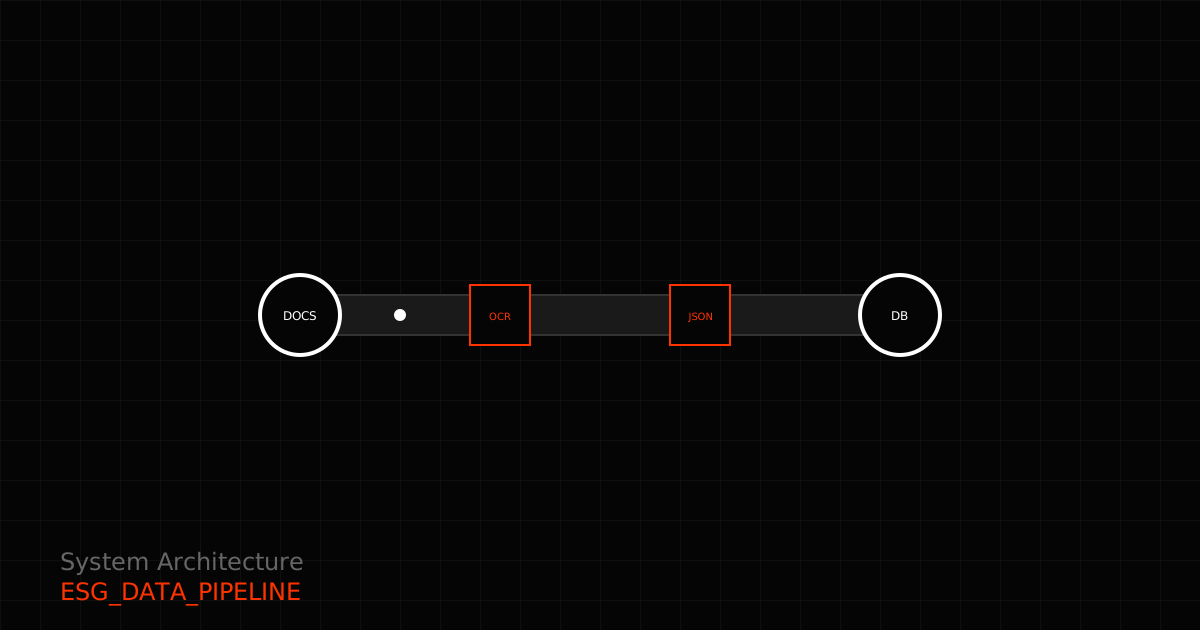
You’re a developer. Your sustainability team just dropped a requirements doc on your desk: “Build an automated ESG data pipeline that extracts utility bills, energy certificates, and supplier emissions data into our CSRD database.”
Naturally, you have questions. How do you handle 50+ document formats? What about multilingual documents—German utility bills, French energy certificates, Italian supplier questionnaires? How do you ensure data quality when processing thousands of documents per month?
This guide walks through building a production-ready ESG data pipeline with LeapOCR, from initial setup to a scalable architecture.
Before diving into code, it helps to visualize the pipeline flow:
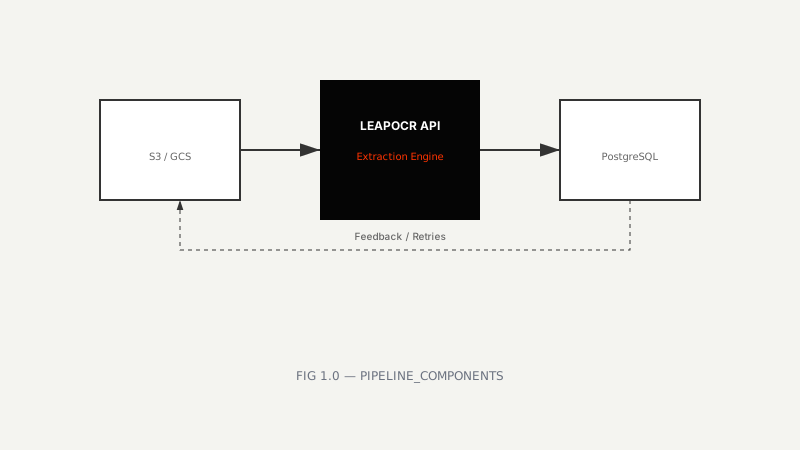 FIG 1.0 — High-level architecture of an automated ESG extraction pipeline
pip install leapocr psycopg2-binary python-dotenv# .env
LEAPOCR_API_KEY=your_api_key_here
DATABASE_URL=postgresql://user:pass@localhost:5432/esg_dbimport os
from leapocr import LeapOCR
import psycopg2
from dotenv import load_dotenv
load_dotenv()
client = LeapOCR(api_key=os.getenv("LEAPOCR_API_KEY"))
conn = psycopg2.connect(os.getenv("DATABASE_URL"))npm install leapocr pg dotenv// .env
LEAPOCR_API_KEY=your_api_key_here
DATABASE_URL=postgresql://user:pass@localhost:5432/esg_dbimport { LeapOCR } from "leapocr";
import { Pool } from "pg";
import dotenv from "dotenv";
dotenv.config();
const client = new LeapOCR({ apiKey: process.env.LEAPOCR_API_KEY! });
const pool = new Pool({ connectionString: process.env.DATABASE_URL });The foundation of reliable data extraction is a well-defined schema. JSON Schema ensures LeapOCR returns data in the exact structure your application expects, with validation at extraction time.
Here’s a schema for utility bills:
utility_bill_schema = {
"$schema": "http://json-schema.org/draft-07/schema#",
"type": "object",
"properties": {
"document_type": {
"type": "string",
"enum": ["electricity_bill", "gas_bill", "water_bill"]
},
"supplier": { "type": "string" },
"account_number": { "type": "string" },
"facility_id": { "type": "string" },
"billing_period": {
"type": "object",
"properties": {
"start_date": { "type": "string", "format": "date" },
"end_date": { "type": "string", "format": "date" }
},
"required": ["start_date", "end_date"]
},
"energy_consumption": {
"type": "object",
"properties": {
"kwh": { "type": "number", "minimum": 0 },
"unit": { "type": "string", "enum": ["kWh", "MWh", "GJ"] }
}
},
"renewable_energy": {
"type": "object",
"properties": {
"kwh": { "type": "number", "minimum": 0 },
"percentage": { "type": "number", "minimum": 0, "maximum": 100 }
}
},
"total_cost": {
"type": "object",
"properties": {
"amount": { "type": "number" },
"currency": { "type": "string", "enum": ["EUR", "GBP", "USD"] }
}
}
},
"required": ["document_type", "facility_id", "billing_period", "energy_consumption"]
}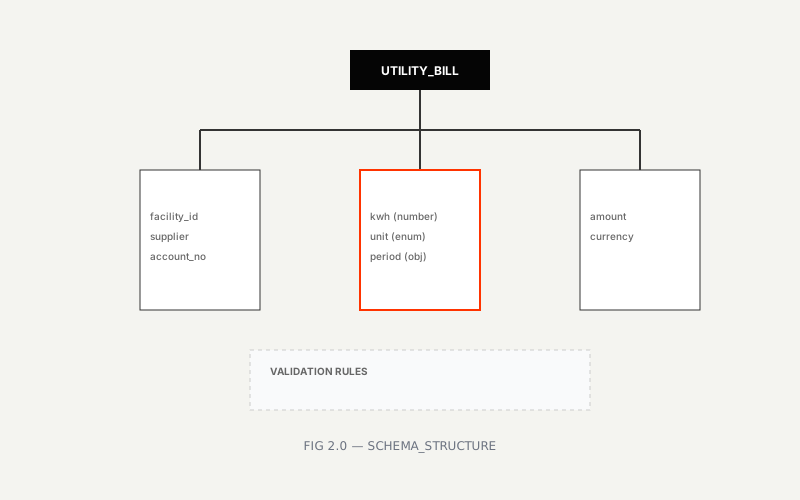 FIG 2.0 — Structure of a utility bill extraction schema
Once you have a schema, templates let you encode domain knowledge and extraction rules. A template encapsulates the schema plus specific instructions for handling edge cases, multilingual documents, and format variations.
# Template: Electricity Utility Bill (Multilingual)
electricity_bill_template = {
  "name": "esg-electricity-bill",
  "description": "Extract electricity consumption data from utility bills in any EU language",
  "format": "structured",
  "schema": utility_bill_schema,
  "instructions": """
  Extract the following fields from the electricity bill:
  - Supplier name and account number
  - Billing period (start and end dates in ISO 8601 format)
  - Total energy consumption in kWh (normalize from MWh, GJ, or other units)
  - Renewable energy consumption if specified (both kWh and percentage)
  - Total cost amount and currency

  Handle multilingual documents (German, French, Italian, Spanish, etc.):
  - Recognize 'Stromrechnung', 'Facture d'électricité', 'Bolletta luce'
  - Convert European decimal format (1.234,56) to standard format (1234.56)
  - Convert European dates (DD.MM.YYYY) to ISO format (YYYY-MM-DD)

  Distinguish between:
  - Total consumption vs. estimated usage
  - Current reading vs. previous reading
  - Net consumption vs. gross consumption

  If multiple rates exist (peak/off-peak), extract the total consumption.
  """,
  "model": "pro-v1",  # Use Pro model for complex layouts and multilingual
  "tags": ["esg", "electricity", "utility-bill"]
}
After defining the template, create it via the API:
# Create template
template = client.templates.create(electricity_bill_template)
print(f"Template created: {template['template_slug']}")
# Output: Template created: esg-electricity-billWith templates in place, you can start building the actual extraction pipeline. There are two approaches: synchronous processing for smaller volumes and asynchronous with webhooks for production scale.
import asyncio
from leapocr import LeapOCR

async def process_utility_bill(file_path: str, facility_id: str):
  """Process a single utility bill synchronously."""
  async with LeapOCR(api_key=os.getenv("LEAPOCR_API_KEY")) as client:
    # Submit document for processing
    job = await client.ocr.process_file(
      file_path=file_path,
      format="structured",
      template_slug="esg-electricity-bill",
      metadata={"facility_id": facility_id}
    )

    # Wait for completion (typically 5-15 seconds)
    result = await client.ocr.wait_until_done(job["job_id"])

    if result["status"] == "completed":
      # Extract validated JSON
      data = result["pages"][0]["result"]

      # Save to database
      save_to_database(data, facility_id)
      return data
    else:
      raise Exception(f"Extraction failed: {result.get('error')}")

def save_to_database(data: dict, facility_id: str):
  """Save extracted data to PostgreSQL."""
  cursor = conn.cursor()

  cursor.execute("""
    INSERT INTO utility_bills (
      facility_id, billing_period_start, billing_period_end,
      energy_consumption_kwh, renewable_kwh, renewable_percentage,
      supplier, account_number, total_cost, currency,
      extracted_at, confidence_score, source_document_url
    ) VALUES (%s, %s, %s, %s, %s, %s, %s, %s, %s, %s, %s, %s, %s)
    ON CONFLICT (facility_id, billing_period_start, billing_period_end)
    DO UPDATE SET
      energy_consumption_kwh = EXCLUDED.energy_consumption_kwh,
      renewable_kwh = EXCLUDED.renewable_kwh,
      extracted_at = EXCLUDED.extracted_at
  """, (
    facility_id,
    data["billing_period"]["start_date"],
    data["billing_period"]["end_date"],
    data["energy_consumption"]["kwh"],
    data.get("renewable_energy", {}).get("kwh"),
    data.get("renewable_energy", {}).get("percentage"),
    data["supplier"],
    data["account_number"],
    data.get("total_cost", {}).get("amount"),
    data.get("total_cost", {}).get("currency"),
    result["extracted_at"],
    result["pages"][0].get("confidence_score", 0),
    result.get("source_document_url")
  ))

conn.commit()For production workloads, synchronous processing becomes a bottleneck. Webhooks let you submit documents asynchronously and handle results when they’re ready:
from fastapi import FastAPI, BackgroundTasks, HTTPException
from leapocr import LeapOCR
app = FastAPI()
client = LeapOCR(api_key=os.getenv("LEAPOCR_API_KEY"))
@app.post("/upload-utility-bill")
async def upload_utility_bill(
file_url: str,
facility_id: str,
background_tasks: BackgroundTasks
):
"""Upload document for async processing."""
job = await client.ocr.process_url(
url=file_url,
format="structured",
template_slug="esg-electricity-bill",
webhook_url="https://your-domain.com/webhooks/leapocr",
metadata={"facility_id": facility_id}
)
return {
"status": "submitted",
"job_id": job["job_id"],
"message": "Document submitted for processing. You'll be notified when complete."
}
@app.post("/webhooks/leapocr")
async def leapocr_webhook(payload: dict):
"""Handle LeapOCR completion webhook."""
job_id = payload["job_id"]
status = payload["status"]
if status == "completed":
# Fetch full results
result = await client.ocr.get_results(job_id)
facility_id = result["metadata"]["facility_id"]
# Check confidence scores
confidence = result["pages"][0].get("confidence_score", 0)
if confidence >= 0.95:
# Auto-approve: save directly to database
save_to_database(result["pages"][0]["result"], facility_id)
await send_slack_notification(f"✅ Auto-approved: {facility_id}")
else:
# Flag for human review
flag_for_review(result, facility_id)
await send_slack_notification(f"⚠️ Review needed: {facility_id} (confidence: {confidence:.2%})")
elif status == "failed":
await send_slack_notification(f"❌ Failed: {job_id}")
# Retry logic or manual intervention
return {"status": "received"}
def flag_for_review(result: dict, facility_id: str):
"""Save to review queue for human validation."""
cursor = conn.cursor()
cursor.execute("""
INSERT INTO review_queue (
facility_id, job_id, extracted_data, confidence_score,
status, created_at
) VALUES (%s, %s, %s, %s, %s, NOW())
""", (
facility_id,
result["job_id"],
json.dumps(result["pages"][0]["result"]),
result["pages"][0].get("confidence_score", 0),
"pending_review"
))
conn.commit()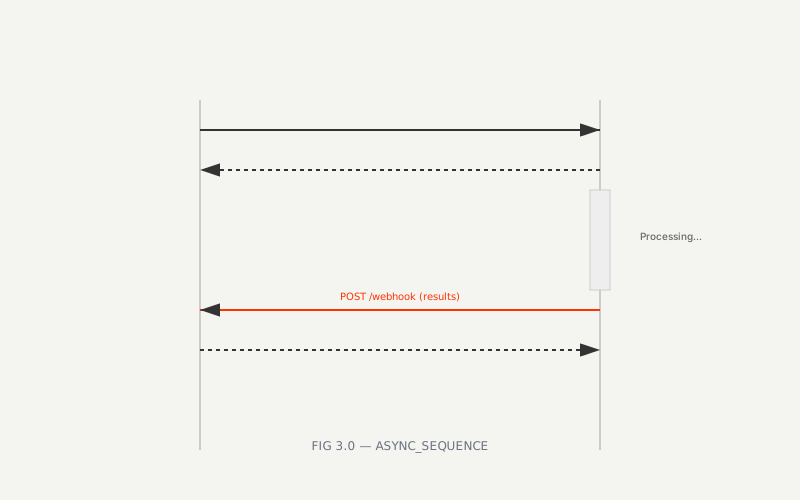 FIG 3.0 — Asynchronous processing flow with webhooks
The webhook approach has several advantages for production use:
Your database design should support both ESG reporting requirements and auditability. Here’s a schema that handles utility bills with audit trails:
-- Utility bills table
CREATE TABLE utility_bills (
  id SERIAL PRIMARY KEY,
  facility_id VARCHAR(50) NOT NULL,
  billing_period_start DATE NOT NULL,
  billing_period_end DATE NOT NULL,
  energy_consumption_kwh NUMERIC(12, 2) NOT NULL,
  renewable_kwh NUMERIC(12, 2),
  renewable_percentage NUMERIC(5, 2),
  supplier VARCHAR(255),
  account_number VARCHAR(100),
  total_cost NUMERIC(12, 2),
  currency VARCHAR(3),
  extracted_at TIMESTAMP NOT NULL,
  confidence_score NUMERIC(3, 2),
  source_document_url TEXT,
  reviewed_by VARCHAR(100),
  reviewed_at TIMESTAMP,
  created_at TIMESTAMP DEFAULT NOW(),
  updated_at TIMESTAMP DEFAULT NOW(),
  UNIQUE(facility_id, billing_period_start, billing_period_end)
);

-- Review queue for low-confidence extractions
CREATE TABLE review_queue (
  id SERIAL PRIMARY KEY,
  facility_id VARCHAR(50) NOT NULL,
  job_id VARCHAR(100) NOT NULL,
  document_type VARCHAR(50),
  extracted_data JSONB NOT NULL,
  confidence_score NUMERIC(3, 2),
  status VARCHAR(20) DEFAULT 'pending_review',
  reviewed_by VARCHAR(100),
  reviewed_at TIMESTAMP,
  review_notes TEXT,
  created_at TIMESTAMP DEFAULT NOW()
);

-- Audit log for data lineage
CREATE TABLE audit_log (
  id SERIAL PRIMARY KEY,
  table_name VARCHAR(50) NOT NULL,
  record_id INTEGER NOT NULL,
  action VARCHAR(20) NOT NULL,
  old_values JSONB,
  new_values JSONB,
  changed_by VARCHAR(100),
  changed_at TIMESTAMP DEFAULT NOW()
);

-- Indexes for common queries
CREATE INDEX idx_utility_bills_facility ON utility_bills(facility_id);
CREATE INDEX idx_utility_bills_period ON utility_bills(billing_period_start, billing_period_end);
CREATE INDEX idx_review_queue_status ON review_queue(status);Utility bills are relatively standardized. ESG reporting also involves more complex documents like supplier emissions questionnaires and energy attribute certificates. The same template approach applies.
supplier_emissions_schema = {
  "type": "object",
  "properties": {
    "supplier_id": {"type": "string"},
    "supplier_name": {"type": "string"},
    "reporting_year": {"type": "integer"},
    "scope1_emissions_tco2e": {"type": "number"},
    "scope2_emissions_tco2e": {"type": "number"},
    "scope3_emissions_tco2e": {"type": "number"},
    "methodology": {
      "type": "string",
      "enum": ["GHG Protocol", "ISO 14064", "Custom"]
    },
    "verification_status": {
      "type": "string",
      "enum": ["Third-party verified", "Self-assessed", "Not verified"]
    },
    "data_coverage_percentage": {"type": "number", "minimum": 0, "maximum": 100}
  },
  "required": ["supplier_id", "reporting_year", "scope1_emissions_tco2e"]
}

supplier_template = {
  "name": "esg-supplier-emissions",
  "schema": supplier_emissions_schema,
  "instructions": """
  Extract supplier emissions data from questionnaires or carbon footprint sheets.
  Look for 'Scope 1', 'Scope 2', 'Scope 3' emissions in metric tons CO2e.
  Identify methodology (GHG Protocol, ISO 14064, or custom).
  Note verification status and data coverage percentage.
  Handle missing Scope 3 data gracefully (mark as 'not_reported').
  """
}
Energy certificates like I-RECs, Guarantees of Origin, and RECs prove renewable energy consumption. They’re often single-page certificates with specific fields:
eac_schema = {
  "type": "object",
  "properties": {
    "certificate_id": {"type": "string"},
    "certificate_type": {
      "type": "string",
      "enum": ["I-REC", "GO", "REC", "Guarantee of Origin"]
    },
    "energy_source": {
      "type": "string",
      "enum": ["Solar", "Wind", "Hydro", "Biomass", "Geothermal"]
    },
    "generation_facility": {"type": "string"},
    "capacity_mw": {"type": "number"},
    "generation_period": {
      "type": "object",
      "properties": {
        "start": {"type": "string", "format": "date"},
        "end": {"type": "string", "format": "date"}
      }
    },
    "energy_mwh": {"type": "number"},
    "issue_date": {"type": "string", "format": "date"},
    "expiry_date": {"type": "string", "format": "date"}
  },
  "required": ["certificate_id", "certificate_type", "energy_mwh"]
}

eac_template = {
  "name": "esg-energy-certificate",
  "schema": eac_schema,
  "instructions": """
  Extract certificate details from I-RECs, Guarantees of Origin, or RECs.
  Look for certificate ID, energy source, generation facility, and energy amount (MWh).
  Extract generation and expiry dates.
  Handle QR codes on certificates (if present).
  """
}Production systems fail. Network issues, rate limits, and malformed documents are inevitable. Build resilience from the start:
import logging
from tenacity import retry, stop_after_attempt, wait_exponential

logging.basicConfig(level=logging.INFO)
logger = logging.getLogger(__name__)

@retry(
  stop=stop_after_attempt(3),
  wait=wait_exponential(multiplier=1, min=2, max=10)
)
async def process_with_retry(file_path: str, facility_id: str):
  """Process document with automatic retry on transient failures."""
  try:
    return await process_utility_bill(file_path, facility_id)
  except Exception as e:
    logger.error(f"Failed to process {file_path}: {e}")
    # Log to monitoring system (e.g., Sentry, Datadog)
    raise

async def batch_process(documents: list[tuple[str, str]]):
  """Process multiple documents in parallel."""
  tasks = [process_with_retry(path, fid) for path, fid in documents]

  results = await asyncio.gather(*tasks, return_exceptions=True)

  success_count = sum(1 for r in results if not isinstance(r, Exception))
  failure_count = len(results) - success_count

  logger.info(f"Batch complete: {success_count} success, {failure_count} failures")

return resultsYou can’t improve what you don’t measure. Add metrics to track extraction performance, confidence scores, and error rates:
from prometheus_client import Counter, Histogram, Gauge
# Metrics
extraction_counter = Counter('esg_extractions_total', 'Total extractions', ['status'])
extraction_duration = Histogram('esg_extraction_duration_seconds', 'Extraction duration')
confidence_gauge = Gauge('esg_confidence_score', 'Last extraction confidence')
async def process_with_metrics(file_path: str, facility_id: str):
"""Process document with metrics."""
with extraction_duration.time():
try:
result = await process_utility_bill(file_path, facility_id)
extraction_counter.labels(status='success').inc()
confidence_gauge.set(result.get('confidence_score', 0))
return result
except Exception as e:
extraction_counter.labels(status='error').inc()
raise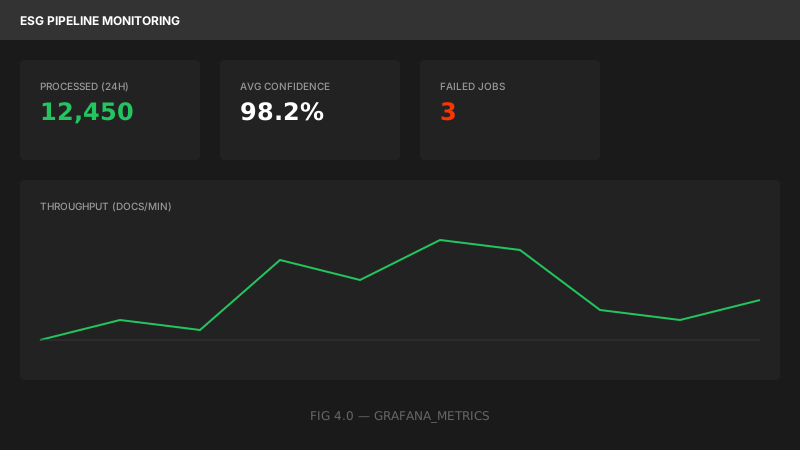 FIG 4.0 — Monitoring extraction performance and data quality
# Run pipeline locally
python pipeline.py --input ./documents --facility-id FAC-001For production, containerize the application and use a reverse proxy:
# docker-compose.yml
version: "3.8"
services:
  pipeline:
    build: .
    environment:
      - LEAPOCR_API_KEY=${LEAPOCR_API_KEY}
      - DATABASE_URL=${DATABASE_URL}
      - WEBHOOK_URL=https://your-domain.com/webhooks/leapocr
    volumes:
      - ./documents:/app/documents
    restart: unless-stopped

  nginx:
    image: nginx:alpine
    ports:
      - "80:80"
    volumes:
      - ./nginx.conf:/etc/nginx/nginx.conf
    depends_on:
- pipelineFor large-scale operations (10,000+ documents/month), consider a cloud-native architecture:
                              ┌─────────────────┐
                              │   S3/GCS Bucket │
                              │  (Upload Docs)  │
                              └────────┬────────┘
                                       │
                                       ▼
                              ┌─────────────────┐
                              │  AWS Lambda /   │
                              │  Cloud Function │
                              │  (Trigger)      │
                              └────────┬────────┘
                                       │
                                       ▼
                              ┌─────────────────┐
                              │  LeapOCR API    │
                              │  (Extract)      │
                              └────────┬────────┘
                                       │
                                       ▼
                              ┌─────────────────┐
                              │  Webhook (SQS)  │
                              └────────┬────────┘
                                       │
                                       ▼
                              ┌─────────────────┐
                              │  Worker (EC2)   │
                              │  (Process)      │
                              └────────┬────────┘
                                       │
                                       ▼
                              ┌─────────────────┐
                              │  PostgreSQL /   │
                              │  MongoDB        │
                              │  (Store Data)   │
└─────────────────┘Never trust a data pipeline without tests. Write tests for schema validation, multilingual handling, and error cases:
import pytest

@pytest.mark.asyncio
async def test_utility_bill_extraction():
  """Test electricity bill extraction."""
  result = await process_utility_bill(
    "test_data/sample_electricity_bill.pdf",
    "TEST-FACILITY-001"
  )

  # Validate required fields
  assert "energy_consumption" in result
  assert result["energy_consumption"]["kwh"] > 0
  assert "billing_period" in result
  assert result["billing_period"]["start_date"] == "2024-01-01"

@pytest.mark.asyncio
async def test_multilingual_extraction():
  """Test German utility bill extraction."""
  result = await process_utility_bill(
    "test_data/stromrechnung_deutsch.pdf",
    "TEST-FACILITY-002"
  )

  # Should handle German decimal format (1.234,56 → 1234.56)
  assert result["energy_consumption"]["kwh"] == 1234.56

@pytest.mark.asyncio
async def test_low_confidence_flagging():
  """Test that low-confidence results are flagged."""
  result = await process_utility_bill(
    "test_data/poor_scan.pdf",
    "TEST-FACILITY-003"
  )

  # Poor scan should have lower confidence
  assert result["confidence_score"] < 0.95
  # Should be in review queue
  cursor = conn.cursor()
  cursor.execute("SELECT COUNT(*) FROM review_queue WHERE facility_id = %s", ("TEST-FACILITY-003",))
assert cursor.fetchone()[0] > 0Building an ESG data pipeline comes down to three things: structured data extraction, intelligent validation, and reliable processing. LeapOCR handles the extraction complexity—multilingual documents, varied formats, confidence scoring—so you can focus on the pipeline logic.
What makes this work:
Try it on your documents
Start building your ESG pipeline.
Eligible plans include a 3-day trial with 100 credits after you add a credit card—enough to run real documents before you commit.
Your sustainability team is waiting.
Ready to go deeper:
Try LeapOCR on your own documents
Eligible paid plans include a 3-day trial with 100 credits after you add a credit card, so you can test actual PDFs, scans, and forms before committing to a rollout.
Keep reading
More implementation guides, benchmarks, and workflow notes for teams building document pipelines.

Stop wrestling with brittle PDFs. Learn how to build a scalable, schema-first medical extraction pipeline using the LeapOCR Python SDK and AsyncIO.
A practical walkthrough for adding LeapOCR to your app using the JavaScript/TypeScript SDK, from installation to your first production-ready workflow.

Install the official LeapOCR PHP SDK from Packagist, process documents with a native PHP API, and ship OCR workflows without hand-rolling multipart uploads or polling.