Published
January 26, 2026
How to build a resilient, high-throughput document ingestion pipeline for logistics using LeapOCR and Go.
Logistics is a volume game. A single container ship can discharge thousands of shipping documents in an hour. For Transport Management Systems (TMS) and Warehouse Management Systems (WMS), the challenge isn’t just storing this data—it’s ingesting it accurately at speed.
Many OCR solutions work well on a single PDF. But when hit with a “document storm” (e.g., end-of-quarter rush), they choke, throttle, or return garbage data.
This guide demonstrates how LeapOCR handles high-velocity logistics workflows. We will use the Go SDK for this example, as it is the standard for high-performance logistics backends, but the architectural principles apply to any stack.
In a typical WMS ingestion pipeline, you face two competing forces:
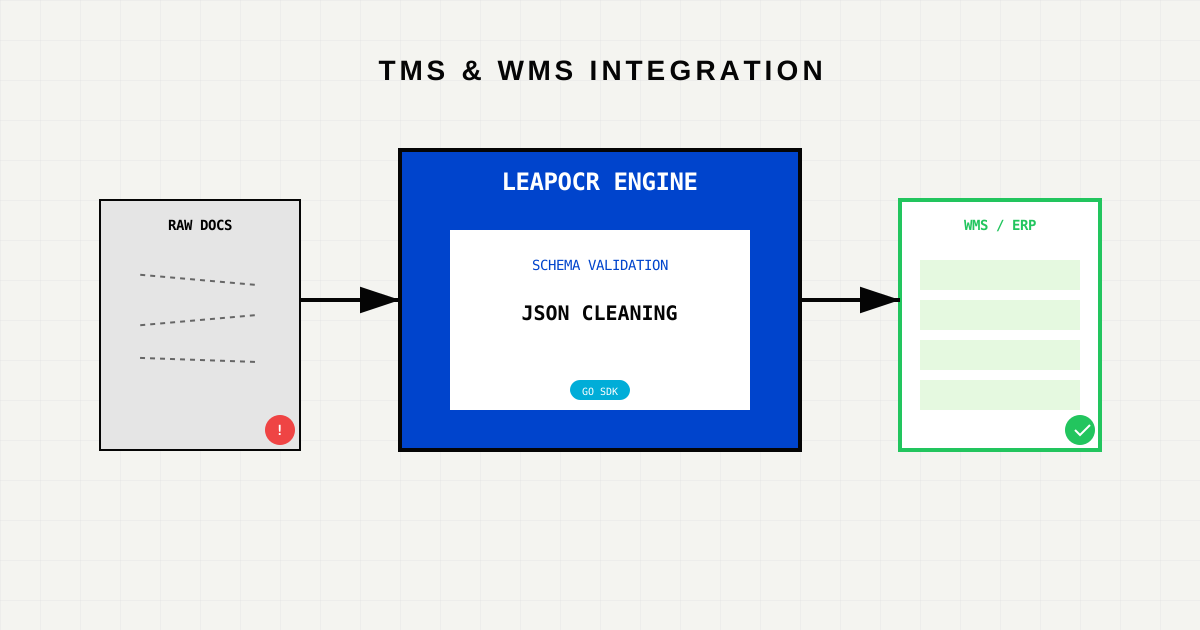
LeapOCR resolves this by decoupling Recognition (the heavy AI lifting) from Validation (the business logic).
LeapOCR is “Schema-First.” Before we write a single line of integration code, we define exactly what a valid Bill of Lading (BoL) looks like for your WMS.
This ensures that your WMS never receives unstructured trash. It only receives validated JSON objects.
// The "Golden Record" your WMS expects
type BillOfLading struct {
    BOLNumber      string   `json:"bol_number"`
    Shipper        string   `json:"shipper"`
    Consignee      string   `json:"consignee"`
    TotalWeightKG  float64  `json:"total_weight_kg"`
    ContainerIDs   []string `json:"container_ids"`
}Integrating LeapOCR is designed to be low-friction. You don’t need to manage machine learning servers or worry about GPU scaling. You simply submit the document URL.
Here is how a typical ingestion worker looks. Note how simple the LeapOCR call is—complexity is handled by the API.
import (
    "context"
    "github.com/leapocr/leapocr-go"
    "github.com/leapocr/leapocr-go/ocr"
)

func processDocument(client *leapocr.Client, docUrl string) {
    // 1. Submit the document to LeapOCR
    // We use 'ModelProV1' because logistics docs often have handwriting/stamps
    job, err := client.OCR.ProcessURL(context.Background(), docUrl, ocr.ProcessOptions{
        Format: ocr.FormatStructured,
        Model:  ocr.ModelProV1,
        Schema: BillOfLading{}, // <--- Enforce our Go struct as the schema
    })

    if err != nil {
        logError("Submission Failed", err)
        return
    }

    // 2. Wait for the heavy lifting (AI processing)
    result, err := client.OCR.WaitUntilDone(context.Background(), job.ID)

    // 3. Push Clean Data to WMS
    if result.Status == ocr.StatusCompleted {
        pushToWMS(result.Data) // resulting data is already compliant JSON
    }
}When processing thousands of Bills of Lading, network blips happen. LeapOCR’s client handles retries for transient network errors automatically.
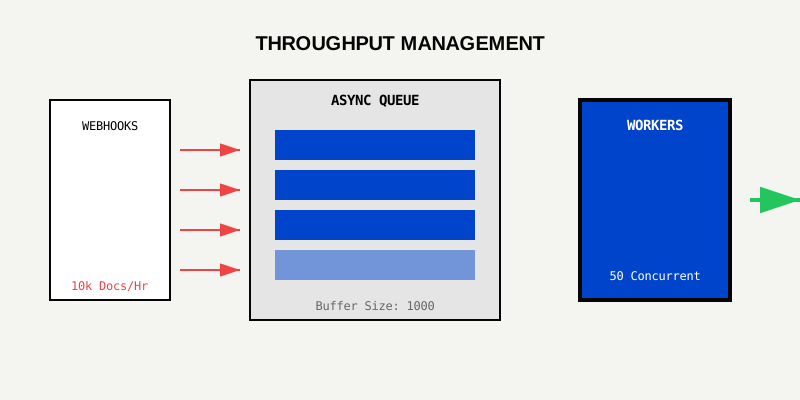
For Logistics Systems, we recommend the following simple architecture:
pro-v1 model is trained on messy, real-world logistics paperwork.Your WMS is only as good as the data you feed it. By integrating LeapOCR, you replace fragile, error-prone manual entry with a robust, automated digital pipeline.
Whether you process 50 or 50,000 documents a day, the integration remains the same: Submit, Validate, Sync.
Ready to automate your dock? Read the API Documentation or Start a Free Trial.
Try LeapOCR on your own documents
Eligible paid plans include a 3-day trial with 100 credits after you add a credit card, so you can test actual PDFs, scans, and forms before committing to a rollout.
Keep reading
More implementation guides, benchmarks, and workflow notes for teams building document pipelines.

Stop manual data entry in your ERP. Learn the specific API patterns to connect LeapOCR to SAP S/4HANA and Oracle Cloud.

A practical walkthrough for adding LeapOCR to your app using the JavaScript/TypeScript SDK, from installation to your first production-ready workflow.
Install the official LeapOCR PHP SDK from Packagist, process documents with a native PHP API, and ship OCR workflows without hand-rolling multipart uploads or polling.