Published
January 25, 2026
Stop manual data entry in your ERP. Learn the specific API patterns to connect LeapOCR to SAP S/4HANA and Oracle Cloud.

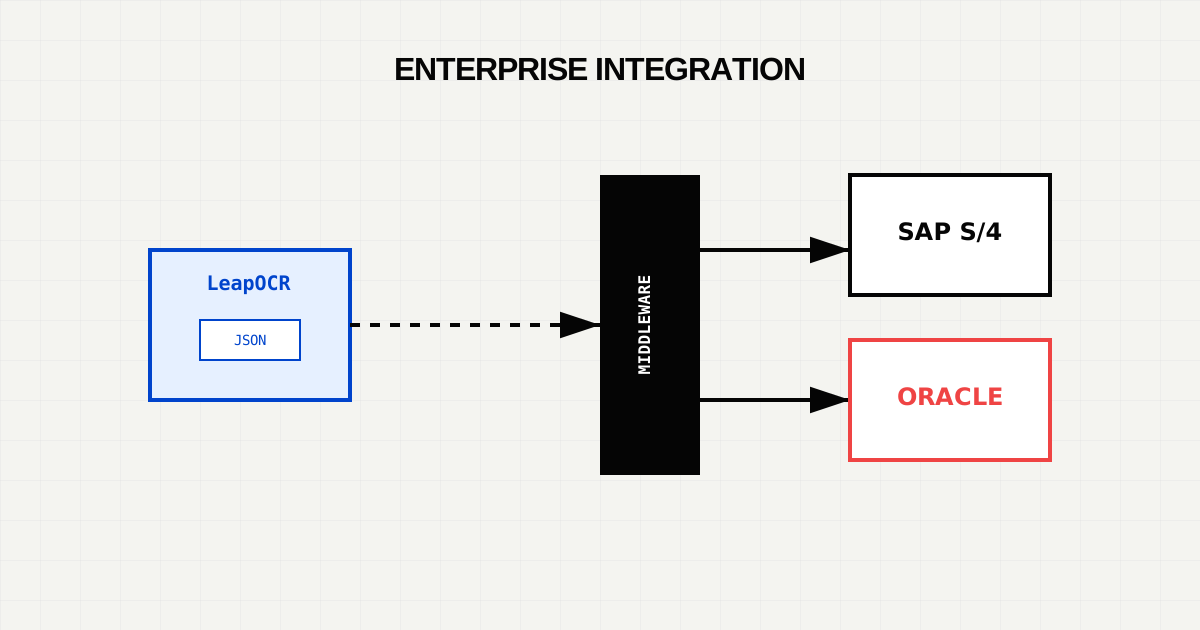
Enterprise Resource Planning (ERP) systems like SAP and Oracle are the backbone of global supply chains. But they have a weakness: they demand structured data.
The real world runs on unstructured documents—PDF invoices, scanned Bills of Lading, and email attachments. This disconnect forces companies to hire armies of data entry clerks to act as “human middleware.”
This guide explains how to replace that manual layer with an automated pipeline using LeapOCR and standard enterprise APIs.
Directly connecting a Document AI model to an ERP is rarely a good idea. You need a Middleware Layer (built in Python/FastAPI, Node.js, or an integration platform like MuleSoft) to handle logic.
The modern standard for SAP integration is OData. For creating supplier invoices, you will use the API_SUPPLIERINVOICE_PROCESS_SRV service.
POST /sap/opu/odata/sap/API_SUPPLIERINVOICE_PROCESS_SRV/A_SupplierInvoice
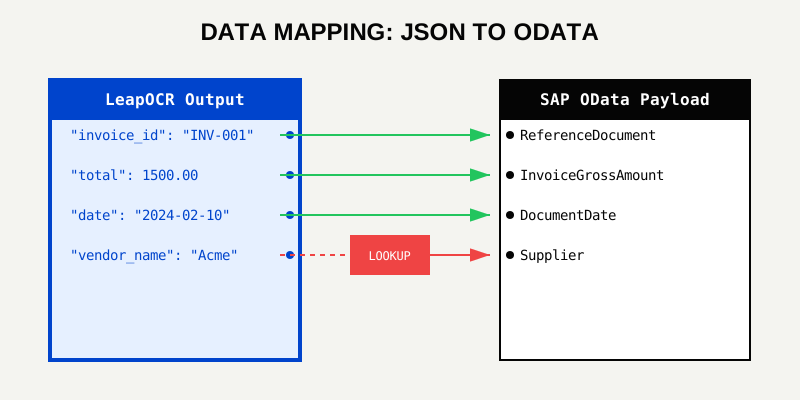
LeapOCR gives you clean keys like vendor_name and total. SAP demands obscure technical names.
import requests

def map_to_sap_payload(ocr_result):
    return {
        "CompanyCode": "1000",
        "DocumentDate": f"/Date({ocr_result['date_epoch']})/",
        "PostingDate": f"/Date({ocr_result['date_epoch']})/",
        "ReferenceDocument": ocr_result['invoice_id'], # The Invoice Number
        "InvoicingParty": lookup_vendor_id(ocr_result['vendor_name']), # You must lookup the SAP ID!
        "InvoiceGrossAmount": str(ocr_result['total_amount']),
        "DocumentCurrency": ocr_result['currency'],
        "to_SuplrInvcItemPurOrdRef": [
            {
                "PurchaseOrder": item['po_number'],
                "PurchaseOrderItem": item['line_id'],
                "SupplierInvoiceItemAmount": str(item['amount'])
            } for item in ocr_result['line_items']
        ]
    }

def post_to_sap(payload):
    # Don't forget the CSRF token fetch!
    session = requests.Session()
    session.headers.update({'x-csrf-token': 'fetch'})
    # ... auth logic ...
    response = session.post(SAP_URL, json=payload)
    return response.json()
Critical Step: The “Lookup”. SAP requires a Vendor ID (e.g., 100340), not a name (“Acme Corp”). Your middleware must fuzzy-match the OCR name against your SAP Master Data to find the ID.
Oracle Cloud uses standard REST APIs. The payload structure is cleaner than SAP’s OData but still requires strict adherence to types.
POST /fscmRestApi/resources/11.13.18.05/invoices
const mapToOraclePayload = (ocrResult) => {
  return {
    InvoiceNumber: ocrResult.invoice_id,
    InvoiceCurrency: ocrResult.currency,
    InvoiceAmount: ocrResult.total_amount,
    InvoiceDate: ocrResult.date_iso, // YYYY-MM-DD
    Supplier: ocrResult.vendor_name, // Oracle often accepts names if unique
    Description: "Automated import via LeapOCR",
    invoiceLines: ocrResult.line_items.map((item) => ({
      LineNumber: item.index,
      LineAmount: item.amount,
      Description: item.description,
    })),
  };
};Enterprise APIs are slow. They might time out. Or they might accept the payload but fail validation 10 minutes later (“Posting Period Closed”).
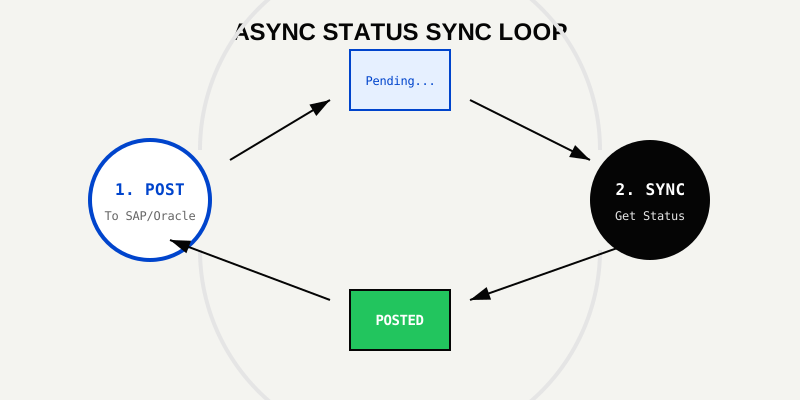
Do not build fire-and-forget integrations.
201 Created, they provide an object ID (e.g., 5105600103). Save this in your database next to the LeapOCR Job ID.When moving from a Proof of Concept (PoC) to Production, integration teams often stumble on these subtle data quality issues.
SAP S/4HANA stores IDs as fixed-length strings. An ID of “1024” is often stored as "0000001024".
INVALID_VENDOR_ID returns even though “1024” exists.zfill(10) function (Python) or padStart(10, '0') (JS) before sending them to the API.Document AI extracts dates as they appear on paper (e.g., “01/02/2026”).
T00:00:00Z before sending to Oracle REST APIs.Basic Auth + x-csrf-token. You must make a GET request to fetch the token, then include it in your POST header. The token expires quickly.Accounts Payable Invoice Specialist or similar, not just generic API access.Integration is 80% data mapping and 20% connectivity.
API_SUPPLIERINVOICE_PROCESS_SRV. Handle CSRF tokens, Vendor ID lookups, and leading zeros.Try LeapOCR on your own documents
Eligible paid plans include a 3-day trial with 100 credits after you add a credit card, so you can test actual PDFs, scans, and forms before committing to a rollout.
Keep reading
More implementation guides, benchmarks, and workflow notes for teams building document pipelines.
How to build a resilient, high-throughput document ingestion pipeline for logistics using LeapOCR and Go.

API integration patterns for connecting AI coding pipelines with modern EHR platforms.
A practical walkthrough for adding LeapOCR to your app using the JavaScript/TypeScript SDK, from installation to your first production-ready workflow.