Published
December 5, 2025
A buyer/engineer’s comparison of four invoice OCR options—layout fidelity, line items, pricing levers, latency, SDK ergonomics, and privacy/deletion defaults.
Processing invoices automatically isn’t just about reading text. You need tables to stay intact, line items to line up, costs to make sense, and data handling policies your security team will actually approve.
This comparison covers four options—LeapOCR, AWS Textract, Azure AI Document Intelligence, and Google Cloud Document AI—focusing on what matters when you’re building or buying invoice processing.
About the numbers: All pricing comes from official documentation [sources listed below]. I’m using US pricing as a reference, but costs vary by region. Check your specific region before making decisions.
Here’s what I looked at:
Layout & line items — Can it handle tables, multi-page invoices, and headers/footers correctly?
Multilingual & handwriting — What happens when invoices aren’t pristine English documents?
Pricing — Not just the listed rate, but volume tiers, surcharges, and hidden costs.
Latency & throughput — Synchronous vs asynchronous, batching, and how you actually poll for results.
SDK ergonomics — How much code do you need to write to get something working?
Privacy & data handling — Delete APIs, retention policies, and data residency options.
Schema flexibility — Can you define your own output structure, or are you stuck with whatever the service gives you?
What it is: A focused OCR service with structured extraction built in.
Inputs: Accepts 100+ file types via URL or direct upload—PDFs, Word docs, images (PNG, JPG, WEBP, TIFF, HEIC), spreadsheets, presentations. Note that PDFs and Word docs get rasterized, so embedded text gets ignored.
Models: Three options—standard-v1 (default, works for most cases), english-pro-v1, and pro-v1 (for messy scans, handwriting, or multiple languages).
Output formats: structured or markdown.
Configuration: Use a JSON schema (optionally with instructions) or reference a templateSlug for reusable configs.
Workflow: Submit asynchronously, then poll with waitUntilDone or use webhooks (on Growth plans). Fetch results with getJobResult and clean up with deleteJob. Jobs auto-delete after 7 days.
Pricing: Credit-based. One credit per page, plus one more for structured extraction. No regional variation—you pay per credit regardless of where you process.
SDKs: TypeScript/JavaScript, Python, Go, and PHP with straightforward polling helpers.
What it is: Amazon’s document analysis service, part of the broader AWS ecosystem.
Endpoints: Three options—DetectDocumentText (basic OCR), AnalyzeDocument (forms and tables), and AnalyzeExpense (optimized for invoices and expenses).
Pricing (us-east-1 example):
AnalyzeDocument and AnalyzeExpense: about $0.065 per page for the first 1M pages/month, drops to $0.05 after thatDetectDocumentText: cheaper than AnalyzeDocument—check the pricing page for current ratesWorkflow: Synchronous for small documents, asynchronous with polling for larger ones. Async results hang around for roughly 7 days (AWS recommends copying anything you need to keep).
SDKs: Full AWS SDK coverage. For robust polling at scale, you’ll typically wire together S3 + SNS/SQS or Step Functions.
What it is: Microsoft’s document intelligence service with prebuilt and custom models.
Endpoints: Prebuilt models for Invoice, Receipt, ID documents, and General Documents. Also offers Custom Extraction for specialized layouts.
Pricing (US example):
Workflow: Asynchronous with polling. The Azure portal gives you usage metrics and cost estimation tools.
SDKs: .NET, Python, JavaScript/TypeScript, Java with polling helpers built in.
Note: Prebuilt invoice model availability varies by region—check what’s available where you need it.
What it is: Google’s document processing platform with specialized processors for different document types.
Endpoints: Specialized processors including Invoice Parser and Form Parser.
Pricing (US example):
Workflow: Asynchronous processors with polling. You poll operations to get results back.
SDKs: REST API plus client libraries for Node.js, Python, Go, Java, and others.
Note: Processor availability and pricing both vary by region—confirm what’s available where you’re working.
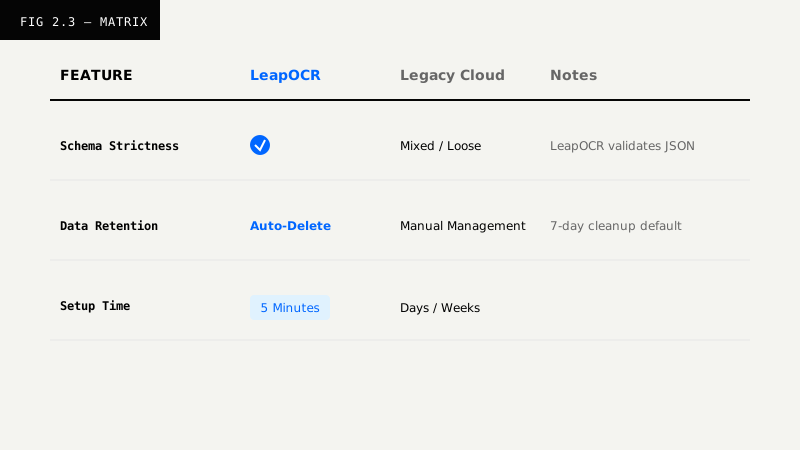
LeapOCR: Uses structured mode with schemas or templates. Tables are handled well for multi-page documents.
Textract: The AnalyzeExpense endpoint is built specifically for invoices and expenses. Tables and line items come back as structured expense fields.
Azure: The Prebuilt Invoice model extracts key fields and line items. For custom layouts, use Custom Extraction.
Google: The Invoice Parser processor returns structured key fields and line items—it’s designed specifically for invoices.
LeapOCR: Use pro-v1 for handwriting, multiple languages, or particularly messy scans.
Textract: Supports handwriting, but quality depends on how legible the input is. Use AnalyzeExpense for structured output from handwritten documents.
Azure: Prebuilt Invoice supports multiple languages. Handwriting support is improving, but test it against your specific use cases.
Google: Invoice Parser is optimized for typed text. Handwriting support is limited—test your samples before committing.
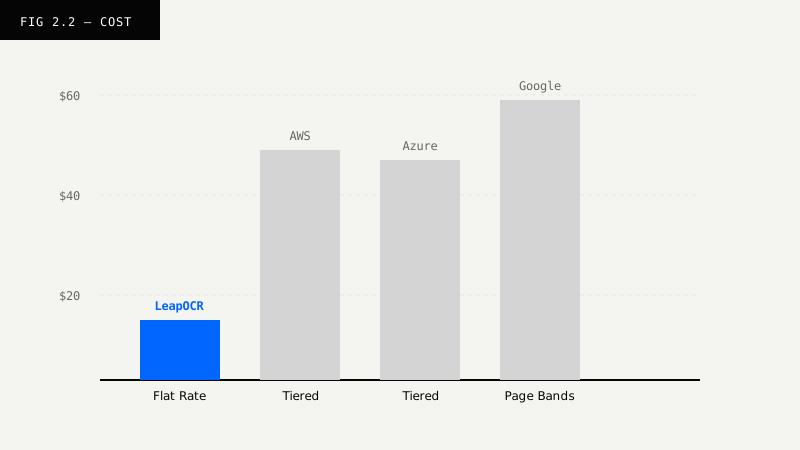
LeapOCR: One credit per page plus one more for structured extraction. Pricing doesn’t change by region.
Textract: Different APIs have different prices—DetectDocumentText is cheapest, AnalyzeDocument and AnalyzeExpense cost more. Volume discounts kick in after 1M pages/month.
Azure: Priced per 1,000 pages or transactions. Custom Extraction runs about $0.03/page. Prebuilt models have separate pricing tiers. Free tier available for some models.
Google: Per-document pricing with page bands—the effective per-page cost changes based on document length. Free trial credits available for new customers.
LeapOCR: Asynchronous with waitUntilDone or webhooks (on Growth plans). Works well for batch processing. Delete jobs after fetching results.
Textract: Synchronous for smaller documents, asynchronous for larger batches. Standard cloud polling patterns.
Azure: Asynchronous with polling. The portal provides metrics to monitor throughput.
Google: Asynchronous processors. Poll operations for results. Batch processing is available.
LeapOCR: Minimal setup needed—just define a schema or use a template. SDKs (TypeScript, Python, Go, PHP) include simple polling helpers.
Textract: Full AWS SDK coverage, but robust polling at scale typically means wiring together S3 + SNS/SQS or Step Functions. More moving parts.
Azure: Client SDKs include polling helpers. Good integration with the Azure portal for monitoring.
Google: Client libraries available. You poll operations and manage processor IDs per region and project.
LeapOCR: Explicit deleteJob API endpoint plus auto-deletion after 7 days. Supports GDPR compliance with EU hosting, zero-retention processing, and configurable data retention. Self-hosted, private VPC, and on-prem deployment options are also available for teams that need data to stay within their own infrastructure.
Textract: Async results stick around for about 7 days—copy them out if you need to keep them longer. You control input and output storage (usually S3).
Azure: Data handling policies vary—check the service terms. You’re responsible for managing storage and deleting artifacts you don’t want kept.
Google: Data is retained as long as needed to provide the service. Review processor-specific data handling policies for your region. You’re responsible for deleting stored artifacts.
LeapOCR: Define your output with JSON schemas plus instructions, or use templateSlug for reusable configurations.
Textract: No JSON schema contract—you get back key-value pairs and expense fields that you post-process yourself.
Azure: Prebuilt Invoice has a fixed schema. Custom Extraction lets you define your own fields. Output is consistent, but validation is up to you.
Google: Invoice Parser uses a fixed schema. You map its fields to your data model. Custom processors are available for specialized layouts.
You can get a solid proof-of-concept done in a week. Here’s what to do:
1. Gather test data Pick 20 real invoices from your actual workflow. Include a mix of vendors, some with handwriting, and a few with multi-page line items. The more realistic your test set, the better your decision will be.
2. Test each service Call the invoice-optimized endpoint for each:
structured mode with a schema or templateAnalyzeExpense3. Measure what matters Track field accuracy (invoice numbers, dates, vendor names, currency), line-item fidelity (descriptions, amounts, taxes), layout preservation (especially for multi-page tables), latency from submission to result, and estimated cost per page using the official pricing calculators.
4. Validate the results Check that totals match the sum of line items, required fields are present, and dates make sense.
5. Document the operational aspects Capture job IDs, latency numbers, which region you used, and any retries or errors.
6. Test data handling Verify that delete/retention works as expected and that outputs are removed from storage after you fetch them.
If cost is the main concern and your invoices are mostly clean: Textract AnalyzeExpense and Azure’s Prebuilt Invoice are both solid choices. LeapOCR’s standard-v1 with structured output gives you predictable JSON without much overhead.
If you need accuracy on messy, handwritten, or multilingual documents: LeapOCR’s pro-v1 is designed for this. Azure Custom Extraction works well if you need specialized fields. Textract can handle handwriting but you’ll want to test your specific documents. Google’s Invoice Parser is optimized for typed text—verify it works with your handwriting samples.
If developer experience matters: LeapOCR has the simplest setup with schemas and templates. Azure has good SDKs and portal integration. Google offers consistent responses through its processor model. Textract is powerful but often requires more infrastructure work with S3, SNS, and SQS.
If privacy and deletion policies are critical: LeapOCR gives you an explicit delete API, auto-deletes after 7 days, and supports GDPR compliance with EU hosting and configurable retention. Self-hosted and private VPC deployment options are available for teams that need full infrastructure control. With AWS, Azure, and Google, you’re responsible for managing stored inputs and outputs yourself—plan your cleanup and storage controls accordingly.
Here’s what a basic LeapOCR integration looks like:
import { LeapOCR } from "leapocr";

const client = new LeapOCR({ apiKey: process.env.LEAPOCR_API_KEY });

const job = await client.ocr.processURL("https://example.com/invoice.pdf", {
  format: "structured",
  model: "standard-v1", // use pro-v1 for noisy or handwritten documents
  schema: {
    invoice_number: "string",
    invoice_date: "string",
    due_date: "string",
    vendor: { name: "string" },
    line_items: [{ description: "string", total: "number" }],
    total: "number",
  },
  instructions: "Return currency as numbers and dates as YYYY-MM-DD.",
});

await client.ocr.waitUntilDone(job.jobId);
const result = await client.ocr.getJobResult(job.jobId);
await client.ocr.deleteJob(job.jobId);AWS Textract
Azure AI Document Intelligence
Google Cloud Document AI
Sources: [1]: https://aws.amazon.com/textract/pricing/?utm_source=chatgpt.com [2]: https://aws.amazon.com/pm/textract/?utm_source=chatgpt.com [3]: https://aws.amazon.com/textract/features/?utm_source=chatgpt.com [6]: https://azure.microsoft.com/en-us/pricing/details/ai-document-intelligence/?utm_source=chatgpt.com [7]: https://techcommunity.microsoft.com/blog/azure-ai-foundry-blog/unlock-unprecedented-value-with-azure-ai-document-intelligence-custom-extraction/4192452?utm_source=chatgpt.com [8]: https://learn.microsoft.com/en-us/azure/ai-services/document-intelligence/prebuilt/invoice?view=doc-intel-4.0.0&utm_source=chatgpt.com [9]: https://learn.microsoft.com/en-us/azure/ai-services/document-intelligence/how-to-guides/estimate-cost?view=doc-intel-4.0.0&utm_source=chatgpt.com [10]: https://cloud.google.com/document-ai?utm_source=chatgpt.com [11]: https://docs.cloud.google.com/document-ai/pricing?utm_source=chatgpt.com [12]: https://docs.cloud.google.com/document-ai/docs?utm_source=chatgpt.com
Try LeapOCR on your own documents
Eligible paid plans include a 3-day trial with 100 credits after you add a credit card, so you can test actual PDFs, scans, and forms before committing to a rollout.
Keep reading
More implementation guides, benchmarks, and workflow notes for teams building document pipelines.

An honest guide to the strongest OCR APIs for developers, including when to choose a parsing-first tool, an invoice-focused API, or a schema-first OCR layer.
Stop buying a separate AI tool for every department. Learn why a unified Vision Language Model (VLM) beats the 'point solution' approach in modern healthcare.
Why classic OCR struggles on real-world documents and how AI-native, layout-aware extraction turns PDFs and scans into reliable, structured data your systems can trust.