Published
December 8, 2025
A practical guide to evolving your OCR architecture from simple scripts to high-throughput, queue-based pipelines that handle millions of documents.
Processing 10 documents is straightforward. You upload them, wait a few seconds, and move on.
Processing 10 million documents requires a different approach. At that volume, typical problems become serious issues: timeouts, memory constraints, API rate limits, and occasional corrupted files that bring down your processing pipeline.
We’ve worked with teams as they grow from their first API call to handling terabytes of documents daily. This guide walks through the architecture changes you’ll need at each stage of that journey.
Scale: 10 - 100 documents / day Architecture: Direct API calls
When you’re starting out—perhaps building a proof-of-concept or handling a few daily invoices—you don’t need complex infrastructure. You need code that’s simple to write and easy to debug.
Synchronous processing works well here. Your script sends a file to the API, waits for the response, and returns the result in the same HTTP request.
import os
import asyncio
from leapocr import LeapOCR

async def process_one_file(path):
    async with LeapOCR(os.getenv("LEAPOCR_API_KEY")) as client:
        job = await client.ocr.process_file(path)
        result = await client.ocr.wait_until_done(job.job_id)

        print(f"Extracted data: {result.pages[0].result}")

if __name__ == "__main__":
    asyncio.run(process_one_file("invoice_001.pdf"))
This approach works because:
Move to the next phase when users report slow page loads or when processing your daily backlog starts taking hours.
Scale: 1,000 - 50,000 documents / day Architecture: Background Workers + Polling or Webhooks
As volume increases, keeping HTTP connections open for every document becomes inefficient. Network interruptions or script crashes can cause you to lose progress on in-flight jobs.
The solution is to separate submission from retrieval.
Your application sends the file to LeapOCR and receives a job_id immediately, without waiting for processing to complete.
Two approaches work here:
client.ocr.get_job_status(job_id) periodically# Your Webhook Handler (e.g., in FastAPI/Flask)
@app.post("/webhooks/leapocr")
async def handle_ocr_webhook(request: Request):
payload = await request.json()
job_id = payload.get("job_id")
status = payload.get("status")
if status == "completed":
# Fetch results immediately or mark DB record as ready
data = await leapocr_client.ocr.get_results(job_id)
save_to_db(data)This approach keeps your application responsive and allows submitting hundreds of files in parallel.
Scale: 1 Million+ documents / month Architecture: Message Queues (SQS/Kafka) + Auto-scaling Workers
At this scale, traffic spikes become a major concern. End-of-month reporting might suddenly send 50,000 documents your way in a single hour. Attempting to process everything immediately can trigger API rate limits or overwhelm your database.
You need a buffer to smooth out these spikes.
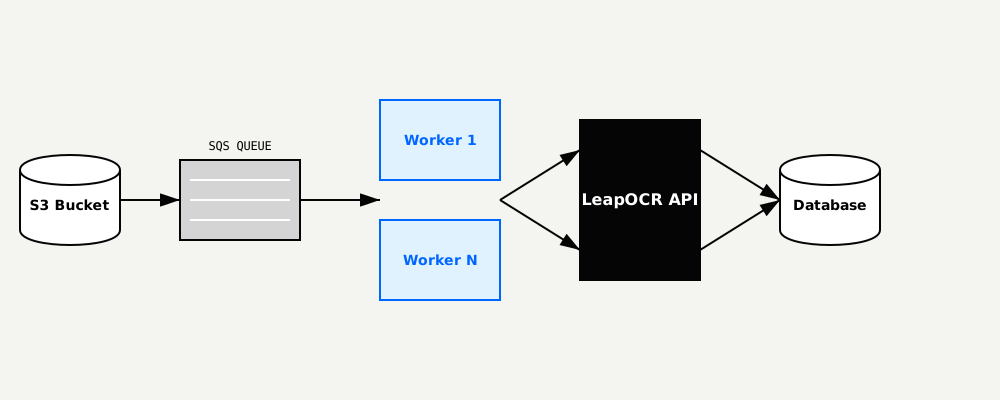
graph LR
    S3[S3 Bucket] -->|Event| SQS[SQS Queue]
    SQS --> Worker1[Worker A]
    SQS --> Worker2[Worker B]
    Worker1 -->|Submit Job| API[LeapOCR API]
    Worker2 -->|Submit Job| API
API -->|Webhook| DB[(Database)]Make your processing idempotent using LeapOCR’s idempotency_key parameter. If a worker crashes and retries a message, you won’t process the same document twice.
Implement Dead Letter Queues (DLQ). Some files cannot be processed—corrupted data, password-protected PDFs, or unsupported formats. After several failed attempts, move these files to a DLQ for manual review instead of retrying indefinitely.
Process documents in batches. When handling thousands of small receipts or invoices, parallel batch processing improves throughput significantly.
As volume increases, manual quality review becomes impossible. You need automated systems to identify problematic documents.
LeapOCR returns confidence scores for each extraction. Use these scores to triage documents automatically:
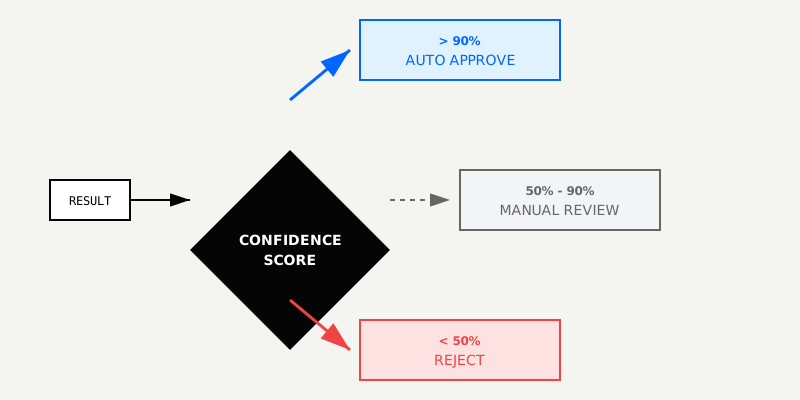
This approach lets you focus human attention on the small percentage of documents that actually need it.
You don’t need Kubernetes to process ten invoices per week, but a simple script won’t handle enterprise-scale document processing either.
LeapOCR supports this entire progression. Start with the Phase 1 script today, then adopt more sophisticated architecture as your volume grows. The API remains the same—only your surrounding infrastructure changes.
Ready to get started? Get your API key and try the Phase 1 example.
Try LeapOCR on your own documents
Eligible paid plans include a 3-day trial with 100 credits after you add a credit card, so you can test actual PDFs, scans, and forms before committing to a rollout.
Keep reading
More implementation guides, benchmarks, and workflow notes for teams building document pipelines.

Real-world OCR advice from people who've spent way too much time scanning documents. Learn from our mistakes and get better results, faster.

Technical walkthrough using the SDK (Python/TS). Code snippets for ingesting documents and mapping to an ESG-specific JSON schema.
Stop wrestling with brittle PDFs. Learn how to build a scalable, schema-first medical extraction pipeline using the LeapOCR Python SDK and AsyncIO.