Published
December 8, 2025
How to use AI to untangle the messy, paper-heavy world of global supply chain documentation.
Global trade still runs on paper. Freight forwarders, 3PLs, and shippers spend their days swapping PDFs—bills of lading (BOLs), manifests, packing lists, EDIFACT guides. Then someone manually types container numbers, HS codes, weights, and references into TMS/ERP systems. The work is slow, mistakes happen, and the costs add up.
This guide shows how to extract reliable structured data from those documents using layout-aware OCR. LeapOCR accepts files via URL or direct upload, supporting over 100 formats including documents (PDF, DOCX, DOC, ODT, RTF, TXT), images (PNG, JPG, WEBP, TIFF, GIF, BMP, HEIC), spreadsheets (XLSX, XLS, CSV, ODS), presentations (PPTX, PPT, ODP), and more. PDFs and Word documents are rasterized (embedded text layers are ignored), while image formats process directly.
Standard OCR tools stumble on logistics paperwork for several reasons:
When you rely on basic text extraction plus regex patterns, a single column change breaks everything. Layout-aware table extraction handles these variations better.
Most teams manually re-key these fields:
These map naturally to a structured schema:
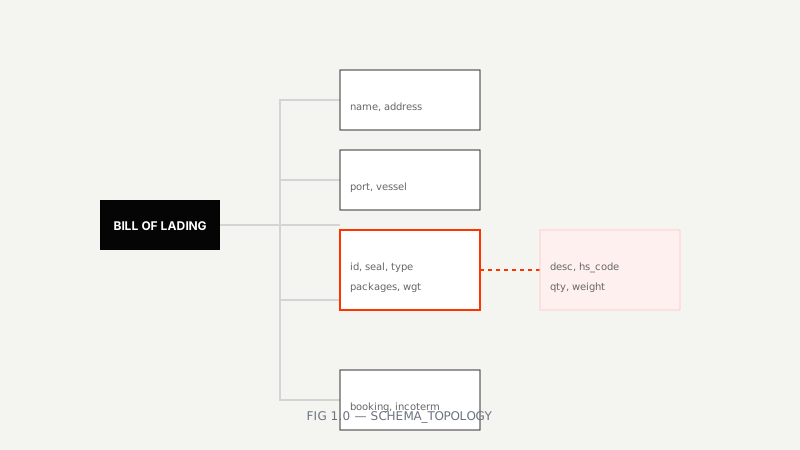 FIG 1.0 — Mapping unstructured BOLs to structured entities
{
  "shipper": { "name": "string", "address": "string" },
  "consignee": { "name": "string", "address": "string" },
  "routing": {
    "port_of_loading": "string",
    "port_of_discharge": "string",
    "vessel": "string",
    "voyage": "string"
  },
  "containers": [
    {
      "id": "string",
      "seal": "string",
      "type": "string",
      "packages": "number",
      "weight_kg": "number"
    }
  ],
  "line_items": [
    {
      "description": "string",
      "hs_code": "string",
      "packages": "number",
      "weight_kg": "number"
    }
  ],
  "references": {
    "booking": "string",
    "customer": "string",
    "incoterms": "string"
  }
}LeapOCR takes a different approach:
The bill of lading sample below shows what makes these documents challenging:
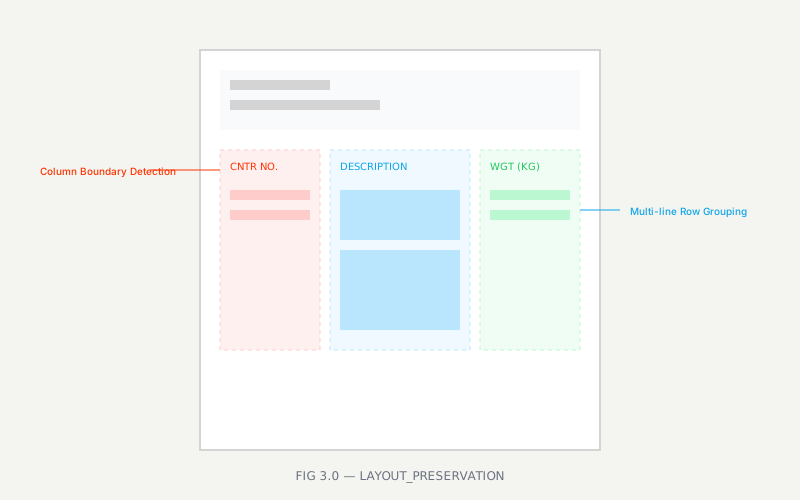 FIG 3.0 — Preserving complex table structures in logistics documents
Look at the dense container and line-item tables. That’s where layout-aware extraction makes the difference—maintaining table structure instead of treating everything as unstructured text.
import { LeapOCR } from "leapocr";

const client = new LeapOCR({ apiKey: process.env.LEAPOCR_API_KEY });

const job = await client.ocr.processURL("https://your-bucket.example.com/bill-of-lading.pdf", {
  format: "structured",
  model: "pro-v1", // use pro for noisy/stamped docs
  schema: {
    shipper: { name: "string" },
    consignee: { name: "string" },
    routing: {
      port_of_loading: "string",
      port_of_discharge: "string",
      vessel: "string",
      voyage: "string",
    },
    containers: [
      {
        id: "string",
        seal: "string",
        type: "string",
        packages: "number",
        weight_kg: "number",
      },
    ],
    line_items: [
      {
        description: "string",
        hs_code: "string",
        packages: "number",
        weight_kg: "number",
      },
    ],
    references: {
      booking: "string",
      customer: "string",
      incoterms: "string",
    },
  },
  instructions: "Return numbers as numbers; keep HS codes as strings.",
});

await client.ocr.waitUntilDone(job.jobId);
const result = await client.ocr.getJobResult(job.jobId);
// Optional: configure webhooks (Growth+ plans) to avoid polling in production flows
await client.ocr.deleteJob(job.jobId);

console.log(result.output);Once you have structured data, add validation to catch issues:
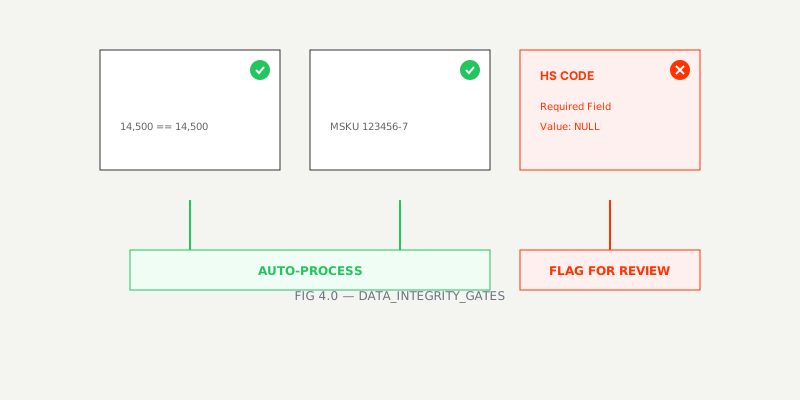 FIG 4.0 — Data integrity gates preventing bad data from entering TMS
Here’s a typical automation pipeline:
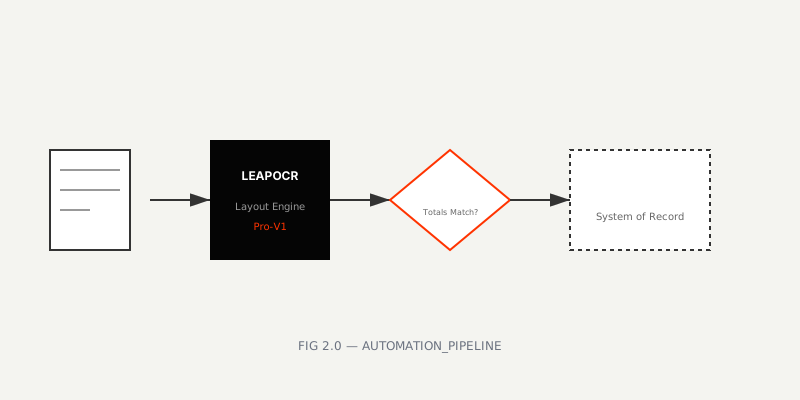 FIG 2.0 — End-to-end logistics automation workflow
The same approach works for other logistics documents:
/assets/blog/pdf-images/edifact-guide-20160630-001.png, -002.pngTry the approach with your own BOL PDFs and plug the JSON directly into your TMS/ERP. If you need help with a tailored schema or want more sample templates, we can add those.
Try LeapOCR on your own documents
Eligible paid plans include a 3-day trial with 100 credits after you add a credit card, so you can test actual PDFs, scans, and forms before committing to a rollout.
Keep reading
More implementation guides, benchmarks, and workflow notes for teams building document pipelines.
Detention and demurrage fees are the silent killers of logistics margins. See how automated document processing stops the clock and saves $100+ per container daily.

A technical breakdown of how document AI extracts BOL data reliably across carriers and formats.

A hypothetical case study showing how automation accelerates cross-border workflows.