Published
December 1, 2025
How combining OCR with modern AI turns static PDFs and document photos into clean, structured data that your tools and teams can actually use.
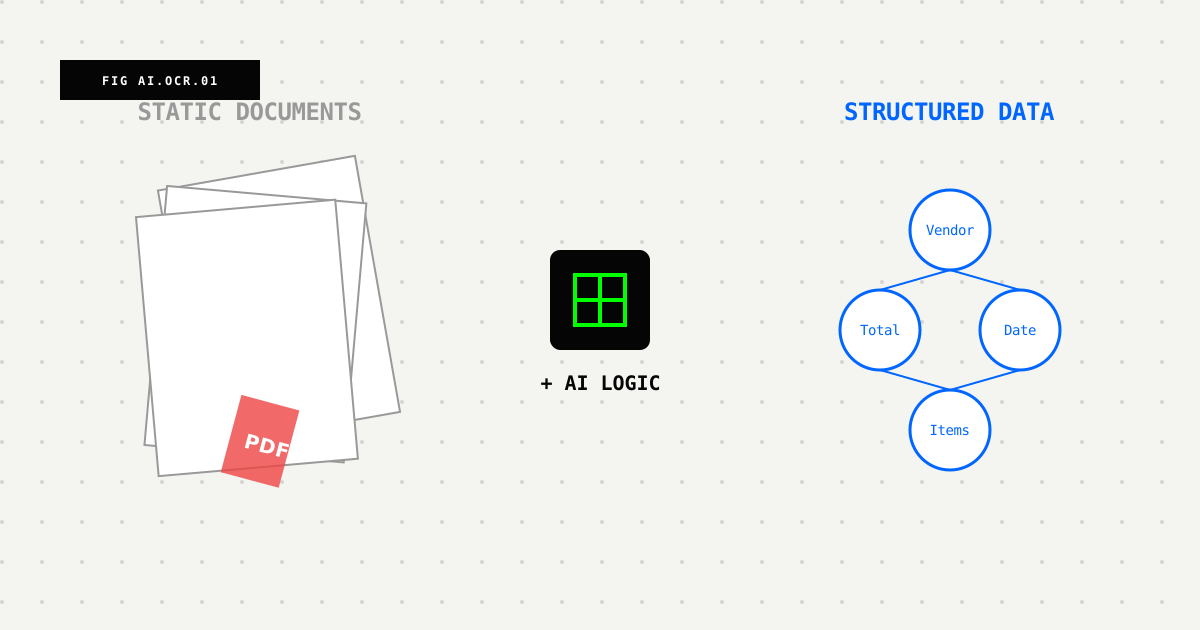
Most companies still run on PDFs, scans, and document photos. Invoices arrive as email attachments. Contracts get scanned “for safekeeping.” Customers send photos of signed forms from their phones. Somewhere in the middle of all this, someone on your team ends up copying numbers and names from one screen into another.
OCR has helped with this problem for years by turning those documents into text. But text alone isn’t the end goal anymore—structured data is.
This post explains why “OCR + AI” is becoming the standard way to handle documents, and how it lets you turn static files into information that flows through your systems.
You’ve probably seen this workflow before:
With a small volume, this feels manageable. But as volume grows, it creates problems:
This pattern shows up everywhere: expense reports, onboarding documents, insurance claims, medical records, shipping documents. Documents arrive, and someone has to manually connect them to the rest of the system.
OCR helped with this, but it only solves part of the problem.
Traditional OCR answers one question well: “What are the words on this page?”
That’s useful. You can make PDFs searchable, copy text instead of retyping, and index documents for keyword search. But most business workflows need to answer a different question: “What does this information mean, and where does it go?”
Plain OCR can’t tell you:
You still need a person to look at the OCR output and decide what to do with each piece of information. OCR helps, but it doesn’t solve the whole problem.
This is where the ”+ AI” part comes in. Modern systems don’t stop at extracting text. They use machine learning models that understand structure and meaning.
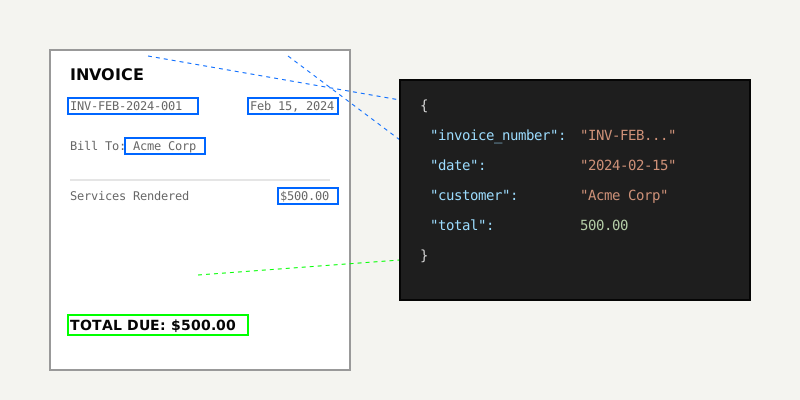
Instead of just seeing “INV-10293”, the system recognizes an invoice number. Instead of just seeing “2025-11-02”, it identifies an invoice date or due date based on context. Instead of seeing a random dollar amount, it recognizes a total or tax amount.
Rather than giving you a page of text to figure out, these systems return structured data:
{
  "customer_name": "Acme Corp",
  "invoice_number": "INV-10293",
  "invoice_date": "2025-11-02",
  "due_date": "2025-11-30",
  "total_amount": "1499.00",
  "currency": "USD"
}
That’s the key shift: OCR becomes part of your data pipeline rather than just a text extraction tool.
The first layer on top of raw text is field extraction. Instead of treating all words as equally important, the model recognizes specific entities and key-value pairs:
The question changes from “what words are on this page?” to “what fields do we need for this workflow?” You don’t want a block of text. You want specific fields you can send to your CRM, ERP, or other internal tools.
Real documents are rarely neat, single-column pages. They include tables with row and column headers, multi-column sections, sidebars, footnotes, checkboxes, and form fields.
Basic OCR reads left-to-right, top-to-bottom. This causes problems:
AI models trained for documents handle layout better. They learn table structures and keep rows and columns intact, connect labels with values (like “Invoice Date: 2025-11-02”), and treat sections differently (headers, body text, footers).
The output matches how your team thinks about the document, rather than giving you a shuffled list of words.
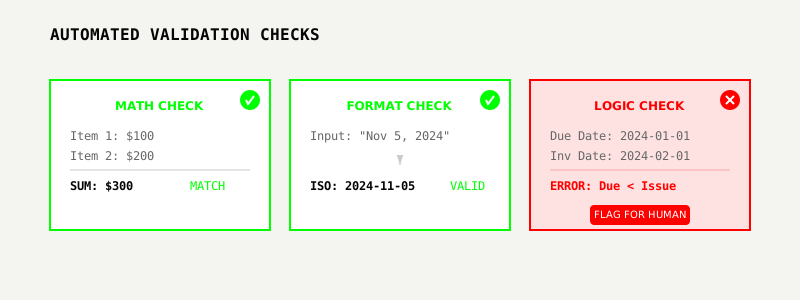
Even with good models, mistakes happen. The goal isn’t zero errors—it’s reducing errors where they matter and having humans review the right things.
AI helps with this by cross-checking totals against the sum of line items plus tax, validating formats (checking that dates look like dates and tax IDs match expected patterns), checking ranges (flagging quantities or amounts that fall outside normal patterns), and detecting missing fields like invoice numbers or customer names.
Instead of reviewing every document manually, your team can automatically accept high-confidence results and focus attention on documents or fields that look suspicious. The time savings come from using humans where they add the most value.
Once you can extract fields reliably, documents stop being one-off tasks and become inputs to a pipeline.
Consider a simple flow:
Now the job isn’t to manually process each invoice. It’s to define which fields you need, decide how strict validation should be, and set up alerts for exceptions.
The same pattern applies across tools: feed data into your CRM for onboarding, your ERP for purchasing and inventory, or dashboards for reporting. Your documents become another data source.
OCR + AI is useful in several practical scenarios:
Invoice and bill processing: Automatically extract invoice numbers, dates, totals, and VAT details, then route them for approval and sync to your accounting tool.
Expense receipts: Read merchant names, dates, categories, and amounts from receipt photos so employees don’t have to type everything into an expense app.
Customer onboarding: Pull names, addresses, plan types, and IDs from PDFs and scanned forms so customer success teams can focus on the relationship instead of paperwork.
Compliance and audit archives: Turn years of scanned records into a searchable archive so finding a specific policy, case, or clause takes seconds instead of hours.
Operations checklists and reports: Extract key metrics, timestamps, and notes from field reports or inspection forms for better tracking and analytics.
In each case, the pattern is the same: less time moving data around, more time making decisions with it.
The impact varies by team:
Operations teams get fewer bottlenecks and backlogs. Workflows that used to depend on who’s available to process documents become predictable and automatable.
Finance teams get faster, cleaner books. Invoices and expenses move through more quickly with fewer transcription errors.
Support and success teams spend less time hunting for information across scattered files and more time helping customers.
Data teams get a better picture of what’s happening in the business because document-sourced data is no longer a blind spot.
Even if you never use the phrase “document AI” internally, people notice when response times improve and tedious tasks disappear.
The tools are changing quickly. Older solutions often felt like black boxes: you sent in a document, waited, and hoped the output was usable. Tuning or debugging results was difficult.
Newer platforms like LeapOCR handle messy, real-world documents instead of perfect lab samples, let you describe what you want extracted in flexible ways, provide developer-friendly APIs and SDKs so integration isn’t a side project, and expose confidence scores and metadata so you can design smarter review flows.
The trend is clear: treat documents like any other structured data source.
This shift is still early, and several directions are clear:
Better handwriting support: Systems are improving at handling forms, notes, and signatures where current technology struggles.
Mixed-language documents: Models are getting better at handling invoices, contracts, or IDs that switch languages mid-page.
Domain-specific models: We’re seeing models tuned for particular industries—healthcare, legal, logistics, insurance—so they understand the terms and patterns that matter in each context.
Closer ties to business logic: Instead of stopping at extracting data, systems are plugging directly into rules engines and workflows to automate routing, approvals, and notifications.
Over time, documents become just another interface for data.
You don’t need to solve “all documents everywhere” on day one. A practical approach:
Choose one repetitive workflow: For example, vendor invoices from a specific inbox or expense receipts from one team
Define the fields you care about: Maybe it’s just vendor, date, invoice number, and total. Don’t overcomplicate it
Run a pilot with OCR + AI: Feed a realistic batch of documents through a tool, compare results to your current process, and measure time saved and error rates
Design an exception flow: Decide how to handle low-confidence fields or unusual documents—who reviews them, and what happens next
Expand gradually: Once you trust the pipeline for one workflow, roll it out to new document types and teams
The goal isn’t “no more PDFs.” It’s “PDFs don’t slow us down.” OCR plus AI is how you get there.
Try LeapOCR on your own documents
Eligible paid plans include a 3-day trial with 100 credits after you add a credit card, so you can test actual PDFs, scans, and forms before committing to a rollout.
Keep reading
More implementation guides, benchmarks, and workflow notes for teams building document pipelines.
Why classic OCR struggles on real-world documents and how AI-native, layout-aware extraction turns PDFs and scans into reliable, structured data your systems can trust.
A production-focused guide to turning PDFs and scans into schema-fit JSON without building a brittle cleanup layer after OCR.
A practical, low-lift way to turn invoices, receipts, onboarding packs, and contracts into structured data—without burning precious engineering cycles.