Published
December 1, 2025
Design and implement a real-world invoice processing pipeline with LeapOCR – from defining your data schema to handling async jobs, validation, and integrations.

Most invoice processing tasks look straightforward, yet somehow they consume hours of team time each week. This guide shows you how to build a practical workflow using the LeapOCR Python SDK that converts incoming invoices into structured data and integrates with your existing systems.
We’ll work with Python 3.9+ and the async-first SDK. If you prefer TypeScript, Go, or direct HTTP API calls, you can find language-specific guides at LeapOCR docs.
The system handles invoices through several stages:
You can adapt this architecture to FastAPI, Django, Celery, any message queue, or whatever stack you’re already using.
The system consists of four main components:
Ingestion layer: Entry points for invoices (file uploads, an “invoices@company.com” inbox, or a scheduled job watching an S3 bucket)
Processing service (Python + LeapOCR): A background worker or API that receives invoice files or URLs, submits them to LeapOCR via the Python SDK, waits for processing, then normalizes and stores results
Data store: A database table or collection for processed invoices containing the fields your business needs
Integration layer: Code that pushes processed invoices into tools like QuickBooks, Xero, or internal finance systems
Here’s the flow:
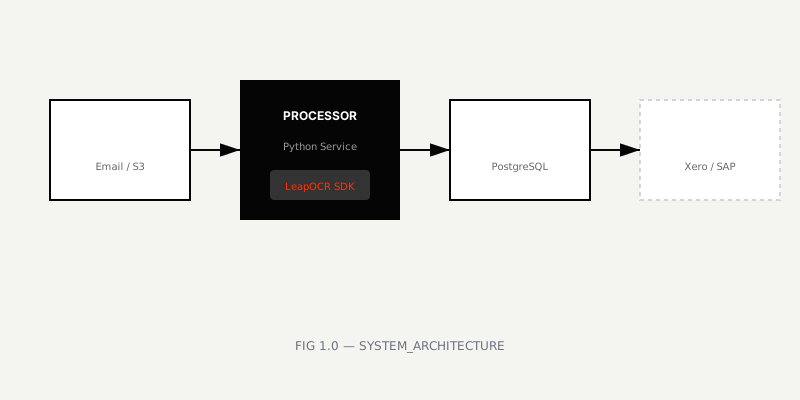 FIG 1.0 — Architecture of an automated invoice processing pipeline
We’ll focus on the Invoice Processor and how to connect it to LeapOCR.
Before writing any code, clarify what “done” means for an invoice.
Talk with the people who currently process invoices and list the fields they actually use. You’ll typically need:
invoice_numbervendor_nameinvoice_datedue_datecurrencysubtotaltax_amounttotal_amountpurchase_order_numberline_items (description, quantity, unit_price, line_total)The example below shows a French invoice we’ll reference throughout this guide:
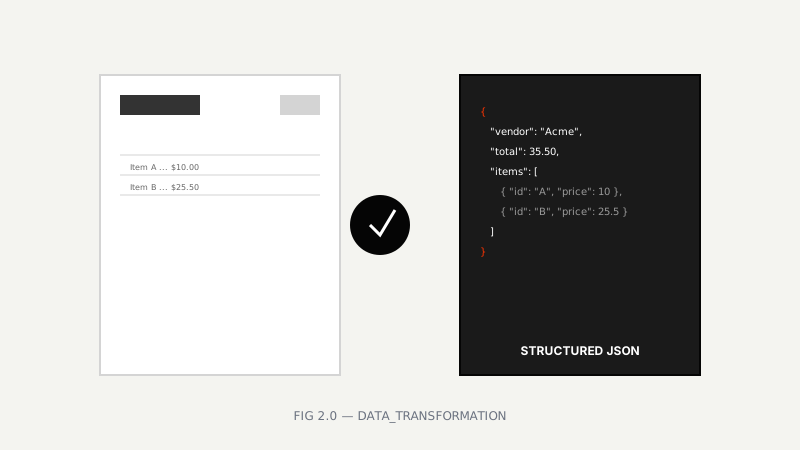 FIG 2.0 — Transforming raw invoice documents into structured data
That same document as structured JSON:
{
  "seller_info": {
    "name": "MAISON JEAN ÉLION",
    "business_type": "EPICERIE EN GROS",
    "address": "66-68, Place Voltaire - CHATEAUROUX",
    "phone": "89"
  },
  "invoice_details": {
    "invoice_number": "1560",
    "date": "Avril 1920",
    "place_of_issue": "Châteauroux"
  },
  "buyer_info": {
    "name": "Vve LABRUNE",
    "location": "Niherne"
  },
  "line_items": [
    {
      "quantity": 24,
      "description": "1/2 tomate",
      "unit_price": 0.5,
      "total_price": 12
    },
    {
      "quantity": 24,
      "description": "4/4 tomate",
      "unit_price": 1,
      "total_price": 24
    },
    {
      "quantity": 10,
      "description": "Lessive k",
      "unit_price": 0.7,
      "total_price": 7
    },
    {
      "quantity": 1,
      "description": "Boite pains epice",
      "unit_price": null,
      "total_price": 3.4
    },
    {
      "quantity": 3,
      "description": "Tapioca",
      "unit_price": 3.25,
      "total_price": 9.75
    },
    {
      "quantity": 10,
      "description": "Paquets de bougies 6 T",
      "unit_price": 3.4,
      "total_price": 34
    },
    {
      "quantity": null,
      "description": "Sortie",
      "unit_price": null,
      "total_price": 0.1
    }
  ],
  "total_amount": 90.25
}
You might normalize or flatten this structure for your internal systems. A simplified JSON shape:
{
  "invoice_number": "INV-10293",
  "vendor_name": "Acme Corp",
  "invoice_date": "2025-11-02",
  "due_date": "2025-11-30",
  "currency": "USD",
  "subtotal": 1200.0,
  "tax_amount": 299.0,
  "total_amount": 1499.0,
  "purchase_order_number": "PO-5541",
  "line_items": [
    {
      "description": "SaaS subscription - November",
      "quantity": 1,
      "unit_price": 1499.0,
      "line_total": 1499.0
    }
  ]
}
This is the output you’ll want from LeapOCR for each invoice.
First, install the Python SDK:
pip install leapocr
# or with uv:
uv add leapocr
You’ll also need:
LEAPOCR_API_KEY in your environment)The SDK uses async/await and async with for proper resource management:
import asyncio
import os
from leapocr import LeapOCR, ProcessOptions, Format


async def quick_smoke_test() -> None:
  async with LeapOCR(os.getenv("LEAPOCR_API_KEY")) as client:
    job = await client.ocr.process_url(
      "https://example.com/invoice.pdf",
      options=ProcessOptions(
        format=Format.STRUCTURED,
      ),
    )

    result = await client.ocr.wait_until_done(job.job_id)
    print(f"Credits used: {result.credits_used}")
    print(f"Pages processed: {len(result.pages)}")


asyncio.run(quick_smoke_test())
For invoices, these settings work well:
Format.STRUCTURED (returns JSON-like results you can store directly)Model.pro-v1 or Model.english-pro-v1 for better accuracy on messy, real-world invoicesComplete model/format options are available at LeapOCR docs.
Define what LeapOCR should extract by creating a schema for your invoices.
Here’s a minimal JSON schema matching the structure we outlined earlier:
INVOICE_SCHEMA: dict = {
  "type": "object",
  "properties": {
    "invoice_number": {"type": "string"},
    "vendor_name": {"type": "string"},
    "invoice_date": {"type": "string"},
    "due_date": {"type": "string"},
    "currency": {"type": "string"},
    "subtotal": {"type": "number"},
    "tax_amount": {"type": "number"},
    "total_amount": {"type": "number"},
    "purchase_order_number": {"type": "string"},
    "line_items": {
      "type": "array",
      "items": {
        "type": "object",
        "properties": {
          "description": {"type": "string"},
          "quantity": {"type": "number"},
          "unit_price": {"type": "number"},
          "line_total": {"type": "number"},
        },
      },
    },
  },
}
Pass this schema when processing an invoice file:
from pathlib import Path
from leapocr import LeapOCR, ProcessOptions, Format, Model


async def extract_invoice(path: Path) -> dict:
  async with LeapOCR(os.getenv("LEAPOCR_API_KEY")) as client:
    job = await client.ocr.process_file(
      path,
      options=ProcessOptions(
        format=Format.STRUCTURED,
        model=Model.english-pro-v1,
        schema=INVOICE_SCHEMA,
      ),
    )

    result = await client.ocr.wait_until_done(job.job_id)

    # First page usually holds the main invoice data
    first_page = result.pages[0].result

    # For structured format, result is typically a dict
    if isinstance(first_page, dict):
      return first_page

    # Parse JSON string if necessary
    import json
    return json.loads(first_page)
Alternatively, if you create a template in LeapOCR (with its own schema, instructions, and model), reference it by template_slug instead of sending a schema from code:
from leapocr import ProcessOptions


async def extract_invoice_with_template(path: Path) -> dict:
  async with LeapOCR(os.getenv("LEAPOCR_API_KEY")) as client:
    job = await client.ocr.process_file(
      path,
      options=ProcessOptions(
        template_slug="invoice-extraction",  # configure this in LeapOCR
      ),
    )

    result = await client.ocr.wait_until_done(job.job_id)
    page = result.pages[0].result
    return page if isinstance(page, dict) else {}
Schemas vs templates:
Wrap this into a reusable function your application can call.
Here’s a simplified invoice processor:
import asyncio
from pathlib import Path
from typing import Any, Dict

from leapocr import LeapOCR, ProcessOptions, Format, Model


async def process_invoice_file(path: Path) -> Dict[str, Any]:
  async with LeapOCR(os.getenv("LEAPOCR_API_KEY")) as client:
    job = await client.ocr.process_file(
      path,
      options=ProcessOptions(
        format=Format.STRUCTURED,
        model=Model.english-pro-v1,
        schema=INVOICE_SCHEMA,
        instructions="Extract invoice fields and line items for accounting import.",
      ),
    )

    result = await client.ocr.wait_until_done(job.job_id)
    first_page = result.pages[0].result

    if isinstance(first_page, dict):
      invoice = first_page
    else:
      import json
      invoice = json.loads(first_page)

    # Delete job immediately instead of waiting 7 days
    await client.ocr.delete_job(job.job_id)

    return invoice


# For manual testing
if __name__ == "__main__":
  asyncio.run(process_invoice_file(Path("invoice.pdf")))
In production, you might call this function from:
For prototypes or low volume, calling wait_until_done directly works. As volume increases, you’ll want more control.
wait_until_doneThe examples above use this method:
result = await client.ocr.wait_until_done(job.job_id)This polls the job until completion or timeout.
When you need to handle progress yourself or store intermediate status, poll manually:
import asyncio
from leapocr import LeapOCR, ProcessOptions, Format


async def manual_polling() -> None:
  async with LeapOCR(os.getenv("LEAPOCR_API_KEY")) as client:
    job = await client.ocr.process_url(
      "https://example.com/invoice.pdf",
      options=ProcessOptions(format=Format.MARKDOWN),
    )

    print(f"Job created: {job.job_id}")

    while True:
      status = await client.ocr.get_job_status(job.job_id)
      print(f"Status: {status.status.value} - {status.progress:.1f}%")

      if status.status.value == "completed":
        break

      await asyncio.sleep(2)

    result = await client.ocr.get_results(job.job_id)
    print(f"Processing complete: {len(result.pages)} pages")


asyncio.run(manual_polling())The Python SDK supports progress callbacks via PollOptions:
from leapocr import PollOptions


async def track_progress_for_large_invoice(path: Path) -> None:
  def on_progress(status) -> None:
    print(
      f"Progress: {status.progress:.1f}% "
      f"({status.processed_pages}/{status.total_pages} pages)"
    )

  async with LeapOCR(os.getenv("LEAPOCR_API_KEY")) as client:
    job = await client.ocr.process_file(path)

    result = await client.ocr.wait_until_done(
      job.job_id,
      poll_options=PollOptions(
        poll_interval=2.0,
        max_wait=300.0,
        on_progress=on_progress,
      ),
    )

    print(f"Done! {len(result.pages)} pages processed.")
As you scale:
LeapOCR gets you most of the way there, but you still need business logic to catch edge cases.
At minimum:
Here’s a simple validator:
from typing import Any, Dict, Literal, TypedDict


ReviewStatus = Literal["auto_approved", "needs_review"]


class ValidatedInvoice(TypedDict):
  data: Dict[str, Any]
  review_status: ReviewStatus
  issues: list[str]


def validate_invoice(invoice: Dict[str, Any]) -> ValidatedInvoice:
  issues: list[str] = []

  if not invoice.get("invoice_number"):
    issues.append("Missing invoice_number")
  if not invoice.get("vendor_name"):
    issues.append("Missing vendor_name")

  total = invoice.get("total_amount")
  if total is None:
    issues.append("Missing total_amount")

  # Basic reconciliation example
  line_items = invoice.get("line_items") or []
  line_total_sum = sum(
    (item.get("line_total") or 0) for item in line_items if isinstance(item, dict)
  )

  if isinstance(total, (int, float)) and line_total_sum and abs(total - line_total_sum) > 1:
    issues.append("Total does not match sum of line_items (±1 tolerance)")

  status: ReviewStatus = "auto_approved" if not issues else "needs_review"

  return {
    "data": invoice,
    "review_status": status,
    "issues": issues,
  }
In your pipeline:
review_status == "auto_approved"needs_review invoices to a human review queue in your internal UI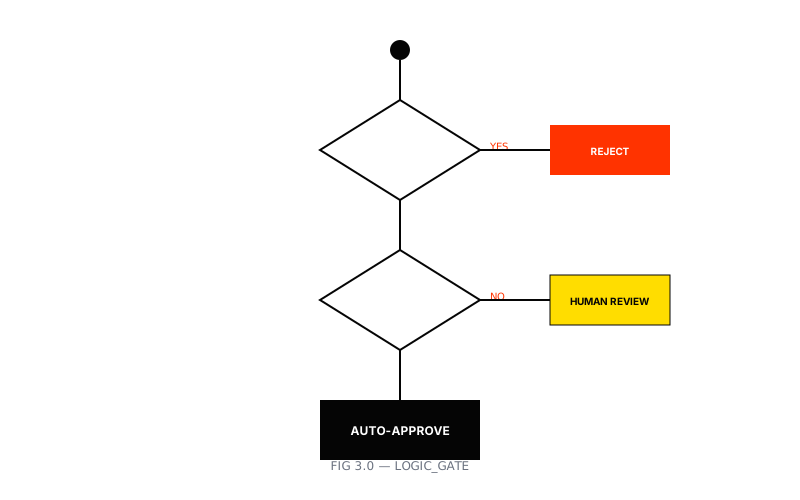 FIG 3.0 — Logic flow for validating and approving invoices
Once invoices are parsed and validated, push them into your accounting system.
Common approaches:
synced=false and have a separate job push them in batchesinvoice.processed that other services consumeKeep a clear audit trail regardless of approach:
When finance asks “why is this number here?”, you can trace it back to the source.
Running this in production requires attention to:
Logging:
job_idMetrics and alerts:
Cost and rate limits:
Once the invoice pipeline works, extending it requires mostly new schemas or templates.
Related use cases:
Each option works with:
You now have the core components of an automated invoice processing system:
Recommended next steps:
For complete documentation on models, options, and advanced patterns, see docs.leapocr.com and the LeapOCR Python SDK examples. If you’re integrating across multiple languages, combine this with the TypeScript SDK guide to maintain consistent document data structures across your stack.
Try LeapOCR on your own documents
Eligible paid plans include a 3-day trial with 100 credits after you add a credit card, so you can test actual PDFs, scans, and forms before committing to a rollout.
Keep reading
More implementation guides, benchmarks, and workflow notes for teams building document pipelines.

How to build a resilient, high-throughput document ingestion pipeline for logistics using LeapOCR and Go.
How to process the two most common U.S. claims forms with schema-first extraction and validation.

A technical breakdown of how document AI extracts BOL data reliably across carriers and formats.